REMOTE TOUCH REMOVAL

Tech Tips
-
Use the same procedure for RHD and LHD vehicles.
-
The procedure listed below is for LHD vehicles.
-
REMOVE CENTER INSTRUMENT CLUSTER FINISH PANEL
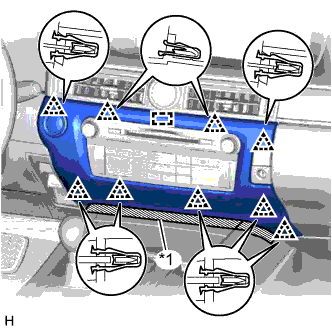
Text in Illustration *1 Protective Tape
-
Put protective tape around the center instrument cluster finish panel.
-
Detach the 9 clips and guide.
-
Disconnect the connector and remove the center instrument cluster finish panel.
-
-
REMOVE INSTRUMENT PANEL FINISH PANEL END RH
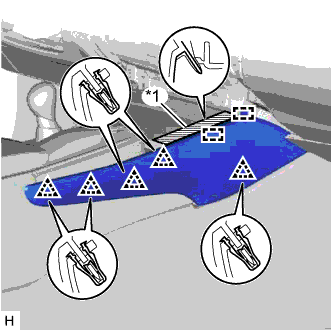
Text in Illustration *1 Protective Tape
-
Put protective tape around the instrument panel finish panel end RH.
-
Detach the 5 clips and 2 guides and remove the instrument panel finish panel end RH.
-
-
REMOVE INSTRUMENT PANEL FINISH PANEL END LH
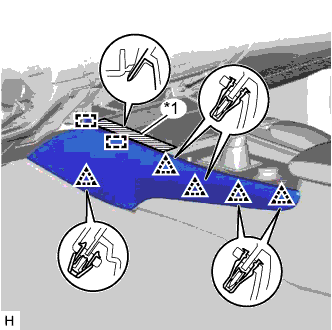
Text in Illustration *1 Protective Tape
-
Put protective tape around the instrument panel finish panel end LH.
-
Detach the 5 clips and 2 guides and remove the instrument panel finish panel end LH.
-
-
REMOVE INSTRUMENT PANEL CUP HOLDER ASSEMBLY
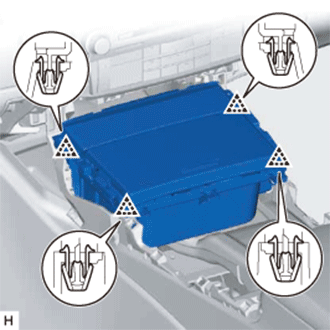
-
Detach the 4 clips.
-
Disconnect the connector and remove the instrument panel cup holder assembly.
-
-
REMOVE UPPER CONSOLE PANEL
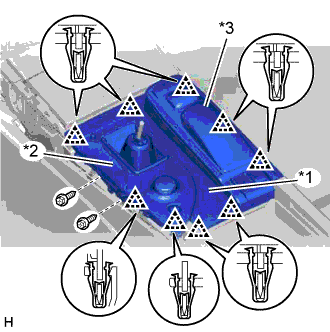
Text in Illustration *1 Upper Console Panel *2 Upper Rear Console Panel Sub-assembly *3 Remote Touch Assembly
-
Remove the 2 screws.
-
Detach the 9 clips.
-
Disconnect the connectors, detach the clamps, and remove the upper console panel together with the upper rear console panel sub-assembly and remote touch assembly.
-
-
REMOVE REMOTE TOUCH ASSEMBLY
-
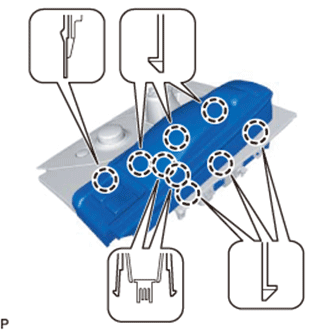
Detach the 9 claws.
-
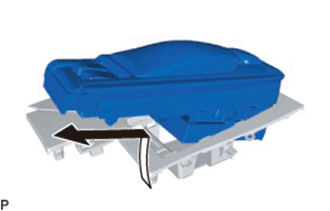
Move the remote touch assembly in the direction of the arrow in the illustration to remove it from the upper console panel.
-