HARD DISK DRIVE INSTALLATION

-
INSTALL HARD DISC
-
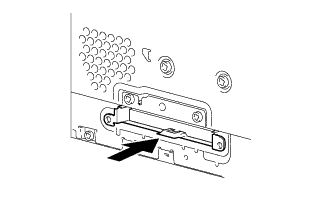
Push the hard disc in the direction of the arrow shown in the illustration to install it.
-
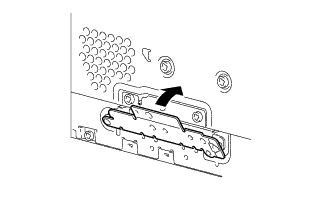
Install the cover in the direction of the arrow shown in the illustration.
-
Install the 3 screws.
-
-
INSTALL NO. 2 RADIO BRACKET
-
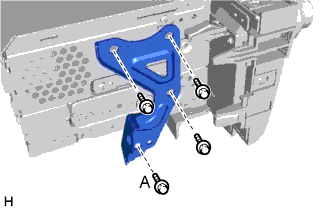
Install the No. 2 radio bracket with the 3 screws.
-
Install the ion generator bracket with the screw labeled A.
-
-
INSTALL MULTI-MEDIA MODULE RECEIVER ASSEMBLY
-
Connect the connectors.
-
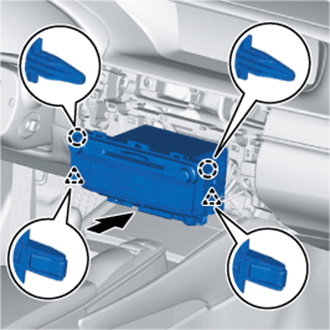
Insert the multi-media module receiver assembly with bracket.
Note
When inserting the multi-media module receiver, do not press the knobs on it.
-
Attach the 2 claws and 2 clips.
-
Install the multi-media module receiver assembly with bracket with the 2 screws.
-
-
INSTALL CENTER INSTRUMENT CLUSTER FINISH PANEL
-
Connect the connector.
-
Attach the 9 clips and guide to install the center instrument cluster finish panel.
-
-
CONNECT CABLE TO NEGATIVE BATTERY TERMINAL
Note
When disconnecting the cable, some systems need to be initialized after the cable is reconnected Click here.