STEREO COMPONENT AMPLIFIER INSTALLATION

-
INSTALL NO. 2 AMPLIFIER BRACKET
-
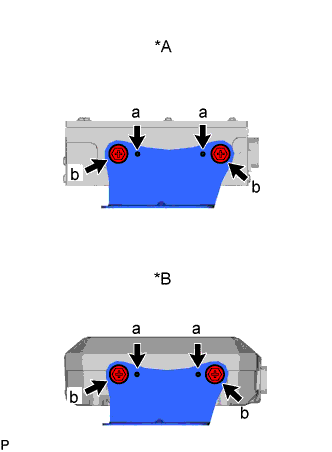
Text in Illustration *A w/o Mark Levinson Speaker System *B w/ Mark Levinson Speaker System Set the aligning protrusions of the bracket, labeled a, into the holes of the amplifier.
-
Install the No. 2 amplifier bracket with the 2 screws labeled b.
-
-
INSTALL NO. 1 AMPLIFIER BRACKET
-
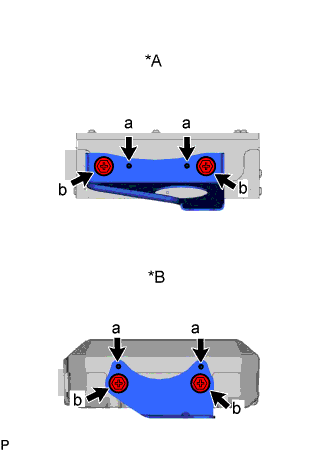
Text in Illustration *A w/o Mark Levinson Speaker System *B w/ Mark Levinson Speaker System Set the aligning protrusions of the bracket, labeled a, into the holes of the amplifier.
-
Install the No. 1 amplifier bracket with the 2 screws labeled b.
-
-
INSTALL STEREO COMPONENT AMPLIFIER ASSEMBLY WITH BRACKET
-
Install the stereo component amplifier assembly with bracket with the 3 nuts.
Tech Tips
Tighten the screws in the order shown in the illustration.
-
Connect all the connectors.
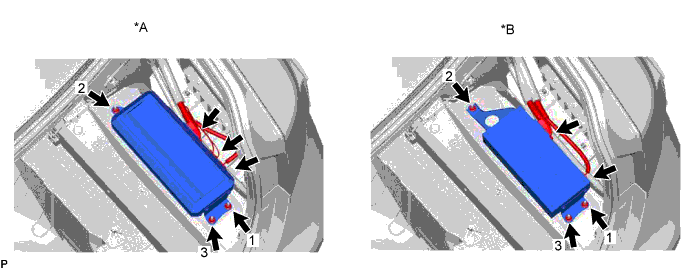
Text in Illustration *A w/ Mark Levinson Speaker System *B w/o Mark Levinson Speaker System
-
-
INSTALL LUGGAGE COMPARTMENT TRIM COVER INNER RH
-
CONNECT CABLE TO NEGATIVE BATTERY TERMINAL
Note
When disconnecting the cable, some systems need to be initialized after the cable is reconnected Click here.