DYNAMIC REAR STEERING SYSTEM TEST MODE PROCEDURE

-
TEST MODE
Tech Tips
-
When the system enters test mode, "DRS Test Mode" is displayed on the multi-information display.
-
Activate Test Mode (using the GTS).
-
Turn the engine switch off.
-
Connect the GTS to the DLC3.
-
Turn the engine switch on (IG).
-
Turn the GTS on.
-
Enter the following menus: Chassis / DRS / Utility / Check Mode.
-
-
End Test Mode (using the GTS).
-
Turn the engine switch off.
-
Connect the GTS to the DLC3.
-
Turn the engine switch on (IG).
-
Turn the GTS on.
-
Switch the system from test mode to normal mode by following the directions on the GTS screen.
-
-
Activate Test Mode (using SST check wire).
-
Turn the engine switch off.
-
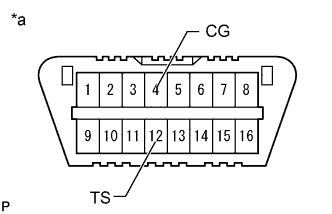
Text in Illustration *a Front view of DLC3 Using SST, connect terminals 12 (TS) and 4 (CG) of the DLC3.
- SST
- 09843-18040
Note
Connect the terminals correctly to avoid a malfunction.
-
Turn the engine switch on (IG).
-
-
End Test Mode (using SST check wire).
-
Turn the engine switch off.
-
Text in Illustration *a Front view of DLC3 Disconnect SST from the DLC3.
- SST
- 09843-18040
-
Turn the engine switch on (IG).
Tech Tips
If the engine switch is turned on (IG) with terminals 12 (TS) and 4 (CG) connected, the system remains in test mode.
-
-