ROOF HEADLINING INSTALLATION

Tech Tips
-
Use the same procedure for RHD and LHD vehicles.
-
The procedure listed below is for LHD vehicles.
-
INSTALL FRONT SHOULDER BELT ANCHOR PLATE SUB-ASSEMBLY LH
-
Attach the 4 claws and guide to install the front shoulder belt anchor plate sub-assembly LH.
-
-
INSTALL FRONT SHOULDER BELT ANCHOR PLATE SUB-ASSEMBLY RH
Tech Tips
Use the same procedure described for the LH side.
-
INSTALL REAR DOOR OPENING TRIM WEATHERSTRIP LH
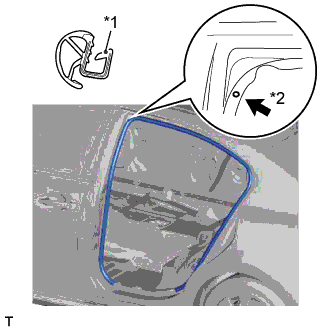
Text in Illustration *1 Paint Mark *2 Mark Position
-
Align the paint mark on the rear door opening trim with the mark position on the vehicle and install the rear door opening trim weatherstrip as shown in the illustration.
-
-
INSTALL REAR DOOR OPENING TRIM WEATHERSTRIP RH
Tech Tips
Use the same procedure described for the LH side.
-
INSTALL FRONT DOOR OPENING TRIM WEATHERSTRIP LH
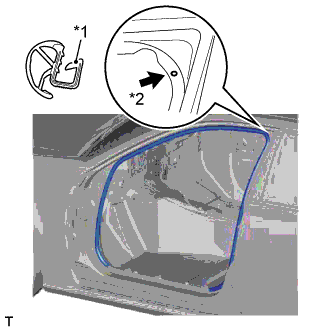
Text in Illustration *1 Paint Mark *2 Mark Position
-
Align the paint mark on the front door opening trim weatherstrip with the mark position on the vehicle and install the front door opening trim weatherstrip as shown in the illustration.
-
-
INSTALL FRONT DOOR OPENING TRIM WEATHERSTRIP RH
Tech Tips
Use the same procedure described for the LH side.
-
INSTALL ROOF HEADLINING ASSEMBLY
-
Insert the roof headlining through the front door and move it as shown in the illustration.
Note
-
Make sure that the roof headlining does not get caught on anything as it may become bent or damaged.
-
Do not damage the roof headlining or vehicle interior.
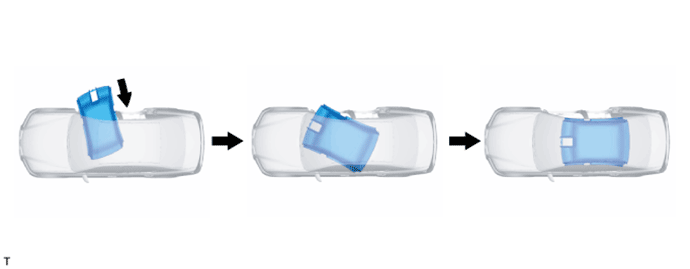
-
-
w/ Sliding Roof:
-
Attach the 12 claws, 3 clips, 3 guides and 11 fasteners to install the roof headlining.
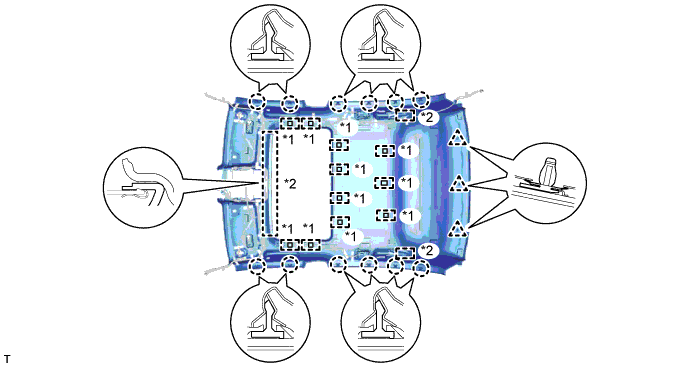
Text in Illustration *1 Fastener *2 Guide
-
-
w/o Sliding Roof:
-
Attach the 12 claws, 3 clips, 2 guides and 3 fasteners to install the roof headlining.
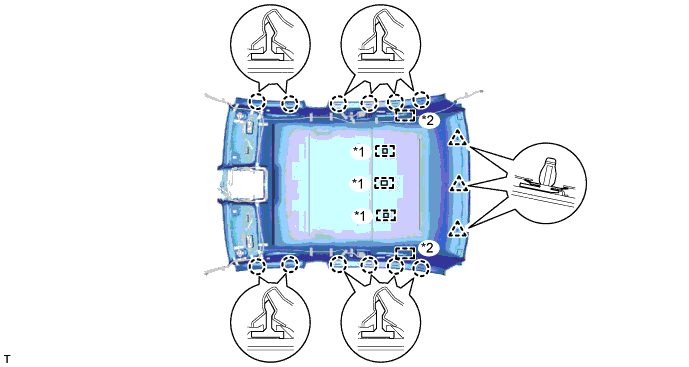
Text in Illustration *1 Fastener *2 Guide
-
-
Connect the connector and attach the clamp to the rear pillar RH.
-
Connect the connector and attach the 3 clamps to the front pillar RH.
-
Connect the connector and attach the 3 clamps to the rear pillar LH.
-
w/ Sliding Roof:
-
Connect the drive gear connector.
-
-
Connect the connectors for the rain sensor, inner mirror, air conditioning thermistor, lane recognition camera sensor and night view camera.
Note
After installing the roof headlining assembly, make sure that the lip of the front door opening trim weatherstrip LH and RH and the rear door opening trim weatherstrip LH and RH is not pinched.
-
-
INSTALL ASSIST GRIP SUB-ASSEMBLY
Tech Tips
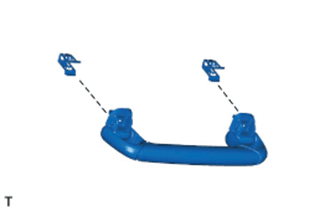
Use the same procedure for both assist grips.
-
Attach the clips to the assist grip as shown in the illustration.
-
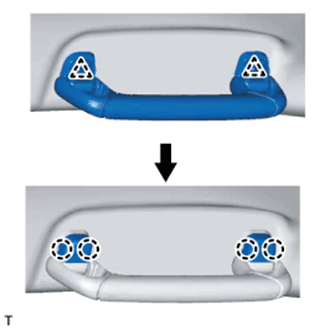
Attach the 2 clips to temporarily install the assist grip.
-
Attach the 4 claws to install the 2 new assist grip covers and fix the assist grip in place.
-
-
INSTALL REAR ASSIST GRIP ASSEMBLY LH
-
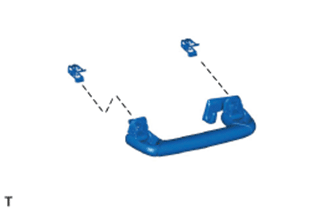
Attach the clips to the rear assist grip as shown in the illustration.
-
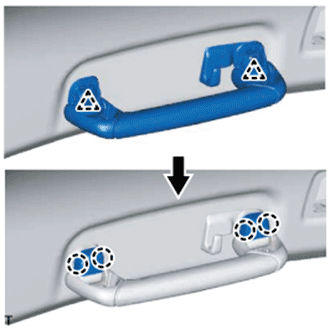
Attach the 2 clips to temporarily install the rear assist grip.
-
Attach the 4 claws to install the 2 new assist grip covers and fix the rear assist grip in place.
-
-
INSTALL REAR ASSIST GRIP ASSEMBLY RH
Tech Tips
Use the same procedure described for the LH side.
-
INSTALL VISOR HOLDER
Tech Tips
Use the same procedure for both visor holders.
-
Attach the 2 claws.
-
Push in the visor holder to install it.
-
-
INSTALL VISOR ASSEMBLY LH
-
Install the visor assembly LH with the 2 screws.
-
Attach the guide.
-
-
INSTALL VISOR ASSEMBLY RH
Tech Tips
Use the same procedure described for the LH side.
-
INSTALL VISOR BRACKET COVER
Tech Tips
Use the same procedure for both visor bracket covers.
-
Attach the 4 claws to install the visor bracket cover.
-
-
INSTALL MAP LIGHT ASSEMBLY
-
Connect the 2 connectors.
-
Attach the 4 clips and 2 guides to install the map light assembly.
-
-
INSTALL FRONT ROOF TOP GARNISH
-
While being careful not to apply force to the camera (for vehicles with the lane keeping assist system), attach the 6 claws and guide to install the front roof top garnish.
Note
w/ Lane Keeping Assist System:
When removing and installing the front roof top garnish, do not apply force to the camera sensor located at (x).
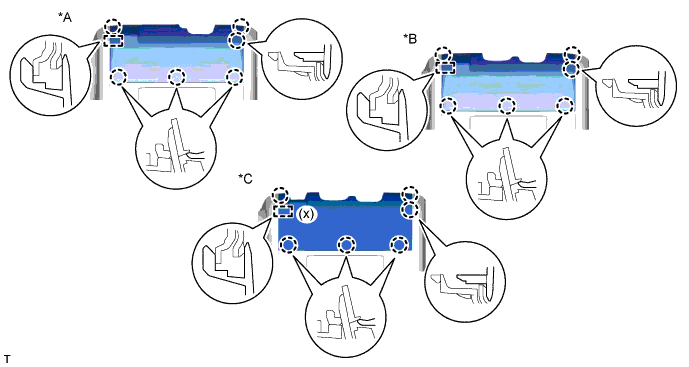
Text in Illustration *A for Standard *B w/ Rain Sensor *C w/ Lane Keeping Assist System - -
-
-
INSTALL INNER ROOF SIDE GARNISH LH
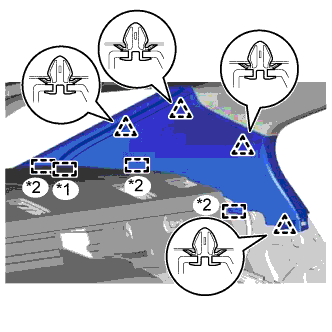
Text in Illustration *1 End Of The Rear Window Shade Assembly *2 Guide
-
w/ Rear Sunshade:
-
Insert the rear window shade assembly and attach the 3 guides.
-
Attach the 4 clips to install the inner roof side garnish LH.
Note
After installing the inner roof side garnish LH, make sure that the lip of the rear door opening trim weatherstrip LH is not pinched.
-
-
w/o Rear Sunshade:
-
Attach the 4 clips and 3 guides to install the inner roof side garnish LH.
Note
After installing the inner roof side garnish LH, make sure that the lip of the rear door opening trim weatherstrip LH is not pinched.
-
-
-
INSTALL INNER ROOF SIDE GARNISH RH
Tech Tips
Use the same procedure described for the LH side.
-
INSTALL REAR SEAT SIDE GARNISH LH
-
Attach the 4 claws and guide to install the rear seat side garnish LH.
Note
After installing the rear seat side garnish LH, make sure that the lip of the rear door opening trim weatherstrip LH is not pinched.
-
-
INSTALL REAR SEAT SIDE GARNISH RH
Tech Tips
Use the same procedure described for the LH side.
-
INSTALL UPPER CENTER PILLAR GARNISH LH
-
Pass the front seat outer belt floor anchor through the upper center pillar garnish LH.
-
Attach the clip to install the upper center pillar garnish LH.
-
Install the 2 screws.
Note
After installing the upper center pillar garnish LH, make sure that the lip of the front door opening trim weatherstrip LH and rear door opening trim weatherstrip LH is not pinched.
-
-
INSTALL UPPER CENTER PILLAR GARNISH RH
Tech Tips
Use the same procedure described for the LH side.
-
INSTALL LOWER CENTER PILLAR GARNISH LH
-
Attach the 5 clips and 2 guides.
-
While pulling both sides of the lower center garnish outward by hand, set the garnish in place, and then attach the 2 claws to install the lower center pillar garnish LH.
Note
After installing the lower center pillar garnish LH, make sure that the lip of the front door opening trim weatherstrip LH and rear door opening trim weatherstrip LH is not pinched.
-
-
INSTALL LOWER CENTER PILLAR GARNISH RH
Tech Tips
Use the same procedure described for the LH side.
-
INSTALL REAR DOOR SCUFF PLATE LH
-
Attach the 10 claws and 3 clips to install the rear door scuff plate LH.
-
-
INSTALL REAR DOOR SCUFF PLATE RH
Tech Tips
Use the same procedure described for the LH side.
-
INSTALL INSTRUMENT PANEL SAFETY PAD SUB-ASSEMBLY
-
INSTALL CONSOLE BOX ASSEMBLY
-
INSTALL FRONT PILLAR GARNISH LH
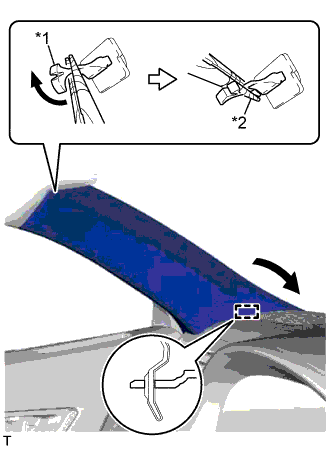
Text in Illustration *1 Front Pillar Garnish Clip *2 Protective Tape
-
Attach the guide.
-
Turn the end of the front pillar garnish clip 90° with needle-nose pliers and install it to the front pillar garnish LH.
Tech Tips
Tape the tips of the needle-nose pliers before use.
-
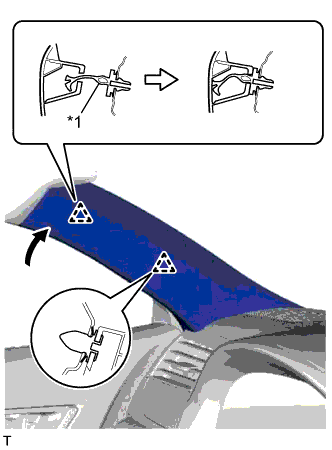
Text in Illustration *1 Front Pillar Garnish Clip Attach the 2 clips to install the front pillar garnish LH.
Note
After installing the front pillar garnish LH, make sure that the lip of the front door opening trim weatherstrip LH is not pinched.
-
-
INSTALL FRONT PILLAR GARNISH RH
Tech Tips
Use the same procedure described for the LH side.
-
INSTALL FRONT DOOR OPENING TRIM COVER LH
-
Attach the 5 claws to install the front door opening trim cover LH.
Note
After installing the front door opening trim cover LH, make sure that the lip of the front door opening trim weatherstrip LH is not pinched.
-
-
INSTALL FRONT DOOR OPENING TRIM COVER RH
Tech Tips
Use the same procedure described for the LH side.
-
INSTALL FRONT DOOR SCUFF PLATE LH
-
Attach the 10 claws and 4 clips to install the front door scuff plate LH.
-
-
INSTALL FRONT DOOR SCUFF PLATE RH
Tech Tips
Use the same procedure described for the LH side.
-
INSTALL REAR SEAT ASSEMBLY
-
INSTALL FRONT SEAT ASSEMBLY LH
-
for Sports Seat Type:
-
for Luxury Seat Type:
-
for Standard Seat Type:
-
-
INSTALL FRONT SEAT ASSEMBLY RH
Tech Tips
Use the same procedure described for the LH side.
-
CONNECT CABLE TO NEGATIVE BATTERY TERMINAL
Note
When disconnecting the cable, some systems need to be initialized after the cable is reconnected Click here.
-
ENABLE AUTOAWAY/RETURN FUNCTION
-
Restore the autoaway/return function setting to the previous condition by changing the customize parameter Click here.
-
-
INSPECT FRONT POWER SEAT CONTROL SYSTEM
-
INSPECT CLIMATE CONTROL SEAT SYSTEM
-
INSPECT SEAT HEATER SYSTEM (w/ Seat Heater System)
-
CHECK SRS WARNING LIGHT