AUTOMATIC TRANSMISSION UNIT DISASSEMBLY

CAUTION:
When working with seal packing material, perform the following:
-
Using a razor blade and gasket scraper, remove all the old seal packing material from the gasket surfaces.
-
Thoroughly clean all components to remove any loose material.
-
Clean both sealing surfaces with a non-residue solvent.
-
Apply seal packing in a continuous line (width approximately 1.2 mm (0.0472 in.)) along the sealing surface.
-
Parts must be assembled within 10 minutes of application. Otherwise, the seal packing material must be removed and reapplied.
-
REMOVE TRANSMISSION CASE COVER
-
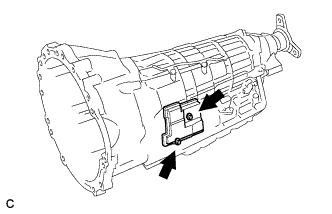
Remove the 2 bolts and transmission case cover.
-
-
REMOVE REFILL PLUG
-
Remove the refill plug.
-
Remove the O-ring from the refill plug.
-
-
REMOVE TRANSMISSION CONTROL SHAFT LEVER RH
-
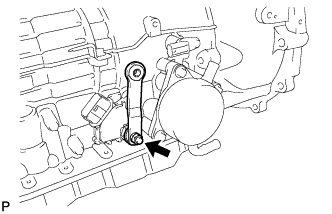
Remove the nut, spring washer and transmission control shaft lever RH.
-
-
REMOVE PARK/NEUTRAL POSITION SWITCH ASSEMBLY
-
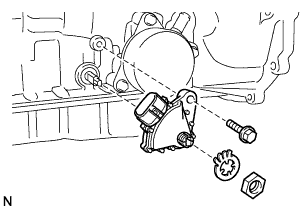
Using a screwdriver, unstake the lock washer.
-
Remove the nut and lock washer.
-
Remove the bolt and park/neutral position switch assembly.
Tech Tips
Make sure that the manual valve lever shaft has not been rotated prior to installing the park/neutral position switch assembly as the detent spring may become detached from the manual valve lever shaft.
-
-
REMOVE OIL COOLER TUBE UNION (w/o ATF Warmer)
-
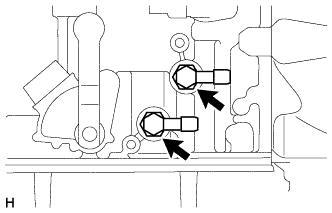
Remove the 2 oil cooler tube unions.
-
Remove the 2 O-rings from the 2 oil cooler tube unions.
-
-
REMOVE TRANSMISSION OIL COOLER ASSEMBLY (w/ ATF Warmer)
-
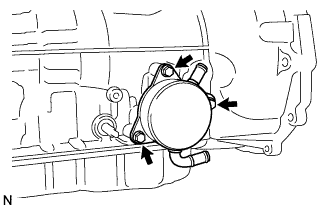
Remove the 3 bolts, transmission oil cooler assembly and spacer.
-
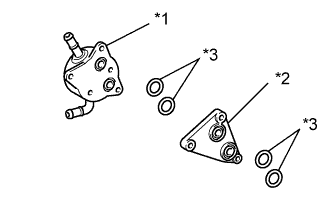
Text in Illustration *1 Transmission Oil Cooler *2 Spacer *3 O-ring Remove the 2 O-rings from the transmission oil cooler assembly.
-
Remove the 2 O-rings from the spacer.
-
-
REMOVE TRANSMISSION REVOLUTION SENSOR
-
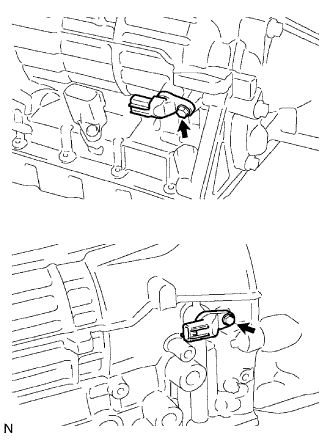
Remove the 2 bolts and 2 transmission revolution sensors.
-
Remove the O-ring from each sensor.
-
-
REMOVE AUTOMATIC TRANSMISSION BREATHER TUBE
-
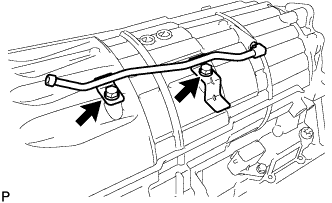
Remove the 2 bolts.
-
Remove the automatic transmission breather tube.
-
-
REMOVE AUTOMATIC TRANSMISSION CASE PLUG
-
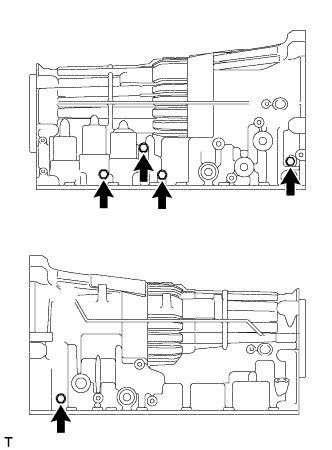
Remove the 5 automatic transmission case plugs from the automatic transmission case subassembly.
-
Remove the 5 O-rings from the 5 automatic transmission case plugs.
-
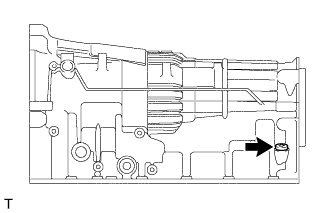
Using T55 "TORX" socket wrench, remove the automatic transmission case plug from the automatic transmission case sub-assembly.
-
Remove the O-ring from the automatic transmission case plug.
-
-
REMOVE AUTOMATIC TRANSMISSION HOUSING
-
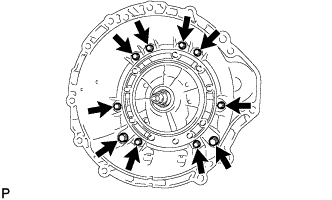
Remove the 10 bolts.
-
Remove the automatic transmission housing.
-
-
REMOVE AUTOMATIC TRANSMISSION FLANGE YOKE ASSEMBLY
-
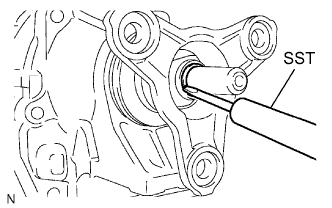
Using SST and a hammer, loosen the staked part of the lock nut.
- SST
- 09930-00010
Note
-
Be sure to use SST with the tapered surface facing the shaft.
-
Do not grind the tip of SST with a grinder or other device.
-
Completely loosen the staked part of the lock nut when removing it.
-
Do not damage the threads of the shaft.
-
Remove the lock nut and automatic transmission flange yoke assembly.
-
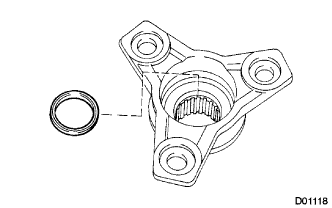
Remove the oil seal from the automatic transmission flange yoke assembly.
-
-
REMOVE EXTENSION HOUSING SUB-ASSEMBLY
-
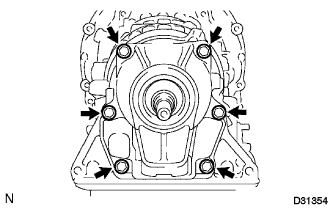
Remove the 6 bolts.
-
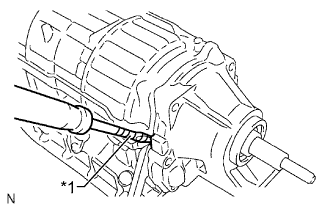
Text in Illustration *1 Protective Tape Using a screwdriver, remove the extension housing sub-assembly.
Note
Be careful not to damage the extension housing sub-assembly.
Tech Tips
Tape the screwdriver tip before use.
-
Remove the thrust needle roller bearing and 2 bearing races.
-
-
REMOVE REAR COVER SLEEVE
-
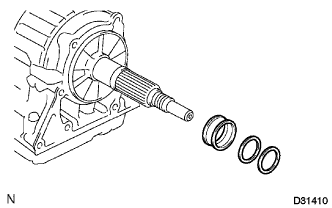
Remove the 2 washers and rear cover sleeve.
-
-
REMOVE OUTPUT SHAFT THRUST BEARING
-
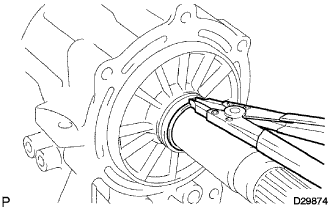
Using a snap ring expander, remove the snap ring from the output shaft of the rear planetary gear assembly.
-
Remove the rear output shaft thrust bearing race, output shaft thrust bearing and the output shaft thrust bearing race.
-
-
REMOVE TRANSMISSION CASE ADAPTER RADIAL BALL BEARING
-
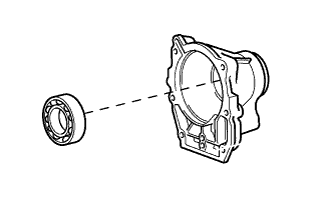
Remove the transmission case adapter radial ball bearing from the extension housing sub-assembly.
-
-
REMOVE AUTOMATIC TRANSMISSION EXTENSION HOUSING OIL SEAL
-
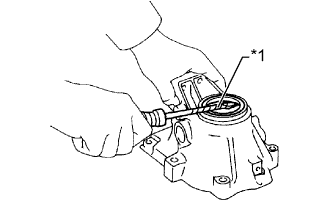
Text in Illustration *1 Protective Tape Using a screwdriver, remove the automatic transmission extension housing oil seal.
Note
Be careful not to damage the extension housing sub-assembly.
Tech Tips
Tape the screwdriver tip before use.
-
-
SECURE AUTOMATIC TRANSMISSION CASE SUB-ASSEMBLY
-
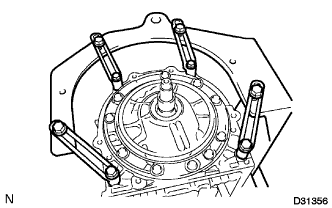
Install the automatic transmission case sub-assembly on the overhaul attachment.
-
-
REMOVE AUTOMATIC TRANSMISSION OIL PAN SUB-ASSEMBLY
Note
Do not turn the transmission over as this will contaminate the valve body with foreign matter located at the bottom of the automatic transmission oil pan sub-assembly.
-
Remove the overflow plug and gasket.
-
Remove the drain plug and gasket.
-
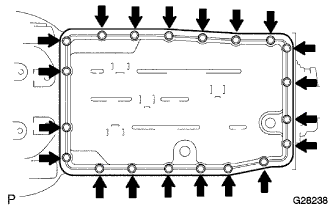
Remove the 20 bolts, automatic transmission oil pan sub-assembly and automatic transmission oil pan gasket.
-
Examine particles in the pan.
-
Remove the 3 transmission oil cleaner magnets from the oil pan. Use the removed magnets to collect any steel chips. Look carefully for the chips and particles in the automatic transmission oil pan sub-assembly and on the magnets to anticipate the type of wear which might be found in the transmission.
Result Steel (magnetic) Bearing, gear and plate wear Brass (non-magnetic) Bushing wear
-
-
-
REMOVE VALVE BODY OIL STRAINER ASSEMBLY
-
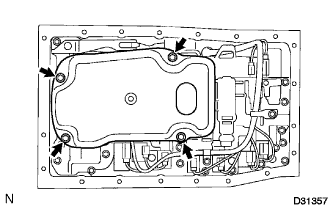
Turn over the transmission.
-
Remove the 4 bolts and valve body oil strainer assembly from the transmission valve body assembly.
-
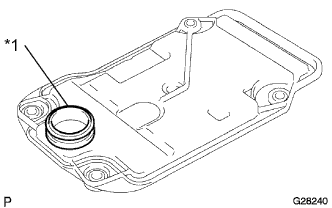
Text in Illustration *1 O-ring Remove the O-ring from the valve body oil strainer assembly.
-
-
REMOVE TRANSMISSION WIRE
-
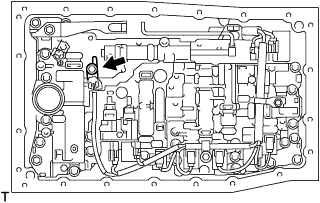
Remove the bolt and the temperature sensor clamp, and disconnect the ATF temperature sensor.
-
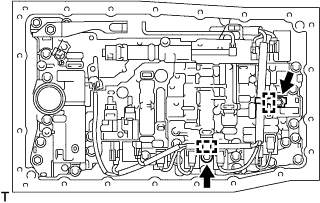
Remove the 2 bolts and the 2 valve body wire harness clamps.
-
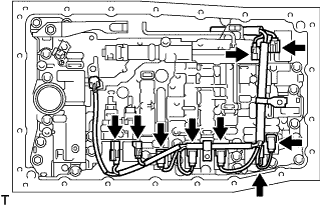
Disconnect the 9 connectors from the shift solenoid valves.
-
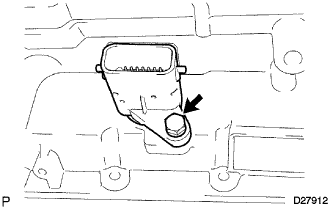
Remove the bolt from the transmission case.
-
Pull the transmission wire out of the transmission case.
-
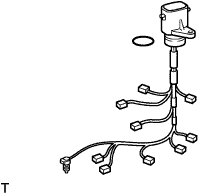
Remove the O-ring from the transmission wire.
-
-
REMOVE TRANSMISSION VALVE BODY ASSEMBLY
-
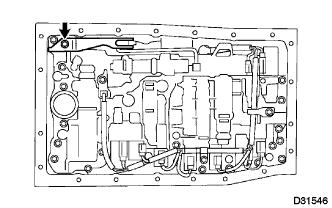
Remove the bolt, detent spring cover and detent spring.
-
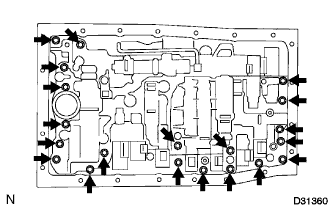
Remove the 20 bolts and transmission valve body assembly.
-
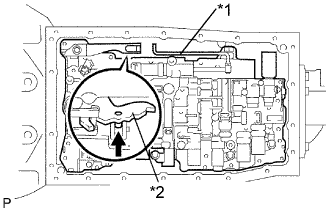
Text in Illustration *1 Lever Pin *2 Manual Valve Lever Sub-assembly Disconnect the lever pin from the manual valve lever sub-assembly.
-
-
REMOVE TRANSAXLE CASE GASKET
-
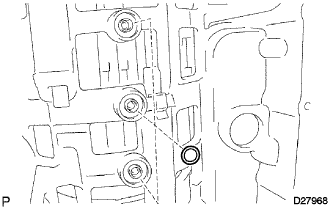
Remove the 3 transaxle case gaskets.
-
-
REMOVE BRAKE DRUM GASKET
-
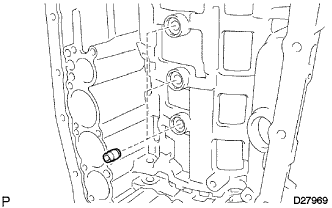
Remove the 3 brake drum gaskets.
-
-
REMOVE CHECK BALL BODY
-
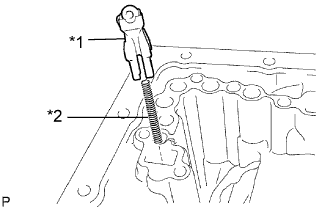
Text in Illustration *1 Check Ball Body *2 Spring Remove the check ball body and spring.
-
-
REMOVE C-2 ACCUMULATOR PISTON
-
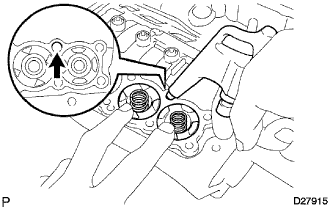
While blowing compressed air into the oil hole, remove the C-2 accumulator piston and the spring from the automatic transmission case.
Note
Take care as the C-3 and B-3 accumulator pistons may jump out.
-
Remove the 2 O-rings from the C-2 accumulator piston.
-
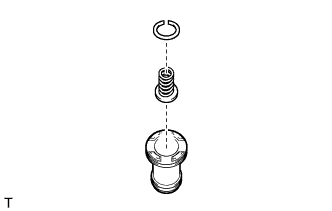
Using a screwdriver, remove the snap ring and the spring sub-assembly from the C-2 accumulator piston.
Note
Be careful not to damage the C-2 accumulator piston.
Tech Tips
Tape the screwdriver tip before use.
-
-
REMOVE B-3 ACCUMULATOR PISTON
-
While blowing compressed air into the oil hole, remove the B-3 accumulator piston and the spring from the automatic transmission case.
Note
Take care as the C-3 accumulator piston may jump out.
-
Remove the 2 O-rings from the B-3 accumulator piston.
-
Using a screwdriver, remove the snap ring and the spring sub-assembly from the B-3 accumulator piston.
Note
Be careful not to damage the B-3 accumulator piston.
Tech Tips
Tape the screwdriver tip before use.
-
-
REMOVE C-3 ACCUMULATOR PISTON
-
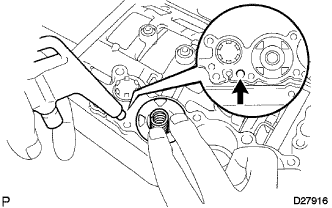
While blowing compressed air into the oil hole, remove the C-3 accumulator piston and the 2 springs from the automatic transmission case.
-
Remove the 2 O-rings from the C-3 accumulator piston.
-
Using a screwdriver, remove the snap ring and the spring sub-assembly from the C-3 accumulator piston.
Note
Be careful not to damage the C-3 accumulator piston.
Tech Tips
Tape the screwdriver tip before use.
-
-
REMOVE B-1 ACCUMULATOR VALVE
-
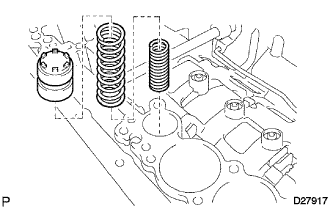
Remove the B-1 accumulator valve and the 2 spring from the automatic transmission case.
-
-
REMOVE PARKING LOCK PAWL BRACKET
-
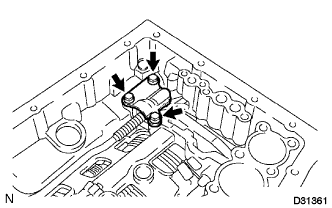
Remove the 3 bolts and parking lock pawl bracket.
-
-
REMOVE PARKING LOCK ROD SUB-ASSEMBLY
-
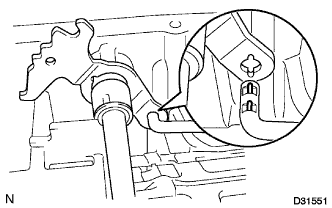
Disconnect the parking lock rod sub-assembly from the manual valve lever sub-assembly.
-
-
REMOVE PARKING LOCK PAWL SHAFT
-
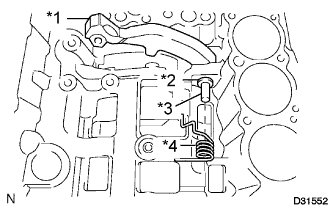
Text in Illustration *1 Parking Lock Pawl *2 E-ring *3 Parking Lock Pawl Shaft *4 Spring Pull out the parking lock pawl shaft from the front side, then remove the parking lock pawl and spring.
-
Remove the E-ring from the parking lock pawl shaft.
-
-
REMOVE MANUAL VALVE LEVER SUB-ASSEMBLY
-
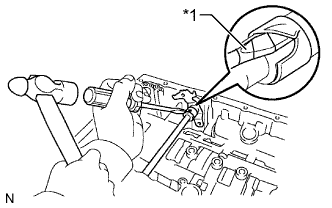
Text in Illustration *1 Protective Tape Using a hammer and a screwdriver, cut off the spacer and remove it from the manual valve lever shaft.
Note
Be careful not to damage the manual valve lever shaft.
Tech Tips
Tape the screwdriver tip before use.
-
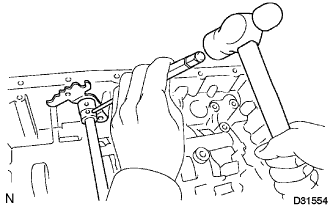
Using a pin punch and a hammer, drive out the spring pin.
Tech Tips
Slowly drive out the spring pin so that it does not fall into the transmission case.
-
Pull the manual valve lever shaft out through the transmission case and remove the manual valve lever sub-assembly.
-
-
REMOVE MANUAL VALVE LEVER SHAFT OIL SEAL
-
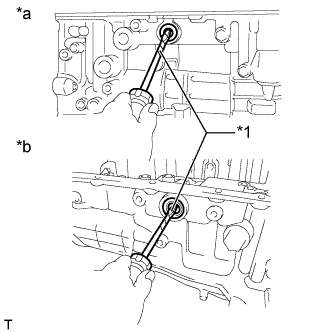
Text in Illustration *1 Protective Tape *a RH Side *b LH Side Using a screwdriver, remove the 2 manual valve lever oil seals.
-
-
REMOVE OIL PUMP ASSEMBLY
-
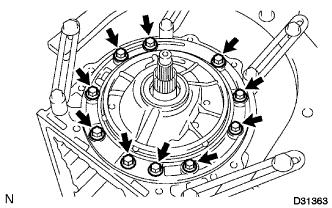
Remove the 10 bolts from the transmission case.
-
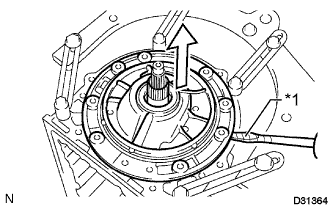
Text in Illustration *1 Protective Tape Using a screwdriver with its tip wrapped with tape, pull out the oil pump assembly.
Note
Be careful not to damage the oil pump assembly and transmission case.
Tech Tips
Tape the screwdriver tip before use.
-
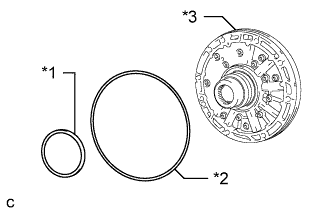
Text in Illustration *1 No. 1 Thrust Bearing Race *2 O-ring *3 Oil Pump Assembly Remove the No. 1 thrust bearing race from the oil pump assembly.
-
Remove the O-ring from the oil pump assembly.
-
-
REMOVE CLUTCH DRUM AND INPUT SHAFT
-
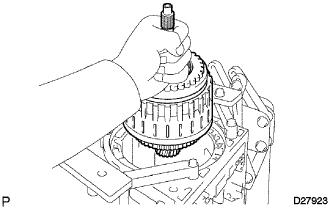
Remove the clutch drum and input shaft from the transmission case.
-
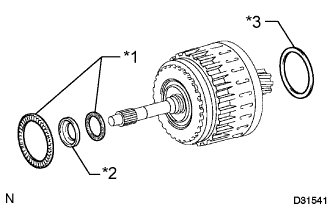
Text in Illustration *1 Thrust Needle Roller Bearing *2 Bearing Race *3 No. 2 Clutch Drum Thrust Washer Remove the No. 2 clutch drum thrust washer, 2 thrust needle roller bearings and bearing race.
-
-
INSPECT NO. 2 ONE-WAY CLUTCH ASSEMBLY
-
Hold the reverse clutch hub and turn the No. 2 one-way clutch assembly.
-
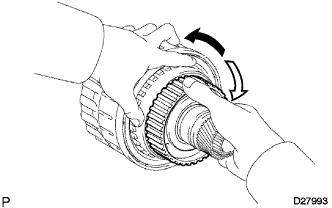
Check that the No. 2 one-way clutch assembly turns freely clockwise and locks counterclockwise.
Text in Illustration 
Lock 
Free If there is a problem with the one-way clutch, replace the No. 2 one-way clutch assembly.
-
-
REMOVE NO. 2 ONE-WAY CLUTCH ASSEMBLY
-
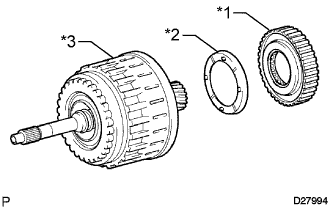
Text in Illustration *1 No. 2 One-way Clutch Assembly *2 No. 2 Clutch Drum Thrust Washer *3 Clutch Drum and Input Shaft Remove the No. 2 one-way clutch assembly and No. 2 clutch drum thrust washer from the clutch drum and input shaft.
-
-
SECURE CLUTCH DRUM AND INPUT SHAFT
-
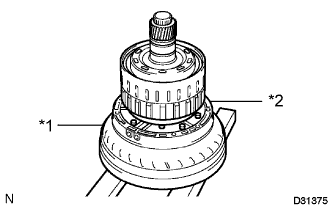
Text in Illustration *1 Torque Converter Assembly *2 Oil Pump Assembly Place the oil pump assembly onto the torque converter assembly, and then place the clutch drum and input shaft onto the oil pump assembly.
-
-
REMOVE REVERSE CLUTCH HUB SUB-ASSEMBLY
-
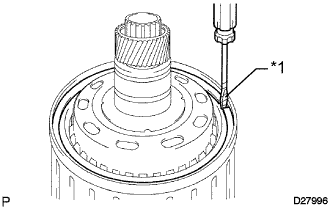
Text in Illustration *1 Protective Tape Using a screwdriver, remove the snap ring from the clutch drum and input shaft.
CAUTION:
Be careful not to damage the reverse clutch piston sub-assembly.
Tech Tips
Tape the screwdriver tip before use.
-
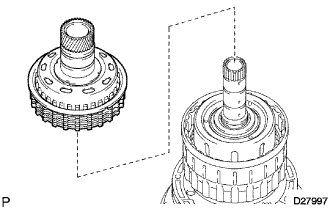
Remove the reverse clutch hub sub-assembly with the reverse clutch reaction sleeve, clutch cushion plate, reverse clutch flange, 5 No. 3 clutch discs and 4 No. 3 clutch plates from the reverse clutch hub sub-assembly.
-
-
REMOVE REVERSE CLUTCH REACTION SLEEVE
-
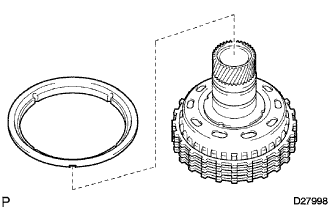
Remove the reverse clutch reaction sleeve from the reverse clutch hub sub-assembly.
-
-
REMOVE NO. 3 CLUTCH DISC
-
Remove the clutch cushion plate, reverse clutch flange, 4 No. 3 clutch plates and 5 No. 3 clutch discs from the reverse clutch hub sub-assembly.
-
-
INSPECT NO. 3 CLUTCH DISC
-
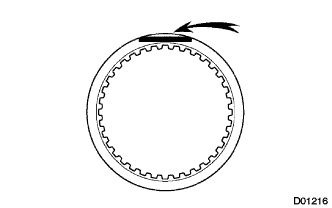
Check whether the sliding surfaces of the discs, plates or flange are worn or burnt.
If necessary, replace them.
Note
-
If the linings of the discs are peeled off or discolored, or if any part of the printed numbers is damaged, replace all discs.
-
Before assembling new discs, soak them in ATF for at least 15 minutes.
-
-
-
INSPECT REVERSE CLUTCH HUB SUB-ASSEMBLY
-
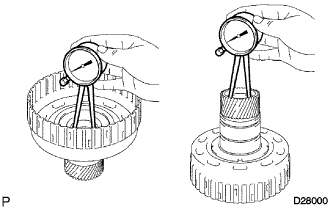
Using a caliper gauge, measure the inside diameter of the reverse clutch hub bushing.
Standard inside diameter 35.812 to 35.837 mm (1.4100 to 1.41090 in.) If the inside diameter is more than the standard inside diameter, replace the reverse clutch hub sub-assembly.
-
-
REMOVE CLUTCH HUB SUB-ASSEMBLY
-
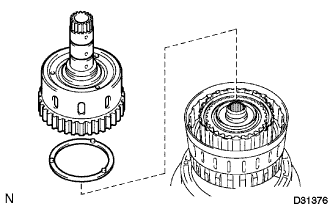
Remove the clutch hub sub-assembly and clutch hub thrust washer from the reverse clutch drum subassembly.
-
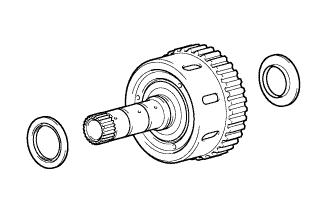
Remove the 2 thrust needle roller bearings from the clutch hub sub-assembly.
-
-
INSPECT CLUTCH HUB SUB-ASSEMBLY
-
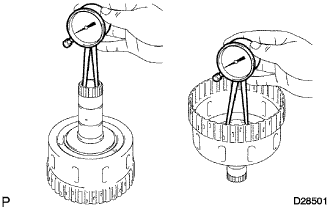
Using a caliper gauge, measure the inside diameter of the clutch hub bushing.
Standard inside diameter 26.037 to 26.062 mm (1.02508 to 1.02606 in.) If the inside diameter is more than the standard inside diameter, replace the clutch hub sub-assembly.
-
-
REMOVE COAST CLUTCH HUB SUB-ASSEMBLY
-
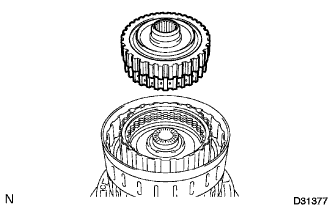
Remove the coast clutch hub sub-assembly from the reverse clutch drum sub-assembly.
-
-
INSPECT UNDERDRIVE ONE-WAY CLUTCH ASSEMBLY
-
Hold the coast clutch hub and turn the underdrive one-way clutch assembly.
-
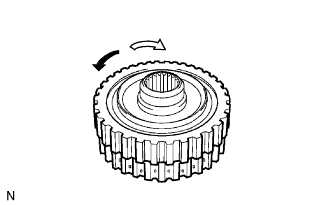
Check that the underdrive one-way clutch assembly turns freely clockwise and locks counterclockwise.
Text in Illustration Lock Free If there is a problem with the underdrive one-way clutch assembly, replace underdrive one-way clutch assembly.
-
-
REMOVE UNDERDRIVE ONE-WAY CLUTCH ASSEMBLY
-
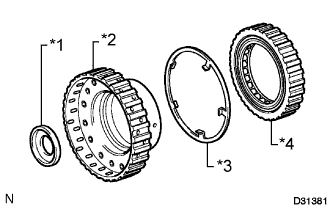
Text in Illustration *1 Thrust Bearing Race *2 Coast Clutch Hub Sub-assembly *3 Clutch Hub Thrust Washer *4 Underdrive One-way Clutch Assembly Remove the underdrive one-way clutch assembly, clutch hub thrust washer and thrust bearing race from the coast clutch hub sub-assembly.
-
-
REMOVE NO. 1 CLUTCH DISC
-
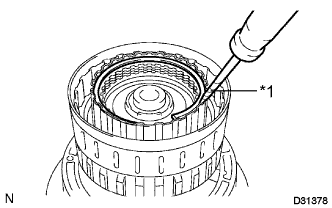
Text in Illustration *1 Protective Tape Using a screwdriver, remove the snap ring.
Note
Be careful not to damage the input shaft.
Tech Tips
Tape the screwdriver tip before use.
-
Remove the flange, clutch cushion plate, 4 No. 1 clutch discs and 4 No. 1 clutch plates from the forward clutch piston sub-assembly.
-
-
INSPECT NO. 1 CLUTCH DISC
-
Check whether the sliding surfaces of the discs, plates or flange are worn or burnt.
If necessary, replace them.
Note
-
If the linings of the discs are peeled off or discolored, or if any part of the printed numbers is damaged, replace all discs.
-
Before assembling new discs, soak them in ATF for at least 15 minutes.
-
-
-
REMOVE COAST CLUTCH DISC
-
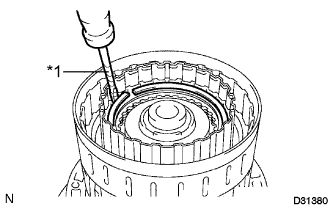
Text in Illustration *1 Protective Tape Using a screwdriver, remove the hole snap ring.
Note
Be careful not to damage the input shaft.
Tech Tips
Tape the screwdriver tip before use.
-
Remove the reverse clutch flange, 3 coast clutch discs and 3 coast clutch plates from the forward clutch piston sub-assembly.
-
-
INSPECT COAST CLUTCH DISC
-
Check whether the sliding surfaces of the discs, plates or flange are worn or burnt.
If necessary, replace them.
Note
-
If the linings of the discs are peeled off or discolored, or if any part of the printed numbers is damaged, replace all discs.
-
Before assembling new discs, soak them in ATF for at least 15 minutes.
-
-
-
REMOVE INPUT SHAFT
-
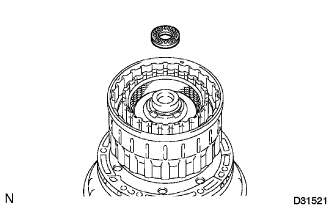
Remove the thrust needle roller bearing from the input shaft.
-
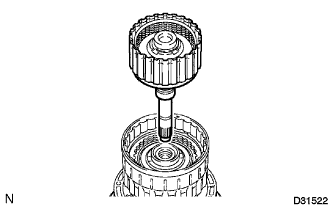
Remove the input shaft from the reverse clutch drum sub-assembly.
-
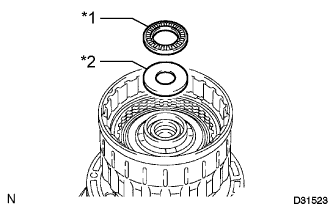
Text in Illustration *1 Thrust Needle Roller Bearing *2 Thrust Bearing Race Remove the thrust needle roller bearing and thrust bearing race from the reverse clutch drum sub-assembly.
-
-
REMOVE INPUT SHAFT OIL SEAL RING
-
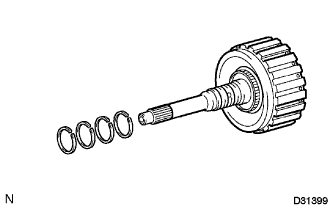
Remove the 4 input shaft oil seal rings from the input shaft.
-
-
REMOVE NO. 1 CLUTCH BALANCER
-
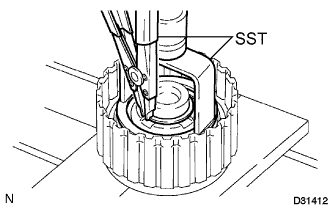
Place SST on the No. 1 clutch balancer, and compress the forward clutch return spring sub-assembly with a press.
- SST
- 09350-30020 ( 09350-07040 )
-
Using SST, remove the snap ring.
- SST
- 09350-30020 ( 09350-07070 )
-
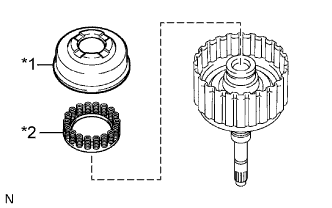
Text in Illustration *1 No. 1 Clutch Balancer *2 Forward Clutch Return Spring Sub-assembly Remove the No. 1 clutch balancer and forward clutch return spring sub-assembly from the input shaft.
-
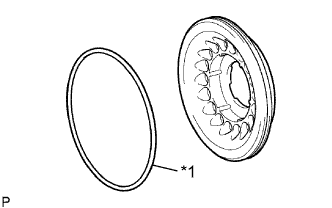
Text in Illustration *1 D-ring Remove the D-ring from the No. 1 clutch balancer.
-
-
INSPECT FORWARD CLUTCH RETURN SPRING SUB-ASSEMBLY
-
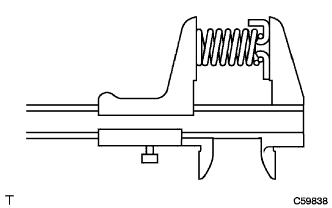
Using a vernier caliper, measure the free length of the spring together with the spring seat.
Standard free length 24.64 mm (0.970 in.) If the free length is less than the standard free length, replace the forward clutch return spring sub-assembly.
-
-
REMOVE FORWARD CLUTCH PISTON SUB-ASSEMBLY
-
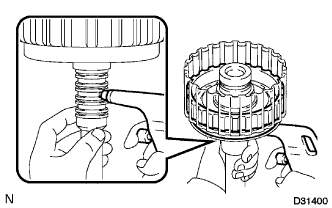
Holding the forward clutch piston sub-assembly by hand, apply compressed air (392 kPa, 4.0 kgf/cm2, 57 psi) to the input shaft to remove the forward clutch piston sub-assembly.
-
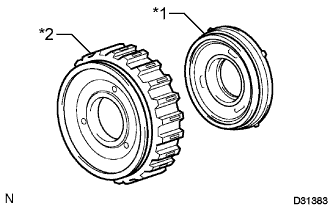
Text in Illustration *1 Coast Clutch Piston *2 Forward Clutch Piston Sub-assembly Remove the coast clutch piston from the forward clutch piston sub-assembly.
-
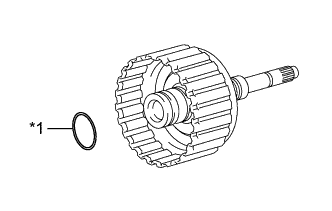
Text in Illustration *1 O-ring Remove the O-ring from the input shaft.
-
-
REMOVE REVERSE CLUTCH FLANGE
-
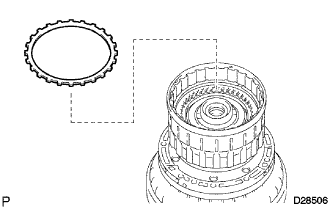
Remove the reverse clutch flange from the reverse clutch drum sub-assembly.
-
-
REMOVE NO. 2 DIRECT CLUTCH DISC
-
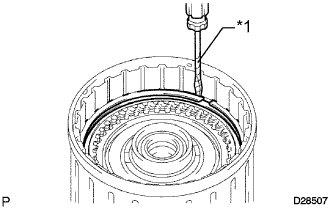
Text in Illustration *1 Protective Tape Using a screwdriver, remove the 2 snap rings from the reverse clutch drum sub-assembly.
Note
Be careful not to damage the reverse clutch drum sub-assembly.
Tech Tips
Tape the screwdriver tip before use.
-
Remove the reverse clutch flange, 6 No. 2 clutch plates and 5 No. 2 direct clutch discs from the reverse clutch drum sub-assembly.
-
-
INSPECT NO. 2 DIRECT CLUTCH DISC
-
Check whether the sliding surfaces of the discs, plates or flange are worn or burnt.
If necessary, replace them.
Note
-
If the linings of the discs are peeled off or discolored, or if any part of the printed numbers is damaged, replace all discs.
-
Before assembling new discs, soak them in ATF for at least 15 minutes.
-
-
-
REMOVE NO. 3 CLUTCH BALANCER
-
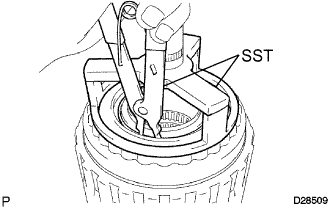
Place SST on the No. 3 clutch balancer, and compress the revers clutch return spring sub-assembly with a press.
- SST
- 09387-00070
-
Using SST, remove the snap ring.
- SST
- 09350-30020 ( 09350-07070 )
-
Remove the No. 3 clutch balancer.
-
-
REMOVE REVERSE CLUTCH RETURN SPRING SUB-ASSEMBLY
-
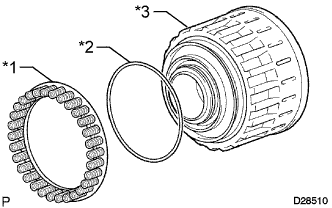
Text in Illustration *1 Reverse Clutch Return Spring Sub-assembly *2 O-ring *3 Reverse Clutch Piston Sub-assembly Remove the reverse clutch return spring sub-assembly and O-ring from the reverse clutch piston sub-assembly.
-
-
INSPECT REVERSE CLUTCH RETURN SPRING SUB-ASSEMBLY
-
Using a vernier caliper, measure the free length of the spring together with the spring seat.
Standard free length 21.04 mm (0.828 in.) If the free length is less than the standard free length, replace the reverse clutch return spring sub-assembly.
-
-
REMOVE REVERSE CLUTCH PISTON SUB-ASSEMBLY
-
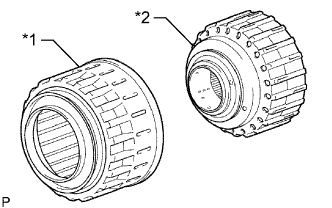
Text in Illustration *1 Reverse Clutch Piston Sub-assembly *2 Reverse Clutch Drum Sub-assembly Remove the reverse clutch piston sub-assembly from the reverse clutch drum sub-assembly.
-
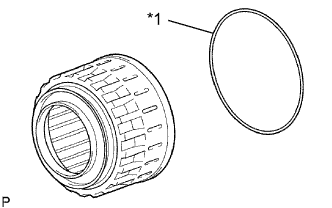
Text in Illustration *1 O-ring Remove the O-ring from the reverse clutch piston sub-assembly.
-
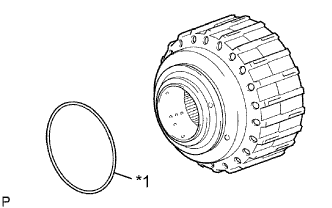
Text in Illustration *1 O-ring Remove the O-ring from the reverse clutch drum sub-assembly.
-
-
REMOVE DIRECT CLUTCH PISTON SUB-ASSEMBLY
-
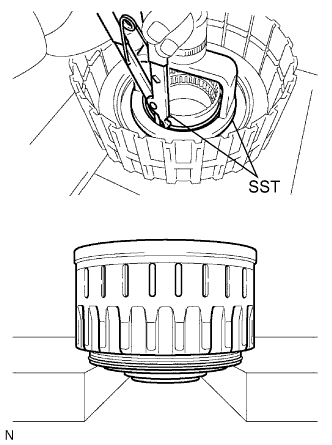
Place SST on the direct clutch piston sub-assembly, and compress the direct clutch return spring subassembly with a press.
- SST
- 09320-89010
-
Using SST, remove the snap ring.
- SST
- 09350-30020 ( 09350-07070 )
-
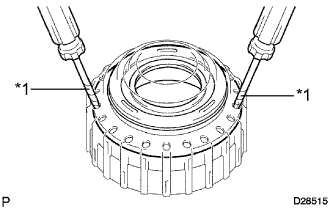
Text in Illustration *1 Protective Tape Using 2 screwdrivers, remove the direct clutch piston sub-assembly from the reverse clutch drum sub-assembly.
Note
Be careful not to damage the direct clutch piston sub-assembly.
Tech Tips
Tape the screwdriver tip before use.
-
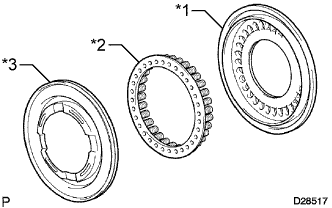
Text in Illustration *1 No. 2 Clutch Balancer *2 Direct Clutch Return Spring Sub-assembly *3 Direct Clutch Piston Sub-assembly Remove the No. 2 clutch balancer and direct clutch return spring sub-assembly from the direct clutch piston sub-assembly.
-
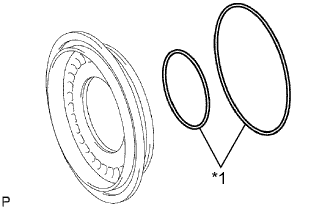
Text in Illustration *1 O-ring Remove the 2 O-rings from the direct clutch piston sub-assembly.
-
-
INSPECT DIRECT CLUTCH RETURN SPRING SUB-ASSEMBLY
-
Using a vernier caliper, measure the free length of the spring together with the spring seat.
Standard free length 19.51 mm (0.768 in.) If the free length is less than the standard free length, replace the direct clutch return spring sub-assembly.
-
-
REMOVE NO. 3 BRAKE DISC
-
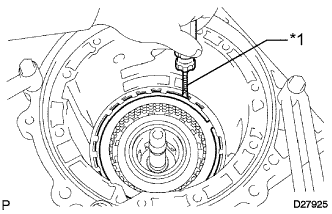
Text in Illustration *1 Protective Tape Using a screwdriver, remove the snap ring from the transmission case.
Note
Be careful not to damage the transmission case.
Tech Tips
Tape the screwdriver tip before use.
-
Remove the No. 3 brake flange, cushion plate, 4 No. 3 brake discs and 4 No. 3 brake plates from the transmission case.
-
-
INSPECT NO. 3 BRAKE DISC
-
Check whether the sliding surfaces of the discs, plates or flange are worn or burnt.
If necessary, replace them.
Note
-
If the linings of the discs are peeled off or discolored, or if any part of the printed numbers is damaged, replace all discs.
-
Before assembling new discs, soak them in ATF for at least 15 minutes.
-
-
-
REMOVE ONE-WAY CLUTCH ASSEMBLY
-
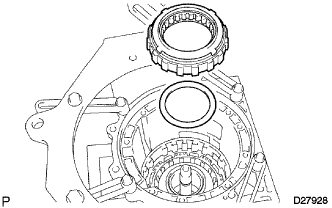
Remove the one-way clutch assembly and No. 1 planetary carrier thrust washer from the transmission case.
-
-
REMOVE 2ND BRAKE CYLINDER
-
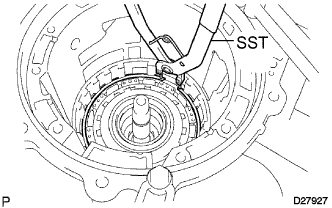
Using SST, remove the snap ring.
- SST
- 09350-30020 ( 09350-07060 )
-
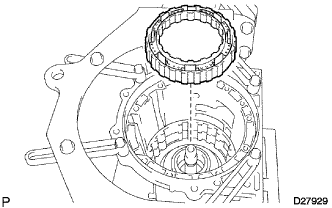
Remove the 2nd brake cylinder from the transmission case.
-
-
REMOVE 2ND BRAKE PISTON
-
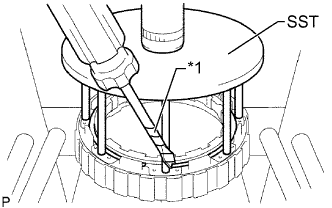
Text in Illustration *1 Protective Tape Using SST, a screwdriver and a press, remove the snap ring.
- SST
- 09351-40010 ( 09351-04060, 09351-04070 )
Note
Be careful not to damage the 2nd brake cylinder.
Tech Tips
Tape the screwdriver tip before use.
-
Remove the No. 3 brake piston return spring sub-assembly.
-
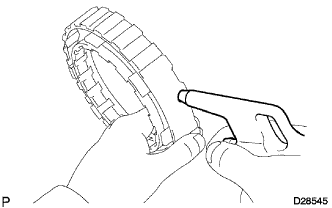
Hold the 2nd brake piston and apply compressed air (392 kPa, 4.0 kgf/cm2, 57 psi) to the 2nd brake cylinder to remove the 2nd brake piston.
-
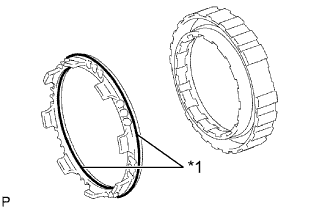
Text in Illustration *1 O-ring Remove the 2 O-rings from the 2nd brake piston.
-
-
INSPECT NO. 3 BRAKE PISTON RETURN SPRING SUB-ASSEMBLY
-
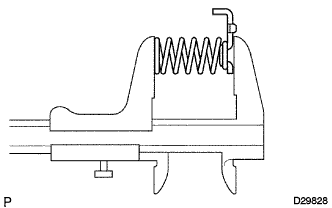
Using a vernier caliper, measure the free length of the spring together with the spring seat.
Standard free length 15.72 mm (0.619 in.) If the inside diameter is less than the standard free length, replace the No. 3 brake piston return spring sub-assembly.
-
-
REMOVE FRONT PLANETARY GEAR ASSEMBLY
-
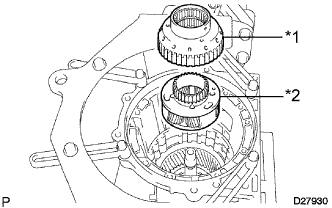
Text in Illustration *1 One-way Clutch Inner Race *2 Front Planetary Gear Assembly Remove the front planetary gear assembly and one-way clutch inner race from the transmission case.
-
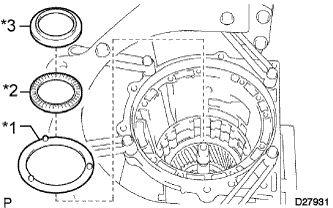
Text in Illustration *1 No. 2 Planetary Carrier Thrust Washer *2 Thrust Needle Roller Bearing *3 No. 3 Thrust Bearing Race Remove the thrust needle roller bearing, No. 3 thrust bearing race and No. 2 planetary carrier thrust washer from the transmission case.
-
-
INSPECT FRONT PLANETARY GEAR ASSEMBLY
-
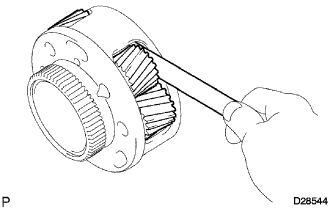
Using a feeler gauge, measure the front planetary pinion gear thrust clearance.
Standard clearance 0.20 to 0.60 mm (0.00788 to 0.0236 in.) If the clearance is more than the standard clearance, replace the front planetary gear assembly.
-
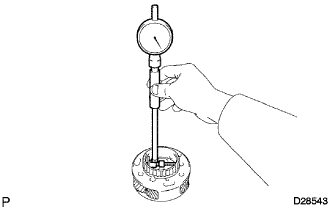
Using a cylinder gauge, measure the inside diameter of the front planetary gear bushing.
Standard inside diameter 57.43 mm (2.26 in.) If the inside diameter is more than the standard inside diameter, replace the front planetary gear assembly.
-
-
INSPECT ONE-WAY CLUTCH ASSEMBLY
-
Install the one-way clutch assembly to the one-way clutch inner race.
-
Hold the one-way clutch inner race and turn the one-way clutch assembly.
-
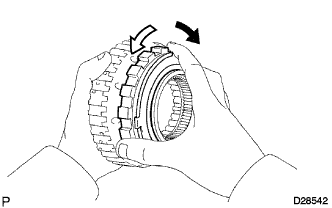
Check that the one-way clutch assembly turns freely counterclockwise and locks clockwise.
Text in Illustration Lock Free If there is a problem with the one-way clutch, replace the one-way clutch assembly.
-
Remove the one-way clutch assembly from the one-way clutch inner race.
-
-
REMOVE FRONT PLANETARY RING GEAR
-
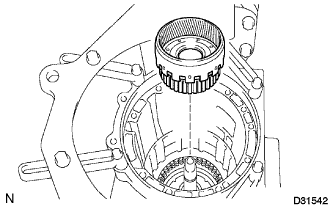
Remove the front planetary ring gear from the transmission case.
-
-
REMOVE CENTER PLANETARY RING GEAR
-
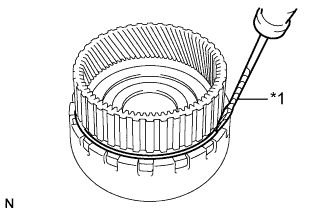
Text in Illustration *1 Protective Tape Using a screwdriver, remove the snap ring.
Note
Be careful not to damage the front planetary ring gear.
Tech Tips
Tape the screwdriver tip before use.
-
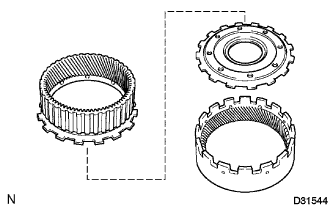
Remove the center planetary ring gear and front planetary ring thrust flange from the front planetary ring gear.
-
Remove the thrust needle roller bearing from the front planetary ring thrust flange.
-
-
REMOVE NO. 1 BRAKE DISC
-
Remove the No. 1 brake flange, 3 No. 1 brake discs and 3 No. 1 brake plates from the transmission case.
-
-
INSPECT NO. 1 BRAKE DISC
-
Check whether the sliding surfaces of the discs, plates or flange are worn or burnt.
If necessary, replace them.
Note
-
If the linings of the discs are peeled off or discolored, or if any part of the printed numbers is damaged, replace all discs.
-
Before assembling new discs, soak them in ATF for at least 15 minutes.
-
-
-
REMOVE BRAKE PISTON RETURN SPRING SUB-ASSEMBLY
-
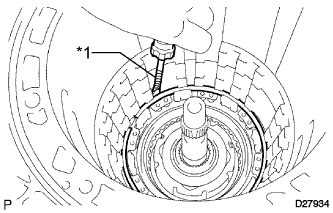
Text in Illustration *1 Protective Tape Using a screwdriver, remove the snap ring from the transmission case.
Note
Be careful not to damage the front transmission case.
Tech Tips
Tape the screwdriver tip before use.
-
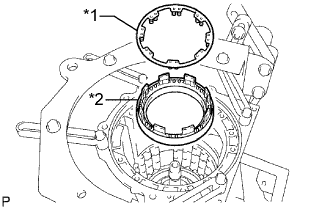
Text in Illustration *1 Brake Piston Return Spring Sub-assembly *2 No. 1 Brake Cylinder Remove the brake piston return spring sub-assembly, No. 1 brake piston and No. 1 brake cylinder from the transmission case.
-
-
INSPECT BRAKE PISTON RETURN SPRING SUB-ASSEMBLY
-
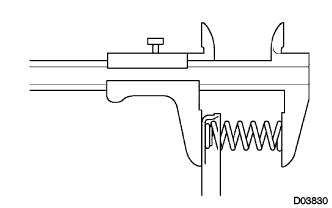
Using a vernier caliper, measure the free length of the spring together with the spring seat.
Standard free length 17.05 mm (0.671 in.) If the free length is less than the standard free length, replace the brake piston return spring sub-assembly.
-
-
REMOVE NO. 1 BRAKE PISTON
-
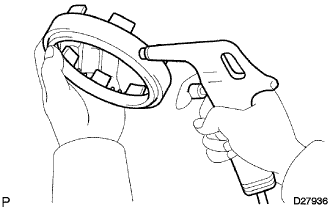
Hold the No. 1 brake cylinder and apply compressed air (392 kPa, 4.0 kgf/cm2, 57 psi) to the No. 1 brake cylinder to remove the No. 1 brake piston.
Tech Tips
If the piston does not pop out with compressed air, lift the piston out with needle-nose pliers.
-
Remove the 2 O-rings from the No. 1 brake piston.
-
-
REMOVE NO. 2 BRAKE DISC
-
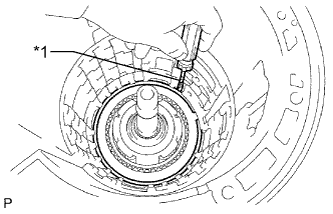
Text in Illustration *1 Protective Tape Using a screwdriver, remove the snap ring from the transmission case.
Note
Be careful not to damage the front transmission case.
Tech Tips
Tape the screwdriver tip before use.
-
Remove the 2 No. 2 brake flanges, No. 2 brake piston return spring sub-assembly, 4 No. 2 brake discs and 3 No. 2 brake plates from the transmission case.
-
-
INSPECT NO. 2 BRAKE DISC
-
Check whether the sliding surfaces of the discs, plates or flange are worn or burnt.
If necessary, replace them.
Note
-
If the linings of the discs are peeled off or discolored, or if any part of the printed numbers is damaged, replace all discs.
-
Before assembling new discs, soak them in ATF for at least 15 minutes.
-
-
-
INSPECT NO. 2 BRAKE PISTON RETURN SPRING SUB-ASSEMBLY
-
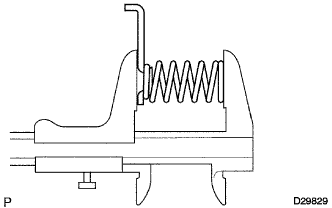
Using a vernier caliper, measure the free length of the spring together with the spring seat.
Standard free length 22.66 mm (0.892 in.) If the free length is less than the standard free length, replace the No. 2 brake piston return spring sub-assembly.
-
-
REMOVE NO. 2 BRAKE PISTON
-
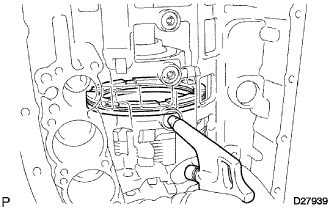
Hold the No. 2 brake piston and apply compressed air (392 kPa, 4.0 kgf/cm2, 57 psi) to the transmission case to remove the No. 2 brake piston and No. 2 brake cylinder.
Tech Tips
If the piston does not pop out with compressed air, lift the piston out with needle-nose pliers.
-
Remove the No.2 brake piston from the No.2 brake cylinder.
-
Remove the 2 O-rings from the No. 2 brake piston.
-
-
REMOVE CENTER PLANETARY GEAR ASSEMBLY
-
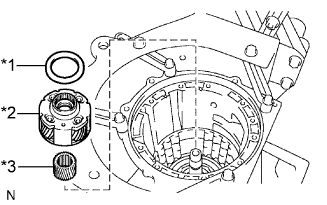
Text in Illustration *1 No. 4 Thrust Bearing Race *2 Center Planetary Gear Assembly *3 Planetary Sun Gear Remove the center planetary gear assembly, planetary sun gear and No. 4 thrust bearing race from the transmission case.
-
-
INSPECT CENTER PLANETARY GEAR ASSEMBLY
-
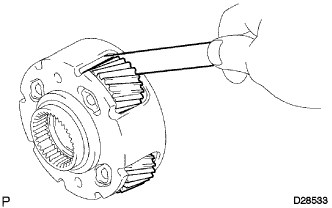
Using a feeler gauge, measure the center planetary gear pinion thrust clearance.
Standard clearance 0.12 to 0.68 mm (0.00473 to 0.02677 in.) If the clearance is more than the standard clearance, replace the center planetary gear assembly.
-
-
REMOVE INTERMEDIATE SHAFT
-
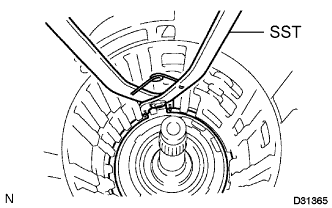
Using SST, remove the snap ring from the transmission case.
- SST
- 09350-30020 ( 09350-07060 )
-
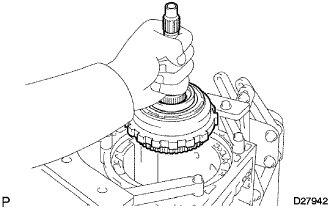
Remove the intermediate shaft with the No. 3 one-way clutch assembly from the transmission case.
-
-
INSPECT NO. 3 ONE-WAY CLUTCH ASSEMBLY
-
Hold the rear planetary ring gear flange sub-assembly and turn the No. 3 one-way clutch assembly.
-
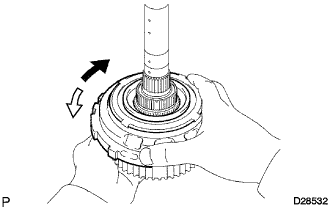
Check that the No. 3 one-way clutch assembly turns freely counterclockwise and locks clockwise.
Text in Illustration Lock Free If there is a problem with the No. 3 one-way clutch assembly, replace the No. 3 one-way clutch assembly.
-
-
REMOVE NO. 3 ONE-WAY CLUTCH ASSEMBLY
-
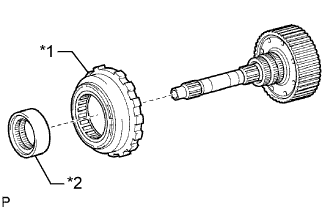
Text in Illustration *1 No. 3 One-way Clutch Assembly *2 One-way Clutch Inner Race Remove the No. 3 one-way clutch assembly and one-way clutch inner race from the intermediate shaft.
-
-
REMOVE REAR PLANETARY RING GEAR FLANGE SUB-ASSEMBLY
-
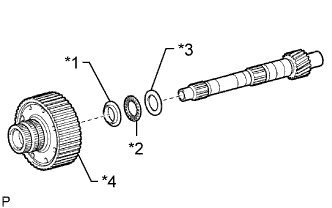
Text in Illustration *1 No. 7 Thrust Bearing Race *2 Thrust Needle Roller Bearing *3 No. 8 Thrust Bearing Race *4 Rear Planetary Ring Gear Flange Sub-assembly Remove the No. 8 thrust bearing race, thrust needle roller bearing, No. 7 thrust bearing race and rear planetary ring gear flange sub-assembly from the intermediate shaft.
-
-
INSPECT REAR PLANETARY RING GEAR FLANGE SUB-ASSEMBLY
-
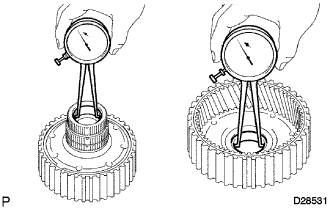
Using a caliper gauge, measure the inside diameter of the rear planetary ring gear bushing.
Standard inside diameter 32.19 mm (1.27 in.) If the inside diameter is more than the standard inside diameter, replace the rear planetary ring gear flange sub-assembly.
-
-
INSPECT INTERMEDIATE SHAFT
-
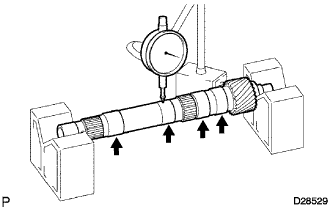
Using a dial indicator, check the intermediate shaft runout.
Standard runout 0.03 mm (0.00118 in.) If the runout exceeds the specification, replace the intermediate shaft with a new one.
-
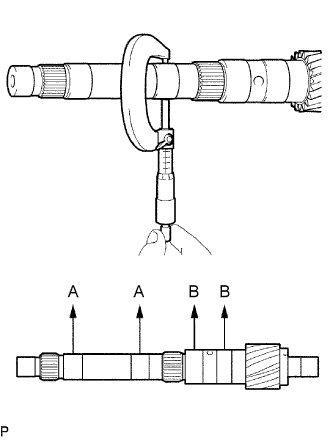
Using a micrometer, check the outer diameter of the intermediate shaft at each point shown in the illustration.
Standard diameter A 25.962 to 25.975 mm (1.02213 to 1.02263 in.) B 32.062 to 32.075 mm (1.26228 to 1.26279 in.) If the outer diameter is outside the standard range, replace the intermediate shaft with a new one.
-
-
REMOVE BRAKE PLATE STOPPER SPRING
-
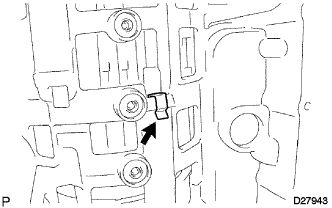
Remove the brake plate stopper spring from the transmission case.
-
-
REMOVE NO. 4 BRAKE DISC
-
Remove the rear cover sleeve, 4 No. 4 brake plates, 4 No. 4 brake discs and No. 4 brake flange from the transmission case.
-
-
INSPECT NO. 4 BRAKE DISC
-
Check whether the sliding surfaces of the discs, plates or flange are worn or burnt.
If necessary, replace them.
Note
-
If the linings of the discs are peeled off or discolored, or if any part of the printed numbers is damaged, replace all discs.
-
Before assembling new discs, soak them in ATF for at least 15 minutes.
-
-
-
REMOVE REAR PLANETARY GEAR ASSEMBLY
-
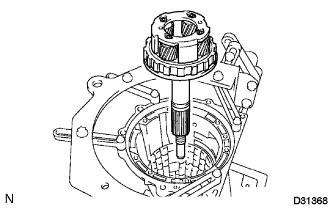
Remove the rear planetary gear assembly from the transmission case.
-
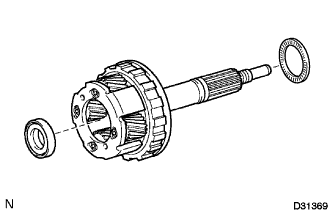
Remove the 2 thrust needle roller bearings from the rear planetary gear assembly.
-
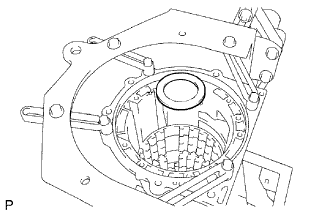
Remove the No. 9 thrust bearing race from the transmission case.
-
-
INSPECT REAR PLANETARY GEAR ASSEMBLY
-
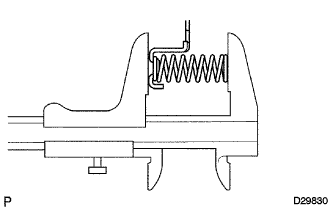
Using a vernier caliper, measure the free length of the spring together with the spring seat.
Standard free length 23.74 mm (0.935 in.) If the free length is less than the standard free length, replace the 1st and reverse brake return spring sub-assembly.
-
-
REMOVE 1ST AND REVERSE BRAKE RETURN SPRING SUB-ASSEMBLY
-
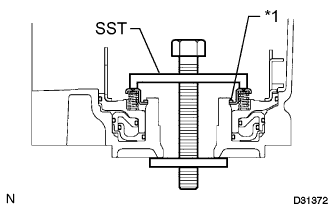
Text in Illustration *1 Snap Ring Place SST on the 1st and reverse brake return spring sub-assembly and compress the 1st and reverse brake return spring sub-assembly.
- SST
- 09350-30020 ( 09350-07050 )
-
Using SST, remove the snap ring and 1st and reverse brake return spring sub-assembly.
- SST
- 09350-30020 ( 09350-07070 )
-
-
INSPECT 1ST AND REVERSE BRAKE RETURN SPRING SUB-ASSEMBLY
-
Using a vernier caliper, measure the free length of the spring together with the spring seat.
Standard free length 23.74 mm (0.935 in.) If the free length is less than the standard free length, replace the 1st and reverse brake return spring sub-assembly.
-
-
REMOVE 1ST AND REVERSE BRAKE PISTON
-
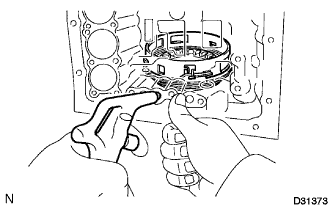
Hold the 1st and reverse brake piston and blow compressed air (392 kPa, 4.0 kgf/cm2, 57 psi) into the transmission case to remove the 1st and reverse brake piston.
Tech Tips
If the 1st and reverse brake piston does not pop out with compressed air, lift the 1st and reverse brake piston out with needle-nose pliers.
-
Remove the brake apply tube from the 1st and reverse brake piston.
-
Remove the O-ring from the 1st and reverse brake piston.
-
-
REMOVE BRAKE REACTION SLEEVE
-
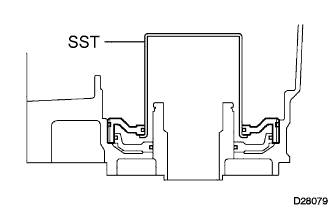
Using SST, remove the brake reaction sleeve.
- SST
- 09350-30020 ( 09350-07080 )
-
Remove the 2 O-rings from the brake reaction sleeve.
-
-
REMOVE NO. 4 BRAKE PISTON
-
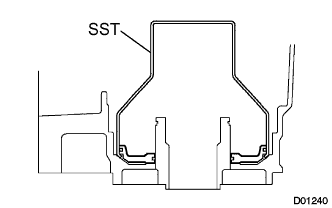
Using SST, remove the No. 4 brake piston.
- SST
- 09350-30020 ( 09350-07090 )
-
Remove the 2 O-rings from the No. 4 brake piston.
-