KICK-DOWN SWITCH REMOVAL

Tech Tips
-
Use the same procedure for the RHD and LHD sides.
-
The procedure listed below is for the LHD sides.
-
REMOVE FRONT DOOR SCUFF PLATE LH
-
Place your hands on the inner portion of the front door scuff plate LH and detach the 2 claws labeled A, 6 claws labeled B and 2 claws labeled C in the order shown in the illustration.
-
Raise the front door scuff plate LH to detach the 4 clips on the outer side and remove it.
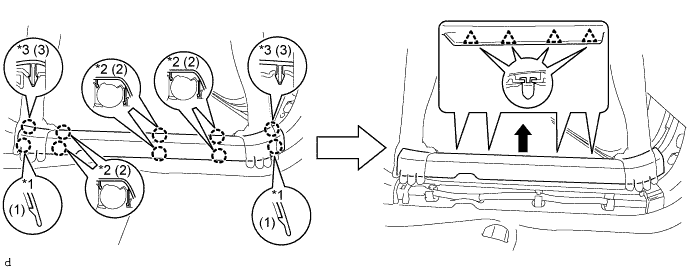
Text in Illustration *1 Claw A *2 Claw B *3 Claw C - -
-
-
REMOVE FRONT DOOR OPENING TRIM COVER LH
-
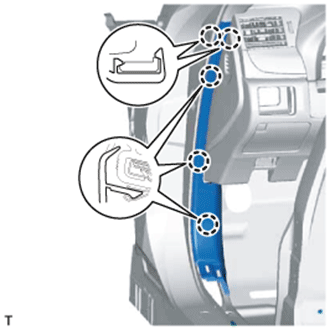
Detach the 5 claws and remove the front door opening trim cover LH.
-
-
REMOVE INSTRUMENT SIDE PANEL LH
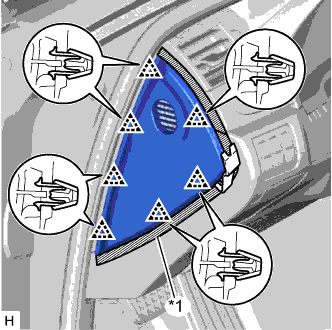
Text in Illustration *1 Protective Tape
-
Put protective tape around the instrument side panel LH.
-
Using a moulding remover, detach the 7 clips and remove the instrument side panel LH.
-
-
REMOVE NO. 1 INSTRUMENT PANEL UNDER COVER SUB-ASSEMBLY
-
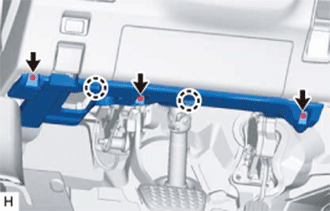
Remove the 3 screws <A>.
-
Detach the 2 claws.
-
Disconnect the connectors, detach the clamp and remove the No. 1 instrument panel under cover sub-assembly.
-
-
REMOVE ACCELERATOR PEDAL
-
REMOVE NO. 3 DASH PANEL INSULATOR PAD
-
REMOVE KICK DOWN SWITCH ASSEMBLY
-
Disconnect the kick down switch connector.
-
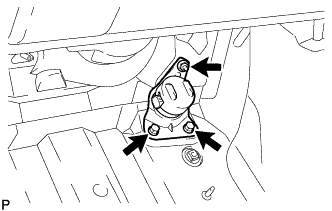
for LHD:
Remove the 2 bolts, nut and kick down switch assembly.
-
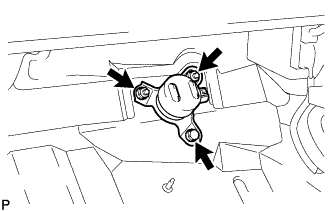
for RHD:
Remove the bolt, 2 nuts and kick down switch assembly.
-