LANE RECOGNITION CAMERA SENSOR REMOVAL

-
REMOVE FRONT ROOF TOP GARNISH
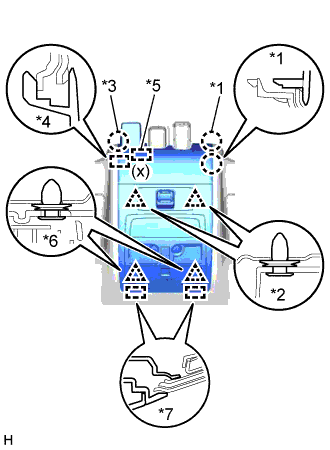
-
w/ Night View System:
-
Using a moulding remover, detach the 2 claws A.
-
Using a moulding remover, detach the 2 clips A.
Tech Tips
When the 2 clips A are detached, claw B, guide B and the fastener may also become detached.
-
Detach the 2 clips B.
-
Move the hooks of the 2 guides A forward, disconnect the connector, and remove the front roof garnish together with the map light assembly.
Note
When removing and installing the front roof top garnish, do not apply force to the camera sensor located at (x).
Tech Tips
If the claw B, guide B, and fastener do not become detached when the 2 clips labeled A are detached, detach claw B, guide B and the fastener to remove the front roof top garnish together with the map light assembly.
-
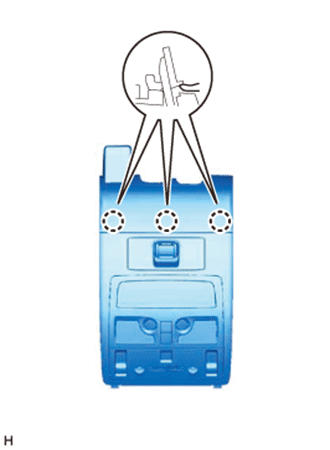
Text in Illustration *1 Claw A *2 Clip A *3 Claw B *4 Guide B *5 Fastener *6 Clip B *7 Guide A Detach the 3 claws on the back of the front roof top garnish and map light assembly, and disconnect the front roof top garnish and map light assembly.
-
-
w/o Night View System:
-
Using a moulding remover, detach the 2 claws A.
-
Using a moulding remover, detach the 2 clips A.
Tech Tips
When the 2 clips A are detached, claw B and guide B may also become detached.
-
Detach the 2 clips B.
-
Move the hooks of the 2 guides A forward, disconnect the connector, and remove the front roof garnish together with the map light assembly.
Note
w/ Lane Keeping Assist System:
When removing and installing the front roof top garnish, do not apply force to the camera sensor located at (x).
Tech Tips
If the claw B and guide B do not become detached when the 2 clips labeled A are detached, detach claw B and guide B to remove the front roof top garnish together with the map light assembly.
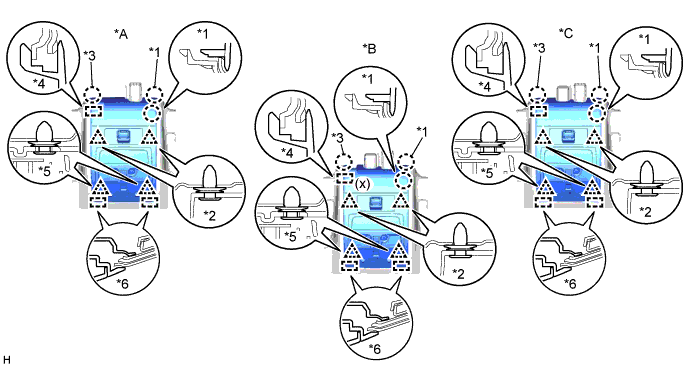
Text in Illustration *A for Standard *B w/ Lane Keeping Assist System *C w/ Rain Sensor - - *1 Claw A *2 Clip A *3 Claw B *4 Guide B *5 Clip B *6 Guide A -
Detach the 3 claws on the back of the front roof top garnish and map light assembly, and disconnect the front roof top garnish and map light assembly.
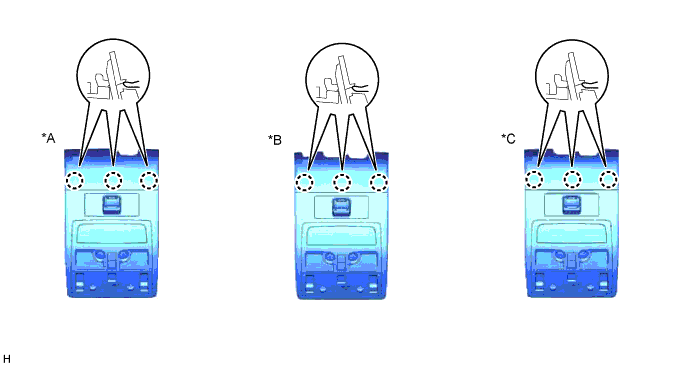
Text in Illustration *A for Standard *B w/ Lane Keeping Assist System *C w/ Rain Sensor - -
-
-
-
REMOVE MAP LIGHT ASSEMBLY
-
Using a moulding remover, detach the 2 claws A.
-
Using a moulding remover, detach the 2 clips A.
Tech Tips
When the 2 clips A are detached, claw B and guide B may also become detached.
-
Detach the 2 clips B.
-
Move the hooks of the 2 guides forward, disconnect the connector, and remove the map light assembly together with the front roof top garnish.
Note
w/ Lane Keeping Assist System:
When removing the map light assembly together with the front roof top garnish, make sure not to apply excessive pressure to the camera sensor (x).
Tech Tips
If claw B and guide B do not become detached when the 2 clips labeled A are detached, detach claw B and guide B to remove the map light assembly together with the front roof top garnish.
Text in Illustration *A for Standard *B w/ Lane Keeping Assist System *C w/ Rain Sensor - - *1 Claw A *2 Clip A *3 Claw B *4 Guide B *5 Clip B *6 Guide A -
Detach the 3 claws on the back of the map light assembly and front roof top garnish, and disconnect the map light assembly and front roof top garnish.
Text in Illustration *A for Standard *B w/ Lane Keeping Assist System *C w/ Rain Sensor - -
-
-
REMOVE LANE RECOGNITION CAMERA SENSOR ASSEMBLY
-
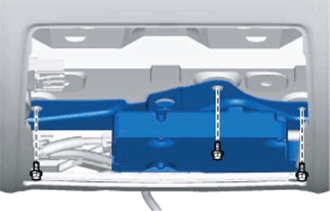
Remove the 3 bolts.
-
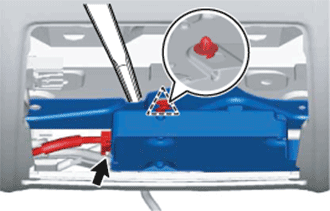
Using a moulding remover, detach the clip and remove the lane recognition camera sensor assembly.
Note
Do not touch the lens of the camera sensor during removal.
-
Disconnect the connector.
-