VEHICLE STABILITY CONTROL SYSTEM Brake Warning Light Remains ON
DESCRIPTION
The skid control ECU (brake actuator assembly) is connected to the combination meter via CAN communication.
If any of the following is detected, the brake system warning light (red indicator) remains on:
-
The skid control ECU (brake actuator assembly) connector is disconnected from the skid control ECU (brake actuator assembly).
-
The brake fluid level is insufficient.
-
EBD operation is disabled.
-
The voltage at terminal IG1 is high.
WIRING DIAGRAM
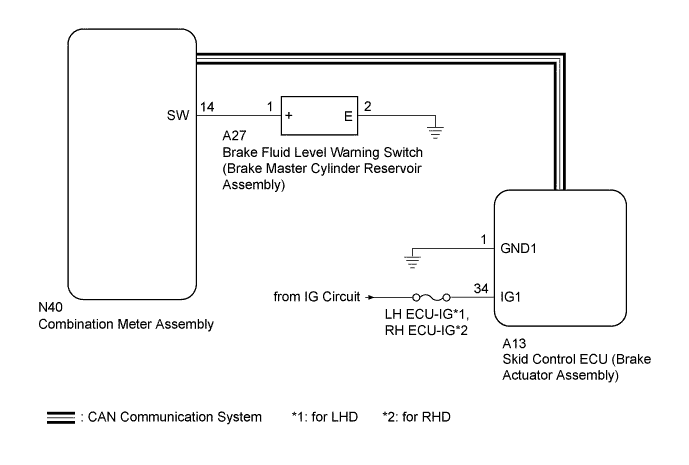
INSPECTION PROCEDURE
Note
-
When replacing the brake actuator assembly, perform zero point calibration and store system information Click here.
-
Inspect the fuses for circuits related to this system before performing the following inspection procedure.
PROCEDURE
-
CHECK CAN COMMUNICATION SYSTEM
-
Check if a CAN communication system DTC is output (for LHD: Click here, for RHD: Click here.
Result Result Proceed to DTC is not output A DTC is output (for LHD) B DTC is output (for RHD) C
B 
GO TO CAN COMMUNICATION SYSTEM (HOW TO PROCEED WITH TROUBLESHOOTING) Click here
C
GO TO CAN COMMUNICATION SYSTEM (HOW TO PROCEED WITH TROUBLESHOOTING) Click here
A 
-
-
CHECK IF SKID CONTROL ECU CONNECTOR IS SECURELY CONNECTED
-
Check if the skid control ECU (brake actuator assembly) connector is securely connected.
OK The connector is securely connected.
NG
CONNECT CONNECTOR TO ECU CORRECTLY
OK
-
-
CHECK HARNESS AND CONNECTOR (IG1 TERMINAL)
-
Disconnect the skid control ECU (brake actuator assembly) connector.
-
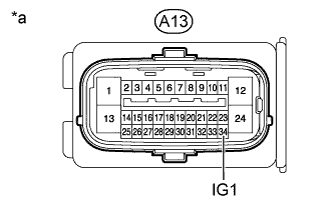
Text in Illustration *a Front view of wire harness connector
(to Skid Control ECU [Brake Actuator Assembly])
Measure the voltage according to the value(s) in the table below.
Standard Voltage Tester Connection Switch Condition Specified Condition A13-34 (IG1) - Body ground Engine switch on (IG) 11 to 14 V Result Result Proceed to OK A NG (for 2GR-FSE) B NG (for 4GR-FSE) C
NG
REPAIR OR REPLACE HARNESS OR CONNECTOR
OK
-
-
CHECK HARNESS AND CONNECTOR (GND1 TERMINAL)
-
Disconnect the skid control ECU (brake actuator assembly) connector.
-
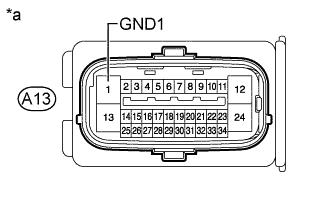
Text in Illustration *a Front view of wire harness connector
(to Skid Control ECU [Brake Actuator Assembly])
Measure the resistance according to the value(s) in the table below.
Standard Resistance Tester Connection Condition Specified Condition A13-1 (GND1) - Body ground Always Below 1 Ω
NG
REPAIR OR REPLACE HARNESS OR CONNECTOR
OK
-
-
INSPECT BRAKE FLUID LEVEL WARNING SWITCH
-
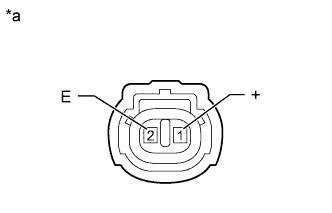
Text in Illustration *a Component without harness connected
(Brake Fluid Level Warning Switch [Brake Master Cylinder Reservoir Assembly])
Turn the engine switch off.
-
Remove the reservoir filler cap and strainer.
-
Disconnect the brake fluid level warning switch (brake master cylinder reservoir assembly) connector.
-
Measure the resistance according to the value(s) in the table below.
Tech Tips
A float is located inside the brake master cylinder reservoir assembly. Its position can be changed by increasing or decreasing the level of brake fluid.
Standard Resistance Tester Connection Switch Condition Specified Condition 1 (+) - 2 (E) Brake fluid level warning switch off (Float up) 10 kΩ or higher Brake fluid level warning switch on (Float down) Below 1 Ω Tech Tips
If there is no problem after finishing the above check, adjust the brake fluid level to the MAX level.
NG
REPLACE BRAKE MASTER CYLINDER RESERVOIR ASSEMBLY Click here
OK
-
-
CHECK HARNESS AND CONNECTOR (COMBINATION METER - BRAKE FLUID LEVEL WARNING SWITCH)
-
Turn the engine switch off.
-
Disconnect the N40 combination meter connector.
-
Disconnect the A27 brake fluid level warning switch (brake master cylinder reservoir assembly) connector.
-
Measure the resistance according to the value(s) in the table below.
Standard Resistance Tester Connection Condition Specified Condition N40-14 (SW) - A27-1 (+) Always Below 1 Ω N40-14 (SW) - Body ground Always 10 kΩ or higher A27-2 (E) - Body ground Always Below 1 Ω
NG
REPAIR OR REPLACE HARNESS OR CONNECTOR
OK
-
-
PERFORM ACTIVE TEST USING GTS (BRAKE WARNING LIGHT)
-
Turn the engine switch off.
-
Connect the GTS to the DLC3.
-
Start the engine.
-
Turn the GTS on.
-
Enter the following menus: Chassis / ABS/VSC/TRC / Active Test.
-
When performing the Brake Warning Light Active Test, check Brake Warning Light in the Data List Click here.
Result Result Proceed to Data List Display Data List Display when Performing Active Test ON/OFF Operation ON Does not change between ON and OFF A Changes between ON and OFF B OFF Does not change between ON and OFF A Changes between ON and OFF B
B
GO TO METER / GAUGE SYSTEM (HOW TO PROCEED WITH TROUBLESHOOTING) Click here
A 
REPLACE BRAKE ACTUATOR ASSEMBLY Click here
-