SFI SYSTEM, Diagnostic DTC:P0300, P0301, P0302, P0303, P0304, P0305, P0306

| DTC Code | DTC Name |
|---|---|
| P0300 | Random / Multiple Cylinder Misfire Detected |
| P0301 | Cylinder 1 Misfire Detected |
| P0302 | Cylinder 2 Misfire Detected |
| P0303 | Cylinder 3 Misfire Detected |
| P0304 | Cylinder 4 Misfire Detected |
| P0305 | Cylinder 5 Misfire Detected |
| P0306 | Cylinder 6 Misfire Detected |
DESCRIPTION
When the engine misfires, high concentrations of hydrocarbons (HC) enter the exhaust gas. Extremely high hydrocarbons concentration levels can cause an increase in exhaust emission levels. High concentrations of hydrocarbons can also cause increases in the three-way catalytic converter temperature, which may cause damage to the three-way catalytic converter. To prevent this increase in emissions and to limit the possibility of thermal damage, the ECM monitors the misfire count. When the temperature of the three-way catalytic converter reaches the point of thermal degradation, the ECM blinks the MIL. To monitor misfires, the ECM uses both the camshaft position sensor and the crankshaft position sensor. The camshaft position sensor is used to identify any misfiring cylinders and the crankshaft position sensor is used to measure variations in the crankshaft rotation speed. Misfires are counted when the crankshaft rotation speed variations exceed predetermined thresholds.
If the misfire exceeds the threshold levels and may cause emission deterioration, the ECM illuminates the MIL and sets a DTC.
| DTC No. | DTC Detection Condition | Trouble Area |
|---|---|---|
| P0300 | Simultaneous misfiring of several cylinders occurs and one of the following conditions below is detected (2 trip detection logic):
|
|
| P0301 P0302 P0303 P0304 P0305 P0306 |
Misfiring of specific cylinder occurs and one of the following conditions below is detected (2 trip detection logic):
|
|
If DTCs that indicate misfires are set for different cylinders, but DTC P0300 is not set, it indicates that misfires have been detected in different cylinders at different times. DTC P0300 is only set when several misfiring cylinders are detected at the same time.
MONITOR DESCRIPTION
The ECM illuminates the MIL and sets a DTC when either one of the following conditions, which could cause emission deterioration, is detected (2 trip detection logic):
-
Within the first 1000 crankshaft revolutions of the engine starting, an excessive misfiring rate (approximately 20 to 50 (w/o Canister Pump Module) or 10 to 50 (w/ Canister Pump Module) misfires per 1000 crankshaft revolutions) occurs once.
-
After the first 1000 crankshaft revolutions, an excessive misfiring rate (approximately 10 to 50 (w/o Canister Pump Module) or 10 to 60 (w/ Canister Pump Module) misfires per 1000 crankshaft revolutions) occurs 4 times in sequential crankshaft revolutions.
The ECM flashes the MIL (immediate detection logic) and sets a DTC (2 trip detection logic) when either one of the following conditions, which could cause the Three-Way Catalytic Converter (TWC) damage, is detected:
-
In every 200 crankshaft revolutions at a high engine speed, the threshold misfiring percentage is recorded once.
-
In every 200 crankshaft revolutions at a normal engine speed, the threshold misfiring percentage is recorded 3 times.
MONITOR STRATEGY
| Required Sensors/Components (Main) | Crankshaft position sensor and VVT sensor |
| Required Sensors/Components (Related) | Engine coolant temperature sensor and intake air temperature sensors and mass air flow meter |
| Frequency of Operation | Continuous |
TYPICAL ENABLING CONDITIONS
| Either of the following conditions 1 or 2 is met: | - |
| 1. Engine coolant temperature at engine start | More than -7°C (19°F) |
| 2. Engine coolant temperature | More than 20°C (68°F) |
| First 1000 revolutions after engine start, or during check mode | Crankshaft 1000 revolutions |
| Except above | Crankshaft 1000 revolutions x 4 |
| All of the following conditions 1, 2, 3 and 4 are met: | Crankshaft 200 revolutions x 3 |
| Except above | Crankshaft 200 revolutions |
| 1. Driving cycles | 1st |
| 2. Check mode | Off |
| 3. Engine speed | Less than 2500 rpm |
| 4. Intake air amount per revolution | Less than 1.4 g/rev |
CONFIRMATION DRIVING PATTERN
-
Connect the GTS to the DLC3.
-
Turn the engine switch on (IG).
-
Turn the GTS on.
-
Record the DTC(s) and freeze frame data.
-
Clear the DTCs (even if no DTCs are stored, perform the clear DTC procedure) Click here.
-
Using the GTS, switch the ECM from normal mode to check mode Click here.
-
Read the misfire counts of each cylinder (Cylinder #1 Misfire Count to Cylinder #6 Misfire Count) with the engine in an idling condition. If any misfire count is displayed, skip the following confirmation driving pattern.
-
Drive the vehicle several times with the conditions, such as engine speed and engine load, shown in Misfire RPM and Misfire Load in the freeze frame data.
Tech Tips
In order to store misfire DTCs, it is necessary to operate the vehicle for the period of time shown in the table below, using the Misfire RPM and Misfire Load in the Data List.
Engine Speed Duration Idling 8.0 minutes or more 1000 4.5 minutes or more 2000 2.5 minutes or more 3000 1.5 minutes or more -
Check whether misfires have occurred by checking DTCs and freeze frame data.
Tech Tips
Do not turn the engine switch off until the stored DTC(s) and freeze frame data have been recorded. When the ECM returns to normal mode (default), the stored DTC(s), freeze frame data and other data will be cleared.
-
Record the DTC(s), freeze frame data and misfire counts.
-
Turn the engine switch off and wait for at least 30 seconds.
-
Clear the DTCs (even if no DTCs are stored, perform the clear DTC procedure).
INSPECTION PROCEDURE
Tech Tips
-
If any DTCs other than misfire DTCs are output, troubleshoot those DTCs first.
-
Read freeze frame data using the GTS The ECM records vehicle and driving condition information as freeze frame data the moment a DTC is stored. When troubleshooting, freeze frame data can be helpful in determining whether the vehicle was moving or stationary, whether the engine was warmed up or not, whether the air fuel ratio was lean or rich, as well as other data recorded at the time of a malfunction.
-
If the misfire does not recur when the vehicle is brought to the workshop, reproduce the conditions stored in the ECM as freeze frame data.
-
If the misfire still cannot be reproduced even though the conditions stored in the ECM as freeze frame data have been reproduced, one of the following factors is considered to be a possible cause of the problem:
-
There was insufficient fuel in the tank.
-
Improper fuel is used.
-
The spark plugs have been contaminated.
-
The problem requires further diagnosis.
-
After finishing repairs, check the misfire counts of the cylinders (Cylinder #1 Misfire Count to Cylinder #6 Misfire Count).
-
Be sure to confirm that no misfiring cylinder DTCs are set again by conducting the confirmation driving pattern after finishing repairs.
-
For 6 cylinder engine, the ECM intentionally does not set the specific misfiring cylinder DTCs at high engine speed. If misfires occur only in high engine speed areas, only DTC P0300 is set.
In the event of DTC P0300 being present, perform the following operations:
-
Clear the DTCs Click here.
-
Start the engine and conduct the confirmation driving pattern.
-
Read the misfire count of each cylinder or DTC(s) using the GTS
-
Repair the cylinder(s) that has a high misfiring count or is indicated by the DTC.
-
After finishing repairs, conduct the confirmation driving pattern again, in order to verify that DTC P0300 is not set.
-
When one of Short FT #1, Long FT #1, Short FT #2 or Long FT #2 in the freeze frame data is outside the range of +/-20%, the air fuel ratio may be Rich (-20% or less) or Lean (+20% or more).
-
When the Coolant Temp in the freeze frame data is less than 75°C (167°F), the misfire have occurred only while warming up the engine.
-
An extremely imbalanced drive wheel which causes body vibration may cause misfire DTCs to be detected.
PROCEDURE
-
CHECK ANY OTHER DTC OUTPUT (IN ADDITION TO MISFIRE DTCS)
-
Connect the GTS to the DLC3.
-
Turn the engine switch on (IG) and turn the GTS on.
-
Enter the following menus: Powertrain / Engine and ECT / Trouble Codes.
-
Read the DTCs.
Result Result Proceed to P0300, P0301, P0302, P0303, P0304, P0305 and/or P0306 A P0300, P0301, P0302, P0303, P0304, P0305 and/or P0306 and other DTCs B Tech Tips
If any DTCs other than P0300, P0301, P0302, P0303, P0304, P0305 and/or P0306 are output, troubleshoot those DTCs first.
B 
GO TO DTC CHART Click here
A 
-
-
CHECK PCV HOSE CONNECTIONS
-
Check the PCV hose (w/ canister pump module) connections Click here.
-
Check the PCV hose (w/o canister pump module) connections Click here.
OK PCV valve and hose are connected correctly and are not damaged.
NG
REPAIR OR REPLACE PCV HOSE
OK
-
-
READ VALUE USING GTS (MISFIRE RPM AND MISFIRE LOAD)
-
Connect the GTS to the DLC3.
-
Turn the engine switch on (IG) and turn the GTS on.
-
Enter the following menus: Powertrain / Engine and ECT / Data List / Misfire RPM and Misfire Load.
-
Read and note the Misfire RPM and Misfire Load (engine load) values.
Tech Tips
The Misfire RPM and Misfire Load values indicate the vehicle conditions under which the misfire occurred.
NEXT
-
-
READ VALUE USING GTS
-
Connect the GTS to the DLC3.
-
Turn the engine switch on (IG) and turn the GTS on.
-
Enter the following menus: Powertrain / Engine and ECT / Data List / Catalyst OT MF F/C.
-
Read the valve displayed on the GTS
Result Data List GTS Display Proceed to Catalyst OT MF F/C Avail A Not Avl B
B 
CHECK MISFIRE COUNT OF PORT INJECTION Click here
A
-
-
PERFORM ACTIVE TEST USING GTS
-
Connect the GTS to the DLC3.
-
Turn the engine switch on (IG) and turn the GTS on.
-
Enter the following menus: Powertrain / Engine and ECT / Active Test / Prohibit the Catalyst OT Misfire Prevent F/C.
-
Perform the Active Test.
Note
When performing the Active Test, make sure the vehicle is stopped and either idling or being revved within 3000 rpm.
NEXT
-
-
CHECK MISFIRE COUNT OF PORT INJECTION
-
Connect the GTS to the DLC3.
-
Start the engine.
-
Turn the GTS on.
-
Enter the following menus: Powertrain / Engine and ECT / Active Test / Control the Injection Way / Port / Ptrol Misfire / Cylinder #1 Misfire Count to Cylinder #6 Misfire Count.
-
Allow the engine to idle.
-
Read each value for Cylinder #1 Misfire Count to Cylinder #6 Misfire Count displayed on the GTS If no misfire counts occur in any cylinders, perform procedure [A] and [B] and then check the misfire counts again.
-
Drive the vehicle with the Misfire RPM and Misfire Load noted in the "Read Value Using GTS (Misfire RPM and Misfire Load)" procedures above [A].
-
Read the Cylinder #1 Misfire Count to Cylinder #6 Misfire Count or DTCs displayed on the GTS [B].
Result Misfire count Proceed to 1 or 2 cylinders have misfire counts A 3 cylinders or more have misfire counts A There are no misfire counts B
B
CHECK MISFIRE COUNT OF DIRECT INJECTION Click here
A
-
-
CHECK MISFIRE COUNT OF DIRECT INJECTION
-
Connect the GTS to the DLC3.
-
Start the engine.
-
Turn the GTS on.
-
Enter the following menus: Powertrain / Engine and ECT / Active Test / Control the Injection Way / Direct / Ptrol Misfire / Cylinder #1 Misfire Count to Cylinder #6 Misfire Count.
-
Allow the engine to idle.
-
Read each value for Cylinder #1 Misfire Count to Cylinder #6 Misfire Count displayed on the GTS If no misfire counts occur in any cylinders, perform procedure [A] and [B] and then check the misfire counts again.
-
Drive the vehicle with the Misfire RPM and Misfire Load noted in the "Read Value Using GTS (Misfire RPM and Misfire Load)" procedures above [A].
-
Read the Cylinder #1 Misfire Count to Cylinder #6 Misfire Count or DTCs displayed on the GTS [B].
Result Misfire Count Proceed to Port Direct 1 or 2 cylinders have misfire counts 1 or 2 cylinders have misfire counts A 3 cylinders or more have misfire counts 3 cylinders or more have misfire counts B 1 or 2 cylinders have misfire counts There are no misfire counts C 3 cylinders or more have misfire counts There are no misfire counts D Tech Tips
Perform "Inspection After Repair" after replacing the fuel injector assembly (for port injection) Click here.
B
CHECK INTAKE SYSTEM Click here
C
REPLACE FUEL INJECTOR FOR PORT INJECTION (MISFIRING CYLINDER) Click here
D
CHECK FUEL PRESSURE (LOW PRESSURE SIDE) Click here
A
-
-
INSPECT SPARK PLUG
-
Inspect the spark plug of the misfiring cylinder Click here.
Tech Tips
Perform "Inspection After Repair" after replacing the spark plug Click here.
NG
REPLACE SPARK PLUG Click here
OK
-
-
CHECK FOR SPARK (SPARK TEST)
-
Perform a spark test Click here.
Tech Tips
-
If the result of the spark test is normal, proceed to the next step.
-
Perform "Inspection After Repair" after repairing or replacing the spark plug or ignition coil assembly Click here.
-
NEXT
-
-
CHECK CYLINDER COMPRESSION PRESSURE (MALFUNCTION CYLINDER)
-
Measure the cylinder compression pressure of the misfiring cylinder Click here.
Tech Tips
Perform "Inspection After Repair" after repairing or replacing the engine assembly Click here.
NG
REPAIR OR REPLACE ENGINE TO DETERMINE CAUSE OF LOW COMPRESSION
OK 
REPLACE ECM Click here
-
-
CHECK INTAKE SYSTEM
-
Check the intake system for vacuum leaks Click here.
OK No leaks from intake system. Tech Tips
Perform "Inspection After Repair" after replacing the intake system Click here.
NG
REPAIR OR REPLACE INTAKE SYSTEM
OK
-
-
READ VALUE USING GTS (COOLANT TEMP)
-
Connect the GTS to the DLC3.
-
Turn the engine switch on (IG).
-
Turn the GTS on.
-
Enter the following menus: Powertrain / Engine and ECT / Data List / MAF and Coolant Temp.
-
Read the Coolant Temp twice, when the engine is both cold and warmed up.
Standard With cold engine Same as ambient air temperature. With warm engine Between 75°C and 100°C (167°F and 212°F). Tech Tips
Perform "Inspection After Repair" after replacing the engine coolant temperature sensor Click here.
NG
REPLACE ENGINE COOLANT TEMPERATURE SENSOR Click here
OK
-
-
READ VALUE USING GTS (MAF)
-
Connect the GTS to the DLC3.
-
Start the engine.
-
Turn the GTS on.
-
Enter the following menus: Powertrain / Engine and ECT / Data List / MAF and Coolant Temp.
-
Allow the engine to idle until the Coolant Temp reaches 75°C (167°F) or more.
-
Read MAF with the engine speed of 3000 rpm.
Standard Between 12.7 gm/sec and 13.7 gm/sec (shift lever: N, A/C: off).
NG
CHECK HARNESS AND CONNECTOR (MASS AIR FLOW METER CONNECTOR CONNECTION) Click here
OK
-
-
CHECK VALVE TIMING
-
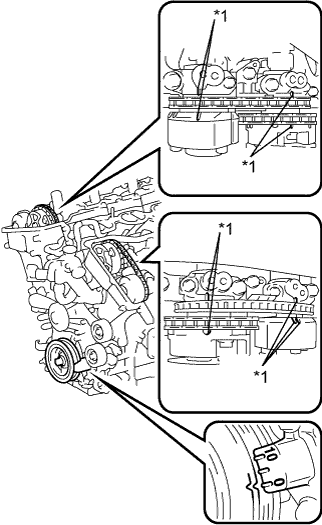
Text in Illustration *1 Timing Mark Remove the cylinder head cover RH and LH.
-
Turn the crankshaft pulley, and align its groove with the timing mark "0" of the timing chain cover.
-
Check that the timing mark of each camshaft timing gear is aligned with the timing mark of each bearing cap as shown in the illustration.
If not, turn the crankshaft 1 revolution (360°), and then align the marks as above.
OK Timing marks on camshaft timing gears are aligned as shown in the illustration.
NG
CHECK ENGINE MECHANICAL SYSTEM Click here
OK
REPLACE ECM Click here
-
-
CHECK FUEL PRESSURE (LOW PRESSURE SIDE)
-
Check the fuel pressure (low pressure side) Click here.
Tech Tips
Perform "Inspection After Repair" after replacing the fuel injector assembly (for port injection) Click here.
B
CHECK FUEL PUMP OPERATION (FOR LOW PRESSURE) Click here
OK
REPLACE FUEL INJECTOR FOR PORT INJECTION (MISFIRING CYLINDER) Click here
-
-
CHECK FUEL PUMP OPERATION (FOR LOW PRESSURE)
-
Check the fuel pump operation Click here.
Tech Tips
Perform "Inspection After Repair" after replacing the fuel pump assembly (for low pressure) Click here.
NG
REPLACE FUEL PUMP (FOR LOW PRESSURE) Click here
OK
CHECK AND REPLACE FUEL SYSTEM (PRESSURE REGULATOR, PIPE LINE AND FILTER)
-
-
CHECK MISFIRE COUNT OF DIRECT INJECTION
-
Connect the GTS to the DLC3.
-
Start the engine.
-
Turn the GTS on.
-
Enter the following menus: Powertrain / Engine and ECT / Active Test / Control the Injection Way / Direct / Ptrol Misfire / Cylinder #1 Misfire Count to Cylinder #6 Misfire Count.
-
Allow the engine to idle.
-
Read each value for Cylinder #1 Misfire Count to Cylinder #6 Misfire Count displayed on the GTS If no misfire counts occur in any cylinders, perform procedure [A] and [B] and then check the misfire counts again.
-
Drive the vehicle with the Misfire RPM and Misfire Load noted in the "Read Value Using GTS (Misfire RPM and Misfire Load)" procedures above [A].
-
Read the Cylinder #1 Misfire Count to Cylinder #6 Misfire Count or DTCs displayed on the GTS [B].
Result Misfire Count Proceed to Port Direct There are no misfire counts There are misfire counts A There are no misfire counts There are no misfire counts B Tech Tips
Perform "Inspection After Repair" after replacing the fuel injector assembly (for direct injection) Click here.
B
CHECK MISFIRE COUNT Click here
A
REPLACE FUEL INJECTOR FOR DIRECT INJECTION (MISFIRING CYLINDER) Click here
-
-
CHECK MISFIRE COUNT
-
Connect the GTS to the DLC3.
-
Start the engine and turn the GTS on.
-
Clear DTCs Click here.
-
Enter the following menus: Powertrain / Engine and ECT / Data List / Misfire RPM, Misfire Load, Cylinder #1 to #6 Misfire Count and Injection Way.
-
Drive the vehicle with Misfire RPM and Misfire Load.
-
Monitor all of the misfire count values or DTCs and Injection Way displayed on the GTS
Result Misfire count Injection way Proceed to There are no misfire counts - A 1 or 2 cylinders have misfire counts Either B 3 cylinders or more have misfire counts Either C There are misfire counts Direct D Tech Tips
Perform "Inspection After Repair" after replacing the fuel injector assembly (for direct injection) Click here.
B
INSPECT SPARK PLUG Click here
C
CHECK INTAKE SYSTEM Click here
D
REPLACE FUEL INJECTOR FOR DIRECT INJECTION (MALFUNCTION CYLINDER INJECTOR) Click here
A
CHECK FOR INTERMITTENT PROBLEMS Click here
-
-
INSPECT SPARK PLUG
-
Inspect the spark plug of the misfiring cylinder Click here.
Tech Tips
Perform "Inspection After Repair" after replacing the spark plug Click here.
NG
REPLACE SPARK PLUG Click here
OK
-
-
CHECK FOR SPARK (SPARK TEST)
-
Perform a spark test Click here.
Tech Tips
-
If the result of the spark test is normal, proceed to the next step.
-
Perform "Inspection After Repair" after replacing the spark plug or ignition coil assembly Click here.
-
NEXT
-
-
CHECK CYLINDER COMPRESSION PRESSURE (MISFIRE CYLINDER)
-
Measure the cylinder compression pressure of the misfiring cylinder Click here.
Tech Tips
Perform "Inspection After Repair" after repairing or replacing the engine assembly Click here.
NG
REPAIR OR REPLACE ENGINE TO DETERMINE CAUSE OF LOW COMPRESSION
OK
REPLACE ECM Click here
-
-
CHECK INTAKE SYSTEM
-
Check the intake system for vacuum leaks Click here.
OK No leaks from intake system. Tech Tips
Perform "Inspection After Repair" after replacing the intake system Click here.
NG
REPAIR OR REPLACE INTAKE SYSTEM
OK
-
-
READ VALUE USING GTS (COOLANT TEMP)
-
Connect the GTS to the DLC3.
-
Turn the engine switch on (IG).
-
Turn the GTS on.
-
Enter the following menus: Powertrain / Engine and ECT / Data List / MAF and Coolant Temp.
-
Read the Coolant Temp twice, when the engine is both cold and warmed up.
Standard With cold engine Same as ambient air temperature. With warm engine Between 75°C and 100°C (167°F and 212°F). Tech Tips
Perform "Inspection After Repair" after replacing the engine coolant temperature sensor Click here.
NG
REPLACE ENGINE COOLANT TEMPERATURE SENSOR Click here
OK
-
-
READ VALUE USING GTS (MAF)
-
Connect the GTS to the DLC3.
-
Turn the engine switch on (IG).
-
Turn the GTS on.
-
Start the engine.
-
Enter the following menus: Powertrain / Engine and ECT / Data List / MAF and Coolant Temp.
-
Allow the engine to idle until the Coolant Temp reaches 75°C (167°F) or more.
-
Read MAF with the engine speed of 3000 rpm.
Standard Between 12.7 gm/sec and 13.7 gm/sec (shift lever: N, A/C: off).
NG
CHECK HARNESS AND CONNECTOR (MASS AIR FLOW METER CONNECTOR CONNECTION) Click here
OK
-
-
CHECK VALVE TIMING
-
Text in Illustration *1 Timing Mark Remove the cylinder head cover RH and LH.
-
Turn the crankshaft pulley, and align its groove with the timing mark "0" of the timing chain cover.
-
Check that the timing mark of each camshaft timing gear is aligned with the timing mark of each bearing cap as shown in the illustration.
If not, turn the crankshaft 1 revolution (360°), and then align the marks as above.
OK Timing marks on camshaft timing gears are aligned as shown in the illustration.
NG
CHECK ENGINE MECHANICAL SYSTEM Click here
OK
REPLACE ECM Click here
-
-
CHECK HARNESS AND CONNECTOR (MASS AIR FLOW METER CONNECTOR CONNECTION)
-
Check the connection and terminal contact pressure of connectors and wire harness between the mass air flow meter sub-assembly and ECM Click here.
Tech Tips
Repair any problems.
NEXT
-
-
CHECK WHETHER DTC OUTPUT RECURS (DTC P0300, P0301, P0302, P0303, P0304, P0305 OR P0306)
-
Connect the GTS to the DLC3.
-
Turn the engine switch on (IG).
-
Turn the GTS on.
-
Clear the DTCs Click here.
-
Turn the engine switch off and wait for at least 30 seconds.
-
Turn the engine switch on (IG) and turn the GTS on.
-
Start the engine and warm it up.
-
Drive the vehicle in accordance with the driving pattern described in Confirmation Driving Pattern.
-
Enter the following menus: Powertrain / Engine and ECT / Utility / All Readiness.
-
Input the DTC: P0300, P0301, P0302, P0303, P0304, P0305 or P0306.
-
Check the DTC judgment result.
Result Result Proceed to ABNORMAL
(P0300, P0301, P0302, P0303, P0304, P0305 or P0306)
A NORMAL
(DTC is not output)
B
B
END
A
-
-
CHECK HARNESS AND CONNECTOR (MASS AIR FLOW METER - ECM)
-
Disconnect the MAF meter connector.
-
Disconnect the ECM connector.
-
Measure the resistance according to the value(s) in the table below.
Standard Resistance (Check for open) Tester Connection Condition Specified Condition F39-5 (VG) - F1-25 (VG) Always Below 1 Ω F39-4 (E2G) - F1-24 (E2G) Always Below 1 Ω Standard Resistance (Check for short) Tester Connection Condition Specified Condition F39-5 (VG) or F1-25 (VG) - Body ground Always 10 kΩ or higher -
Reconnect the ECM connector.
-
Reconnect the MAF meter connector.
NG
REPAIR OR REPLACE HARNESS OR CONNECTOR
OK
-
-
REPLACE MASS AIR FLOW METER
-
Replace the mass air flow meter Click here.
Tech Tips
-
If the result of the inspection performed in steps 13 and 24 indicated no problem, proceed to the next step without replacing the mass air flow meter.
-
Perform "Inspection After Repair" after replacing the mass air flow meter Click here.
-
NEXT
-
-
CONFIRM WHETHER MALFUNCTION HAS BEEN SUCCESSFULLY REPAIRED
-
Connect the GTS to the DLC3.
-
Turn the engine switch on (IG).
-
Turn the GTS on.
-
Clear the DTCs Click here.
-
Turn the engine switch off and wait for at least 30 seconds.
-
Turn the engine switch on (IG) and turn the GTS on.
-
Start the engine and warm it up.
-
Drive the vehicle in accordance with the driving pattern described in Confirmation Driving Pattern.
-
Enter the following menus: Powertrain / Engine and ECT / Utility / All Readiness.
-
Input the DTC: P0300, P0301, P0302, P0303, P0304, P0305 or P0306.
-
Check the DTC judgment result.
Result Result Proceed to ABNORMAL
(P0300, P0301, P0302, P0303, P0304, P0305 or P0306)
A NORMAL
(DTC is not output)
B
B
END
A
REPLACE ECM Click here
-