FOUR WHEEL DRIVE CONTROL SYSTEM DTC CHECK / CLEAR

-
DTC CHECK (GTS)
-
Check the DTCs.
-
Connect the GTS to the DLC3.
-
Turn the engine switch on (IG).
-
Check the DTCs by following the prompts on the GTS screen.
Tech Tips
Refer to the GTS operator's manual for further details.
-
-
Clear the DTCs.
-
Connect the GTS to the DLC3.
-
Turn the engine switch on (IG).
-
Clear the DTCs by following the prompts on the GTS screen.
Tech Tips
Refer to the GTS operator's manual for further details.
-
-
-
DTC CHECK (SST CHECK WIRE)
-
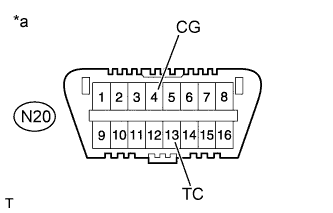
Text in Illustration *a Front view of DLC3 Check the DTCs.
-
Using SST, connect terminals TC and CG of the DLC3 (to be in the DTC output mode).
- SST
- 09843-18040
-
Turn the engine switch on (IG).
-
"DIAG AWD" is displayed on the multi-information display, and the 4WD ECU assembly checks the system for malfunctions.
-
If the 4WD control system is normal, "DIAG AWD FF" will be displayed on the multi-information display (normal system code).
-
If the 4WD control system is not normal, "DIAG AWD XX (DTC)" will be displayed on the multi-information display.
-
-
Text in Illustration *a Front view of DLC3 Clear the DTCs.
-
Using SST, connect terminals TC and CG of the DLC3.
- SST
- 09843-18040
-
Turn the engine switch on (IG).
-
Clear the DTCs stored in the 4WD ECU assembly by depressing the brake pedal 8 times or more within 5 seconds.
-
Check that the AWD warning (multi-information display) displays "AWD DAIG FF".
-
Turn the engine switch off.
-
Remove SST from the terminals of DLC3.
-
-