SPIRAL CABLE INSTALLATION

-
INSPECT SPIRAL CABLE SUB-ASSEMBLY
Note
If the steering sensor is installed to a misaligned spiral cable sub-assembly, DTCs for an abnormal steering sensor value such as DTC B1801, C1231 and DTC C1433 are stored and it is impossible to repair them. If this happens, replace the spiral cable with sensor sub-assembly with a new one.
-
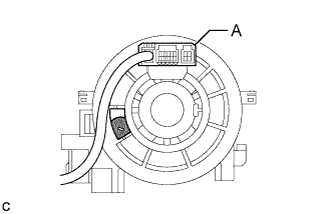
Check if the spiral cable sub-assembly is centered.
Text in Illustration 
Colored Part Tech Tips
When the spiral cable sub-assembly is centered, the part indicated by A is positioned at the top and the colored part shown in the illustration is visible.
-
If the spiral cable sub-assembly is not centered, center it.
If the cable cannot be centered, it is possible that the spiral cable sub-assembly is broken. Replace the spiral cable with sensor sub-assembly with a new one.
-
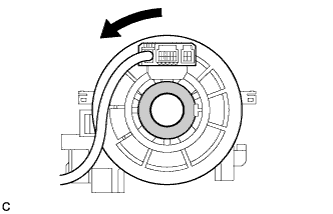
While pushing on the interlock indicated in the illustration, rotate the spiral cable sub-assembly counterclockwise slowly by hand until it stops.
Text in Illustration 
Interlock Note
-
When rotating the spiral cable sub-assembly, make sure to push on the interlock indicated in the illustration to release the interlock mechanism.
-
Do not turn the spiral cable sub-assembly using the airbag wire harness.
-
-
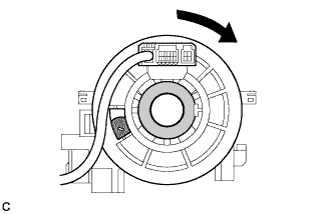
Rotate the spiral cable sub-assembly clockwise approximately 2.5 turns to the position where the colored part shown in the illustration is visible.
Text in Illustration Colored Part Interlock Tech Tips
The spiral cable sub-assembly will rotate approximately 2.5 turns to both the left and right from the center.
-
-
-
INSTALL SPIRAL CABLE SUB-ASSEMBLY
-
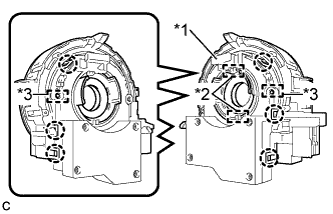
Text in Illustration *1 Lock Pin *2 Guide *3 Pin Align the 2 pins and 2 guides, and engage the 6 claws to install the spiral cable sub-assembly to the steering sensor.
Note
-
The spiral cable sub-assembly can be rotated up to 30° even when the interlock is engaged. Therefore, make sure that both guides are aligned properly when installing the spiral cable sub-assembly to the steering sensor.
-
Do not remove the lock pin before the spiral cable sub-assembly is installed to the steering sensor.
-
-
Remove the lock pin from the steering sensor.
-
-
TURN FRONT WHEELS TO FACE STRAIGHT AHEAD
-
INSTALL SPIRAL CABLE WITH SENSOR SUB-ASSEMBLY
Note
-
Do not replace the spiral cable sub-assembly with the battery connected and the ignition switch to ON.
-
Do not rotate the spiral cable sub-assembly without the steering wheel with the battery connected and the ignition switch to ON.
-
Ensure that the steering wheel is installed and aligned straight when inspecting the steering sensor.
-
Check that the ignition switch is off.
-
Check that the cable is disconnected from the negative (-) battery terminal.
CAUTION:
Wait at least 90 seconds after disconnecting the cable from the negative (-) battery terminal to disable the SRS system.
-
Check that the front wheels are facing straight ahead.
-
Set the turn signal switch to the neutral position.
Note
If it is not in the neutral position, the turn signal switch pin may snap.
-
Engage the 3 claws to install the spiral cable with sensor sub-assembly.
-
Connect the each connector.
-
-
INSTALL UPPER STEERING COLUMN COVER
-
Engage the 2 claws to install the upper steering column cover.
-
Engage the 4 clips and 2 guides to the upper steering column cover.
-
-
INSTALL LOWER STEERING COLUMN COVER (for Manual Tilt and Manual Telescopic Steering Column)
-
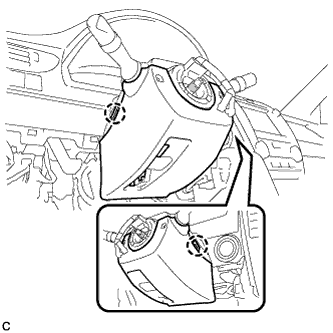
Engage the 2 claws to install the lower steering column cover.
-
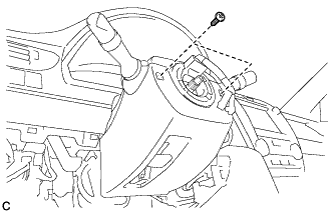
Install the 2 screws.
- Torque:
- 2.0 N*m { 20 kgf*cm, 18 in.*lbf }
-
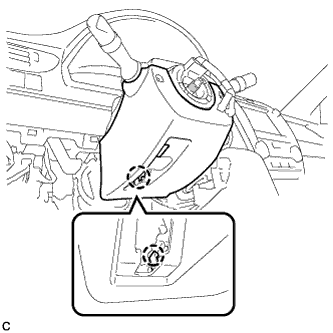
Engage the claw.
-
-
INSTALL LOWER STEERING COLUMN COVER (for Power Tilt and Power Telescopic Steering Column)
-
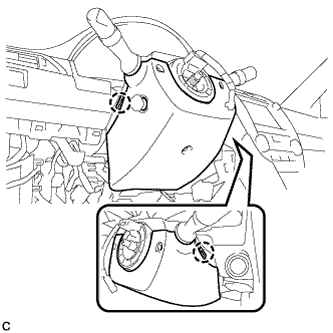
Engage the 2 claws to install the lower steering column cover.
-
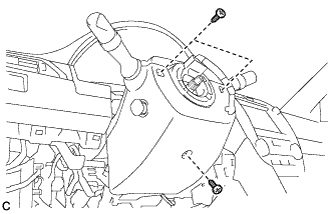
Install the 3 screws.
- Torque:
- 2.0 N*m { 20 kgf*cm, 18 in.*lbf }
-
-
INSPECT AND ADJUST SPIRAL CABLE WITH SENSOR SUB-ASSEMBLY
Note
Do not adjust the spiral cable sub-assembly with the battery connected and the ignition switch to ON.
-
Check that the ignition switch is off.
-
Check that the cable is disconnected from the negative (-) battery terminal.
CAUTION:
Wait at least 90 seconds after disconnecting the cable from the negative (-) battery terminal to disable the SRS system.
-
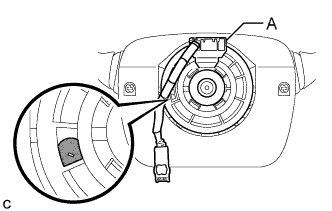
Check if the spiral cable sub-assembly is centered.
Text in Illustration Colored Part Tech Tips
When the spiral cable sub-assembly is centered, the part indicated by A is positioned at the top and the colored part shown in the illustration is visible.
-
If the spiral cable sub-assembly is not centered, center it.
Note
-
When rotating the spiral cable sub-assembly, make sure to push on the interlock indicated in the illustration to release the interlock mechanism.
-
Do not turn the spiral cable sub-assembly using the airbag wire harness.
-
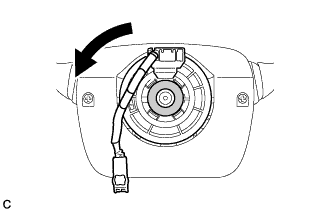
While pushing on the interlock indicated in the illustration, rotate the spiral cable sub-assembly counterclockwise slowly by hand until it stops.
Text in Illustration Interlock -
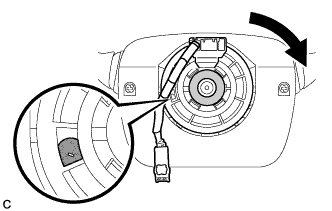
Rotate the spiral cable sub-assembly clockwise approximately 2.5 turns to the position where the colored part shown in the illustration is visible.
Text in Illustration Colored Part Interlock Tech Tips
The spiral cable sub-assembly will rotate approximately 2.5 turns to both the left and right from the center.
-
-
-
INSTALL STEERING WHEEL ASSEMBLY
-
ADJUST PARKING ASSIST MONITOR SYSTEM