REAR VIEW MONITOR SYSTEM TERMINALS OF ECU

-
REAR TELEVISION CAMERA ASSEMBLY
-
Disconnect the T6 rear television camera assembly connector.

-
Measure the voltage on the wire harness side connector according to the value(s) in the table below.
Terminal No. (Symbol) Wiring Color Terminal Description Condition Specified Condition T6-6 (CB+) - Body ground L - Body ground Power source Ignition switch ACC 5.5 to 7.05 V If the result is not as specified, there may be a malfunction on the wire harness side.
-
Reconnect the T6 rear television camera assembly connector.
-
Measure the voltage and check for pulses at each terminal of the connector.
Terminal No. (Symbol) Wiring Color Terminal Description Condition Specified Condition T6-3 (CV+) - T6-2 (CV-) W - R Video signal Ignition switch ON
Shift lever in R
Camera lens not covered, displaying an image
Pulse generation
(Refer to waveform 1)
Ignition switch ON
Shift lever in R
Camera lens covered, blacking out screen
Pulse generation
(Refer to waveform 2)
T6-5 (CGND) - Body ground LG - Body ground Shield ground Always Below 1 V Tech Tips
A waterproof connector is used for the rear television camera assembly. Therefore, inspect the waveform at the navigation receiver assembly*1 or radio and display receiver assembly*2 with the connector connected.
-
*1: for Navigation System (for Navigation Receiver Type)
-
*2: for Audio and Visual System (for Radio and Display Type)
If the result is not as specified, the rear television camera assembly may be malfunctioning.
-
-
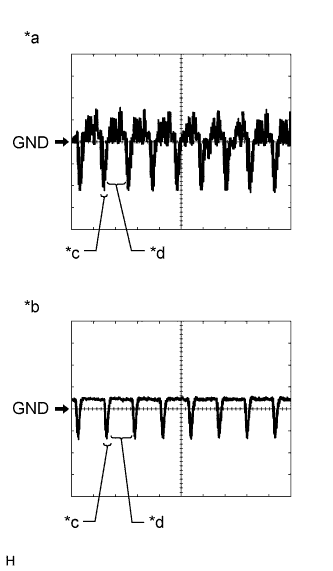
Text in Illustration *a Waveform 1 (camera lens is not covered, displaying an image) *b Waveform 2 (camera lens is covered, blacking out the screen) *c Synchronization Signal *d Video Waveform Reference (Oscilloscope waveform):
Tech Tips
A waterproof connector is used for the rear television camera assembly. Therefore, inspect the waveform at the navigation receiver assembly*1 or radio and display receiver assembly*2 with the connector connected.
-
*1: for Navigation System (for Navigation Receiver Type)
-
*2: for Audio and Visual System (for Radio and Display Type)
-
Waveform 1 (camera lens is not covered, displaying an image)
Item Content Measurement terminal T6-3 (CV+) - T6-2 (CV-) Measurement setting 200 mV/DIV., 50 μs./DIV. Condition Ignition switch ON, shift lever in R Tech Tips
-
The video waveform changes according to the image sent by the rear television camera assembly.
-
The video waveform is constantly output when the ignition switch is turned to ACC.
-
-
Waveform 2 (camera lens is covered, blacking out the screen)
Item Content Measurement terminal T6-3 (CV+) - T6-2 (CV-) Measurement setting 200 mV/DIV., 50 μs./DIV. Condition Ignition switch ON, shift lever in R Tech Tips
-
The video waveform changes according to the image sent by the rear television camera assembly.
-
The video waveform is constantly output when the ignition switch is turned to ACC.
-
-
-
-
NAVIGATION RECEIVER ASSEMBLY (for Navigation System (for Navigation Receiver Type)) Click here
-
RADIO AND DISPLAY RECEIVER ASSEMBLY (for Audio and Visual System (for Radio and Display Type)) Click here