POWER WINDOW MASTER SWITCH REMOVAL

-
REMOVE MULTIPLEX NETWORK MASTER SWITCH ASSEMBLY WITH FRONT DOOR ARMREST BASE PANEL
-
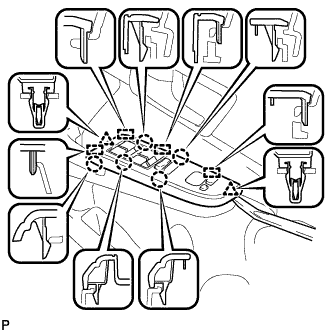
Using a moulding remover, disengage the 2 clips, 5 claws and 4 guides as shown in the illustration.
-
Disconnect each connector and remove the multiplex network master switch assembly with front door armrest base panel.
-
-
REMOVE MULTIPLEX NETWORK MASTER SWITCH ASSEMBLY
-
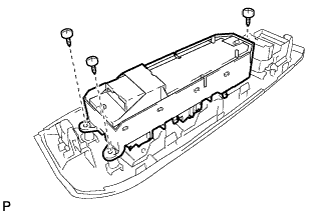
Remove the 3 screws and multiplex network master switch assembly from the front upper armrest base panel.
-