LOWER INSTRUMENT PANEL INSTALLATION
PROCEDURE
-
INSTALL NO. 1 INSTRUMENT PANEL SAFETY PAD (for 1NZ-FE)
-
Engage the 2 clips to install the No. 1 instrument panel safety pad.
-
-
INSTALL NO. 2 INSTRUMENT PANEL SAFETY PAD (for 1NZ-FE)
Tech Tips
Use the same procedure as for the No. 1 instrument panel safety pad.
-
INSTALL SPARE SWITCH HOLE COVER
-
Engage the 2 claws to install the spare switch hole cover.
-
-
INSTALL LOWER INSTRUMENT PANEL SUB-ASSEMBLY
-
Engage the 2 guides to install the lower instrument panel sub-assembly.
-
Install the <A> screw, 7 <B> bolts and 2 <C> bolts.
-
Connect each connector and engage each clamp.
-
Install the 2 clips.
-
Engage the 2 claws to install the DLC3 connector.
-
-
INSTALL ANTENNA CORD SUB-ASSEMBLY
-
CONNECT HOOD LOCK CONTROL LEVER SUB-ASSEMBLY
-
Engage the 3 claws to connect the hood lock control lever sub-assembly.
-
-
INSTALL NO. 1 INSTRUMENT PANEL BRACE MOUNTING BRACKET
-
Install the No. 1 instrument panel brace mounting bracket with the 2 <D> screws.
-
-
INSTALL SHIFT LEVER ASSEMBLY (for Manual Transmission)
-
CONNECT TRANSMISSION CONTROL CABLE ASSEMBLY
-
INSTALL SHIFT LOCK CONTROL UNIT ASSEMBLY (for CVT)
-
INSTALL SHIFT LEVER KNOB SUB-ASSEMBLY (for CVT)
-
INSTALL NO. 2 POWER OUTLET SOCKET COVER
-
INSTALL POWER OUTLET SOCKET ASSEMBLY
-
INSTALL LOWER INSTRUMENT PANEL CENTER FINISH PANEL
-
Engage the clamp to connect the connector.
-
Engage the 4 claws and 6 guides to install the lower center instrument panel finish panel.
-
Install the 2 <A> screws.
-
-
INSTALL SHIFTING HOLE COVER SUB-ASSEMBLY (for Manual Transmission)
-
INSTALL CENTER INSTRUMENT CLUSTER FINISH PANEL ASSEMBLY
-
Engage the 4 clips and claw to install the center instrument cluster finish panel assembly.
-
-
INSTALL SHIFT LEVER KNOB SUB-ASSEMBLY (for Manual Transaxle)
-
INSTALL NO. 1 STEREO JACK ADAPTER ASSEMBLY (w/ Audio)
-
INSTALL AIRBAG CUT-OFF SWITCH (w/ Knee Airbag)
-
INSTALL INSTRUMENT PANEL HOLE COVER (w/o Knee Airbag)
-
Engage the 2 claws to install the instrument panel hole cover.
-
-
INSTALL PATTERN SELECT SWITCH ASSEMBLY (for 1NZ-FE)
-
INSTALL ENGINE SWITCH (w/ Entry and Start System)
-
INSTALL SPARE SWITCH HOLE COVER (w/o Entry and Start System)
-
Engage the 2 claws to install the spare switch hole cover.
-
-
INSTALL HEATER SWITCH ASSEMBLY (w/ Combustion Type Power Heater)
-
Connect the connector.
-
Engage the 2 claws to install the heater switch assembly.
-
-
INSTALL HEADLIGHT LEVELING SWITCH (for Halogen Headlight)
-
INSTALL VSC OFF SWITCH
-
INSTALL OUTER MIRROR SWITCH ASSEMBLY
-
INSTALL NO. 2 LOWER INSTRUMENT PANEL FINISH PANEL (for LHD)
-
Engage the 3 clips and 3 guides to install the No. 2 lower instrument panel finish panel.
-
-
INSTALL NO. 2 LOWER INSTRUMENT PANEL FINISH PANEL (for RHD)
-
Engage the 5 clips and guide to install the No. 2 lower instrument panel finish panel.
-
-
INSTALL GLOVE COMPARTMENT DOOR STOPPER SUB-ASSEMBLY
-
Engage the claw to install the glove compartment door stopper sub-assembly.
-
-
INSTALL GLOVE COMPARTMENT DOOR CHECK CUSHION
-
Install the 2 glove compartment door check cushions to the glove compartment door assembly.
-
-
INSTALL GLOVE COMPARTMENT DOOR ASSEMBLY
-
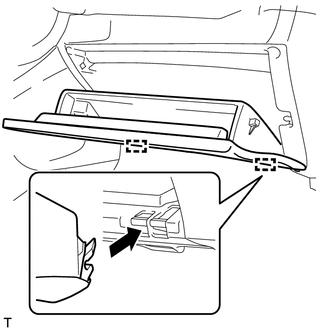
Horizontally engage the 2 hinges of the glove compartment door assembly.
Note
Make sure to install the glove compartment door assembly hinges horizontally.
-
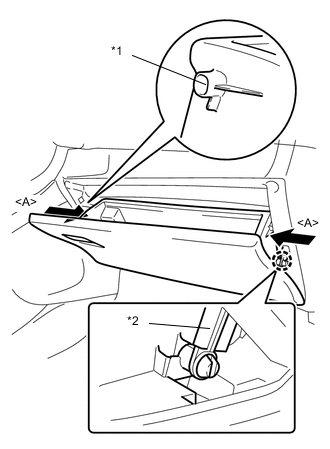
Engage the 2 stoppers by pushing the sections <A> indicated by the arrows.
-
Engage the claw and connect the glove compartment door stopper sub-assembly to install the glove compartment door.
Text in illustration *1 Stopper *2 Glove Compartment Door Stopper Sub-assembly
-
-
INSTALL NO. 1 LOWER INSTRUMENT PANEL AIRBAG ASSEMBLY (w/ Knee Airbag)
-
INSTALL LOWER INSTRUMENT PANEL FINISH PANEL SUB-ASSEMBLY (w/o Knee Airbag)
-
Engage the 2 clips and 4 claws to install the lower instrument panel finish panel sub-assembly.
-
-
INSTALL INSTRUMENT PANEL UNDER TRAY (w/ Knee Airbag)
-
Engage the clip and 7 claws to install the instrument panel under tray.
-
-
INSTALL INSTRUMENT PANEL UNDER TRAY (w/o Knee Airbag)
-
Engage the 2 clips and 5 claws to install the instrument panel under tray.
-
-
CONNECT AIR INLET DAMPER CONTROL CABLE SUB-ASSEMBLY (for Manual Air Conditioning System)
-
CONNECT DEFROSTER DAMPER CONTROL CABLE SUB-ASSEMBLY (for Manual Air Conditioning System)
-
CONNECT AIRMIX DAMPER CONTROL CABLE SUB-ASSEMBLY (for Manual Air Conditioning System)
-
INSTALL LOWER INSTRUMENT CENTER CLUSTER FINISH PANEL SUB-ASSEMBLY (for Manual Air Conditioning System)
-
INSTALL AIR CONDITIONING CONTROL ASSEMBLY (for Automatic Air Conditioning System)
-
INSTALL NO. 1 INTERIOR ILLUMINATION LIGHT ASSEMBLY RH
-
INSTALL NO. 2 INSTRUMENT PANEL UNDER COVER SUB-ASSEMBLY
-
Engage the guide and 3 claws to install the No. 2 instrument panel under cover sub-assembly.
-
-
INSTALL TIRE PRESSURE WARNING RESET SWITCH (except 1NZ-FE)
-
INSTALL NO. 1 INTERIOR ILLUMINATION LIGHT ASSEMBLY LH
-
INSTALL NO. 1 INSTRUMENT PANEL UNDER COVER SUB-ASSEMBLY
-
Engage the guide and 2 claws to install the No. 1 instrument panel under cover sub-assembly.
-
Install the 2 <D> screws.
-
-
INSTALL NO. 1 RADIO BRACKET (w/o Audio)
-
Install the No. 1 radio bracket to the stereo opening cover with the 4 screws.
-
-
INSTALL NO. 2 RADIO BRACKET (w/o Audio)
-
Install the No. 2 radio bracket to the stereo opening cover with the 4 screws.
-
-
INSTALL STEREO OPENING COVER WITH BRACKET (w/o Audio)
-
Engage the clamp to connect the antenna connector.
-
Install the stereo opening cover with bracket with the 4 screws.
-
-
INSTALL HEADLIGHT DIMMER SWITCH ASSEMBLY
-
INSTALL REAR CONSOLE BOX ASSEMBLY
-
INSTALL UPPER INSTRUMENT PANEL
-
CONNECT CABLE TO NEGATIVE BATTERY TERMINAL
- Torque:
- 5.4 N*m { 55 kgf*cm, 48 in.*lbf }
Note
When disconnecting the cable, some systems need to be initialized after the cable is reconnected Click here.
-
CHECK SRS WARNING LIGHT