ENGINE IMMOBILISER SYSTEM(w/o Entry and Start System) Key Cannot be Registered
DESCRIPTION
A maximum of 5 master key ID codes and 3 sub key ID codes can be registered.
WIRING DIAGRAM
Refer to "System Diagram" Click here.
CAUTION / NOTICE / HINT
Note
-
If the transponder key ECU assembly is replaced, refer to the Service Bulletin.
-
When using the GTS with the vehicle ignition switch off, connect the GTS to the vehicle and turn a courtesy light switch on and off at intervals of 1.5 seconds or less until communication between the GTS and the vehicle begins. Then select the Model Code "KEY REGIST" under manual mode and enter the following menus: Body Electrical / Immobiliser. While using the GTS, periodically turn a courtesy light switch on and off at intervals of 1.5 seconds or less to maintain communication between the GTS and the vehicle.
PROCEDURE
-
CHECK REGISTRATION MODE
-
Check that the system enters registration mode.
OK System enters registration mode.
NG 
INSPECT UN-LOCK WARNING SWITCH ASSEMBLY Click here
OK 
-
-
CHECK SECURITY INDICATOR LIGHT OPERATION
-
In registration mode, insert the key into the ignition key cylinder and check the security indicator light.
Tech Tips
If the new key ID code registration fails, code 2-1 will be output through the security light. Trying to re-register an already registered key will cause code 2-2 to be output when the key is inserted. If the number of registered key ID codes exceeds the maximum limit, code 2-3 will be output through the security indicator light. The output details are shown in the following illustration.
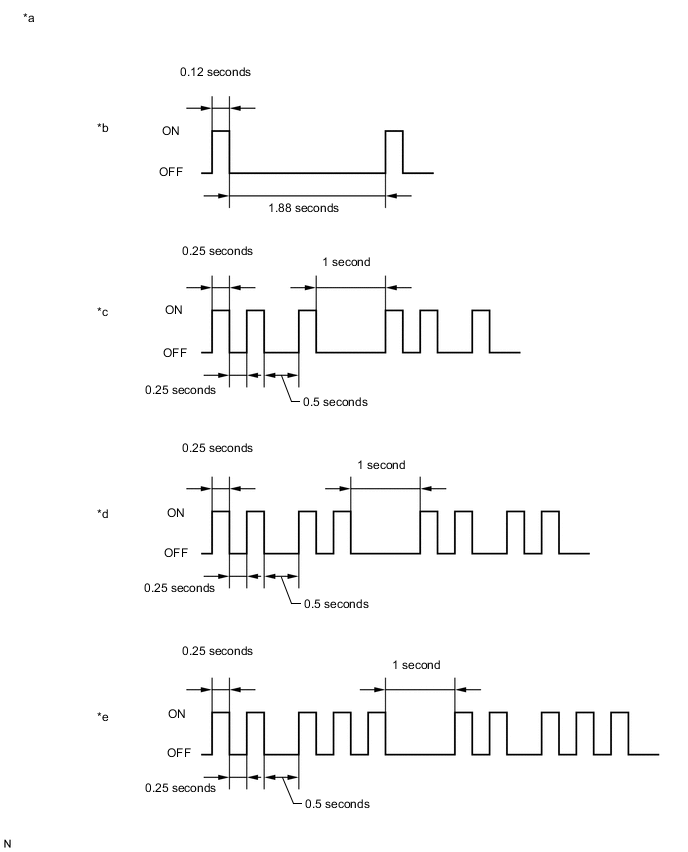
Text in Illustration *a Security Indicator Light *b Normal (Immobiliser system is operating normally) *c Code 2-1 *d Code 2-2 *e Code 2-3 - - Result Result Proceed to Code 2-2 is output A Code 2-1 or Code 2-3 is output B
A 
END (REGISTERED KEY WAS USED)
B
-
-
READ VALUE USING GTS (TRANSPONDER S-CODE, TRANSPONDER M-CODE)
-
Using the GTS, read the Data List Click here.
Immobiliser Tester Display Measurement Item/Range Normal Condition Diagnostic Note Transponder S-code Number of registered sub keys/Min.: 0, Max.: 15 Number of registered sub keys - Transponder M-code Number of registered master keys/Min.: 0, Max.: 15 Number of registered master keys - Result Result Proceed to 5 is displayed for "Transponder M-code" and 0 is displayed for "Transponder S-code" A 0 is displayed for "Transponder M-code" and 3 is displayed for "Transponder S-code" B 5 is displayed for "Transponder M-code" and 3 is displayed for "Transponder S-code" C Values are other than above D
A
KEY REGISTRATION (SUB-KEY)
B
KEY REGISTRATION (MASTER KEY)
C
MAXIMUM NUMBER OF KEYS ALREADY REGISTERED
D
-
-
KEY REGISTRATION
-
Refer to the table below to determine if additional keys can be registered.
Number of Keys Registered (Master and Sub) Proceed to 0 New key ID code registration 1 to 7 Additional key ID code registration -
Check if an additional key can be registered.
OK Additional key can be registered.
OK
END (KEY MALFUNCTION)
NG
REPLACE TRANSPONDER KEY ECU ASSEMBLY
-
-
INSPECT UN-LOCK WARNING SWITCH ASSEMBLY
-
Remove the un-lock warning switch assembly Click here.
-
Inspect the un-lock warning switch assembly Click here.
NG
REPLACE UN-LOCK WARNING SWITCH ASSEMBLY Click here
OK
-
-
CHECK HARNESS AND CONNECTOR (UN-LOCK WARNING SWITCH ASSEMBLY - TRANSPONDER KEY ECU ASSEMBLY)
-
Disconnect the F15 un-lock warning switch assembly connector.
-
Disconnect the F54 transponder key ECU assembly connector.
-
Measure the resistance according to the value(s) in the table below.
Standard Resistance (Check for Open) Tester Connection Condition Specified Condition F15-1 - F54-3 (KSW) Always Below 1 Ω F15-2 - Body ground Always Below 1 Ω Standard Resistance (Check for Short) Tester Connection Condition Specified Condition F15-1 or F54-3 (KSW) - Body ground Always 10 kΩ or higher
OK
REPLACE TRANSPONDER KEY ECU ASSEMBLY
NG
REPAIR OR REPLACE HARNESS OR CONNECTOR
-