AUDIO AND VISUAL SYSTEM(for Radio and Display Type) Portable Player cannot be Connected Manually/Automatically
CAUTION / NOTICE / HINT
Tech Tips
-
For vehicles equipped with an Extension Module, refer to optional equipment's manuals.
-
Some versions of "Bluetooth" compatible audio players may not function, or the function may be limited using the radio and display assembly, even if the portable audio player itself can play files Click here.
PROCEDURE
-
CHECK CONNECTED DEVICE SETTINGS
-
Push the "SETUP" button.
-
Select the "Bluetooth" and enter the "Registered devices".
-
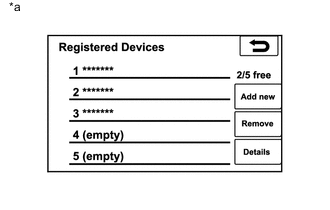
Text in Illustration *a Example Check if the portable player is registered as a connected device.
Result Result Proceed to The portable player is registered as a connected device A The portable player is not registered as a connected device B
B 
REGISTER PORTABLE PLAYER AS CONNECTED DEVICE
A 
-
-
CHECK AUTOMATIC CONNECTION SETTINGS
-
Display the "Detailed Bluetooth settings" screen and check automatic connection settings of the "Bluetooth" audio.
-
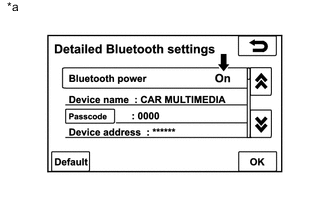
Text in Illustration *a Example Check if "On" is displayed for "Bluetooth power" on the "Detailed Bluetooth settings" screen.
OK "On" is displayed.
-
NG
CHANGE "BLUETOOTH POWER" TO ON
OK
-
-
CHECK PORTABLE PLAYER STATUS
-
Check the status of the portable player.
-
Check that the portable player is in standby mode.
-
Check that the portable player is not connected to another device (headphones etc.).
OK The portable player is in standby mode or not connected to another device (headphones, etc.).
-
NG
CHANGE PORTABLE PLAYER TO STANDBY MODE AND DISCONNECT OTHER DEVICES (HEADPHONES etc.)
OK
-
-
CHECK USING ANOTHER "BLUETOOTH" AUDIO COMPATIBLE VEHICLE OF SAME MODEL
-
Check if the portable player can be connected manually/automatically on another "Bluetooth" audio compatible vehicle of the same model.
OK The portable player can be connected manually/automatically.
NG
PORTABLE PLAYER IS NOT COMPATIBLE
OK
-
-
REMOVE ADDITIONAL DEVICES WHICH USE RADIO WAVES
-
Remove additional devices which use radio waves.
-
Check if the portable player can be connected manually/automatically.
OK The portable player can be connected manually/automatically.
OK
END
NG
PROCEED TO NEXT SUSPECTED AREA SHOWN IN PROBLEM SYMPTOMS TABLE Click here
-