STEERING LOCK SYSTEM Unable to Lock Steering Wheel
DESCRIPTION
The steering lock actuator activates the steering lock motor and moves the lock bar into the steering column to lock the steering wheel.
When the steering lock is operating, the steering may not lock when the lock bar is not aligned with the lock hole of the steering column. In this case, the steering can be locked by turning the steering wheel a little in the same manner as is done for a vehicle with a mechanical key to change the position of the lock hole.
WIRING DIAGRAM
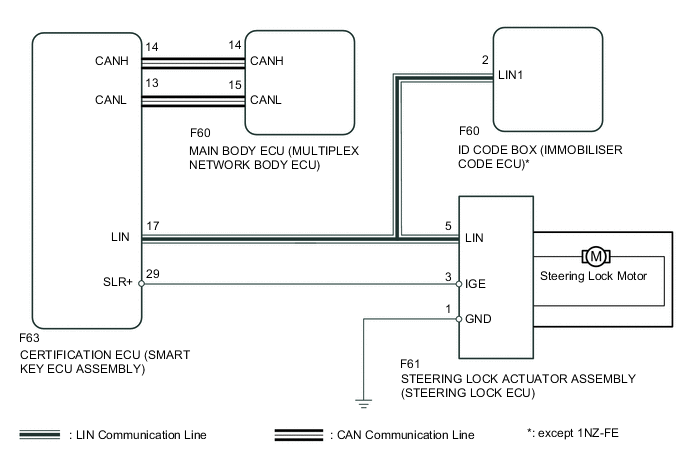
CAUTION / NOTICE / HINT
Note
-
When using the intelligent tester with the engine switch off, perform either of the following: 1) Turn a courtesy light switch on and off at intervals of 1.5 seconds or less until communication between the intelligent tester and vehicle begins, or 2) connect the intelligent tester to the vehicle and select "MANUAL" from the initial screen on the intelligent tester, and then select "KEY REGIST" under Model Code.
-
Perform either of the following operations to lock/unlock the steering:
-
To unlock the steering, carry the key and turn the engine switch on (ACC) or on (IG) while the shift lever is in P*1 or N*2.
-
To lock the steering, turn the engine switch off with the shift lever in P, and then open a door.
-
Make sure that no DTCs are output. If any DTCs are output, proceed to the Diagnostic Trouble Code Chart Click here.
-
The steering lock system uses LIN communication. First perform the inspections in "How to Proceed with Troubleshooting" to confirm that there are no communication malfunctions before proceeding with troubleshooting Click here.
-
Before replacing the steering lock actuator assembly (steering lock ECU), certification ECU (smart key ECU assembly) or ID code box (immobiliser code ECU)*3, refer to the Service Bulletin.
-
After completing repairs, confirm that the problem does not occur.
-
When disconnecting the cable from the negative (-) battery terminal, some systems need to be initialized after the cable is reconnected Click here.
-
*1: for CVT
-
*2: for Multi-mode Manual Transaxle
-
*3: except 1NZ-FE
Tech Tips
| Problem Symptom | Data List Item | Active Test Item |
|---|---|---|
| Unable to lock steering wheel |
Entry&Start
Main Body |
- |
PROCEDURE
-
READ VALUE USING INTELLIGENT TESTER (LOCK REQUEST RECEIVE)
-
Use the Data List to check if the steering lock command is functioning properly.
Entry&Start Tester Display Measurement Item/Range Normal Condition Diagnostic Note Lock Request Receive Reception state of steering lock command signal determined by certification ECU (smart key ECU assembly) and sent to ID code box (immobiliser code ECU)*1 /NG or OK
Tech Tips
The reception state is maintained for 10 seconds.
OK: Within 10 seconds of opening any door with engine switch off and shift lever in P*2 or N*3
NG: Except above
When 10 seconds or more elapse after receiving the signal, the item changes to "NG". *1: except 1NZ-FE
*2: for CVT
*3: for Multi-mode Manual Transaxle
OK The certification ECU (smart key ECU assembly) receives a lock request signal within 10 seconds of turning the engine switch from on (IG) to off and opening a door with the shift lever in P*2 or N*3, and OK is displayed on the intelligent tester screen.
NG 
READ VALUE USING INTELLIGENT TESTER Click here
OK 
-
-
INSPECT STEERING LOCK ACTUATOR ASSEMBLY (STEERING LOCK ECU) (IGE VOLTAGE)
-
Disconnect the F61 steering lock actuator assembly (steering lock ECU) connector.
-
Measure the resistance according to the value(s) in the table below.
Standard Resistance Tester Connection Condition Specified Condition F61-1 (GND) - Body ground Always Below 1 Ω -
Reconnect the F61 steering lock actuator assembly (steering lock ECU) connector.
-
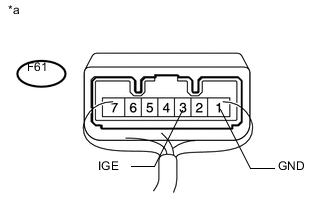
Text in Illustration *a Component with harness connected
(Steering lock actuator assembly (Steering lock ECU))
Measure the voltage according to the value(s) in the table below.
Standard Voltage Tester Connection Condition Specified Condition F61-3 (IGE) - F61-1 (GND) When all of the following conditions are met:
-
Steering lock unlocked
-
Engine switch off
-
Shift lever in P*1 or N*2
-
Driver side door close to open
-
Motor activated: Below 1 V
-
Motor not activated: 11 to 14 V
*1: for CVT
*2: for Multi-mode Manual Transaxle
Tech Tips
When the steering lock is activated and the engine switch is turned on (IG), the steering lock motor activates to release the steering lock. The motor operation occurs for 2 to 15 seconds.
-
NG 
REPAIR OR REPLACE HARNESS OR CONNECTOR
OK
-
-
CHECK HARNESS AND CONNECTOR (CERTIFICATION ECU - STEERING LOCK ECU)
-
Disconnect the F63 certification ECU (smart key ECU assembly) connector.
-
Disconnect the F61 steering lock actuator assembly (steering lock ECU) connector.
-
Check for deformation and corrosion of the connector case and terminals.
OK There is no deformation or corrosion of the connector case or terminals. -
Measure the resistance according to the value(s) in the table below.
Standard Resistance (Check for Open) Tester Connection Condition Specified Condition F63-29 (SLR+) - F61-3 (IGE) Always Below 1 Ω Standard Resistance (Check for Short) Tester Connection Condition Specified Condition F63-29 (SLR+) or F61-3 (IGE) - Body ground Always 10 kΩ or higher Result Result Proceed to NG A OK (for LHD) B OK (for RHD) C
A
REPAIR OR REPLACE HARNESS OR CONNECTOR
B
REPLACE STEERING LOCK ACTUATOR ASSEMBLY (STEERING LOCK ECU) Click here
C
REPLACE STEERING LOCK ACTUATOR ASSEMBLY (STEERING LOCK ECU) Click here
-
-
READ VALUE USING INTELLIGENT TESTER
-
Using the intelligent tester, check the following main body ECU Data List item by opening and closing the driver side door to confirm the state of the driver side door courtesy light switch.
Main Body Tester Display Measurement Item/Range Normal Condition Diagnostic Note FL Door Courtesy Front door courtesy switch LH/ON or OFF ON: Front door LH open
OFF: Front door LH closed
If this item does not change according to the actual state of the driver side door, there is a malfunction in the door courtesy light switch or a related part. FR Door Courtesy Front door courtesy switch RH/ON or OFF ON: Front door RH open
OFF: Front door RH closed
If this item does not change according to the actual state of the driver side door, there is a malfunction in the door courtesy light switch or a related part. OK The Data List item changes in accordance with the opening and closing of the driver side door. Result Result Proceed to OK (except 1NZ-FE) A OK (for 1NZ-FE) B NG C
B
READ VALUE USING INTELLIGENT TESTER (L CODE CHECK) Click here
C
GO TO LIGHTING SYSTEM (DOOR COURTESY SWITCH CIRCUIT) Click here
A
-
-
READ VALUE USING INTELLIGENT TESTER (S CODE CHECK)
-
Use the Data List to check if S code certification is functioning properly.
Entry&Start Tester Display Measurement Item/Range Normal Condition Diagnostic Note S Code Check Verification result between certification ECU (smart key ECU assembly) and ID code box (immobiliser code ECU)* /NG or OK OK: Verification result normal
NG: Verification result abnormal
- OK OK is displayed on the intelligent tester. Tech Tips
Reasons for verification failure:
-
The certification ECU (smart key ECU assembly) or ID code box (immobiliser code ECU)* is malfunctioning.
-
There is a problem with the communication between ECUs.
-
An ECU is replaced, but is not registered.
-
An ECU is replaced with an ECU which has a code already stored in it.
*: except 1NZ-FE
Result Result Proceed to OK A NG (except 1NZ-FE) B NG (for 1NZ-FE) C -
B
REPLACE ID CODE BOX Click here
C
REPLACE CERTIFICATION ECU (SMART KEY ECU ASSEMBLY)
A
-
-
READ VALUE USING INTELLIGENT TESTER (L CODE CHECK)
-
Use the Data List to check if L code certification is functioning properly.
Entry&Start Tester Display Measurement Item/Range Normal Condition Diagnostic Note L Code Check Verification result between ID code box (immobiliser code ECU)*1 or certification ECU (smart key ECU assembly)*2 and steering lock actuator assembly/NG or OK OK: Verification result normal
NG: Verification result abnormal
- OK OK is displayed on the intelligent tester. Tech Tips
Reasons for verification failure:
-
The steering lock actuator assembly (steering lock ECU)*2 or ID code box (immobiliser code ECU)*1 is malfunctioning.
-
There is a problem with the communication between ECUs.
-
An ECU is replaced, but is not registered.
-
An ECU is replaced with an ECU which has a code already stored in it.
*1: except 1NZ-FE
*2: for 1NZ-FE
Result Result Proceed to OK A NG (except 1NZ-FE) B NG (for 1NZ-FE) C -
B
REPLACE ID CODE BOX Click here
C
REPLACE STEERING LOCK ACTUATOR ASSEMBLY (STEERING LOCK ECU) Click here
A
-
-
REPLACE STEERING LOCK ACTUATOR ASSEMBLY (STEERING LOCK ECU)
-
Replace the steering lock actuator assembly (steering lock ECU) with a new one.
-
Perform the registration procedures (Refer to Service Bulletin for registration).
-
Turn the engine switch on (IG).
-
Operate the steering wheel and check the steering condition.
OK Steering is unlocked.
OK
END
NG
REPLACE CERTIFICATION ECU (SMART KEY ECU ASSEMBLY)
-
-
REPLACE ID CODE BOX
-
Replace the id code box (immobiliser code ECU)* with a new one.
-
Perform the registration procedures (Refer to Service Bulletin for registration).
-
Use the Data List to check if S code certification is functioning properly again.
Entry&Start Tester Display Measurement Item/Range Normal Condition Diagnostic Note S Code Check Verification result between certification ECU (smart key ECU assembly) and ID code box (immobiliser code ECU)* /NG or OK OK: Verification result normal
NG: Verification result abnormal
- *: except 1NZ-FE
OK OK is displayed on the intelligent tester.
OK
END
NG
REPLACE CERTIFICATION ECU (SMART KEY ECU ASSEMBLY)
-
-
REPLACE ID CODE BOX
-
Replace the id code box (immobiliser code ECU)* with a new one.
-
Perform the registration procedures (Refer to Service Bulletin for registration).
-
Use the Data List to check if L code certification is functioning properly again.
Entry & Start Tester Display Measurement Item/Range Normal Condition Diagnostic Note L Code Check Verification result between ID code box (immobiliser code ECU)* and steering lock actuator assembly/NG or OK OK: Verification result normal
NG: Verification result abnormal
- Result Result Proceed to OK A NG (for LHD) B NG (for RHD) C *: except 1NZ-FE
A
END
B
REPLACE STEERING LOCK ACTUATOR ASSEMBLY (STEERING LOCK ECU) Click here
C
REPLACE STEERING LOCK ACTUATOR ASSEMBLY (STEERING LOCK ECU) Click here
-
-
REPLACE STEERING LOCK ACTUATOR ASSEMBLY (STEERING LOCK ECU)
-
Replace the steering lock actuator assembly (steering lock ECU) with a new one.
-
Perform the registration procedures.
-
Use the Data List to check if L code certification is functioning properly again.
Entry & Start Tester Display Measurement Item/Range Normal Condition Diagnostic Note L Code Check Verification result between ID code box (immobiliser code ECU)* and steering lock actuator assembly/NG or OK OK: Verification result normal
NG: Verification result abnormal
- *: except 1NZ-FE
OK
END
NG
REPLACE CERTIFICATION ECU (SMART KEY ECU ASSEMBLY)
-