AUDIO AND VISUAL SYSTEM(for Radio Receiver Type) USB Device or "iPod" cannot Charge
WIRING DIAGRAM
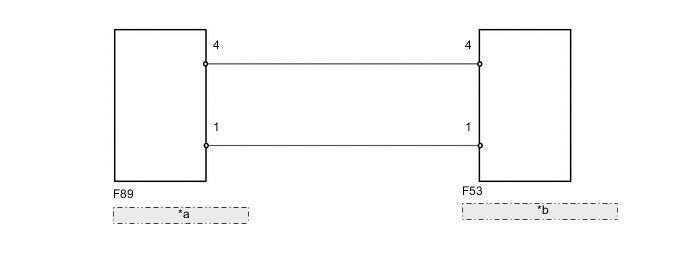
| *a | RADIO RECEIVER ASSEMBLY |
| *b | NO. 1 STEREO JACK ADAPTER ASSEMBLY |
CAUTION / NOTICE / HINT
Tech Tips
USB device or "iPod" may not be able to charge on vehicle when its battery is particularly depleted.
PROCEDURE
-
REPLACE USB DEVICE OR "iPod"
-
Disconnect the USB device or "iPod" from the No. 1 stereo jack adapter assembly.
-
Turn the ignition switch off.
Tech Tips
When this malfunction occurs, it is necessary to turn off the ignition switch to make it possible for the vehicle to recognize a new device when it is connected.
-
Turn the ignition switch to ACC.
-
Connect a known good USB device or "iPod" to the No. 1 stereo jack adapter assembly.
OK USB device or "iPod" charges.
OK 
USB DEVICE OR "iPod" WAS DEFECTIVE
NG 
-
-
INSPECT RADIO RECEIVER ASSEMBLY
-
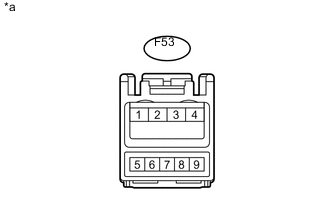
Text in Illustration *a Front view of wire harness connector
(to No. 1 Stereo Jack Adapter Assembly)
Disconnect the F53 No. 1 stereo jack adapter assembly connector.
-
Measure the voltage according to the value(s) in the table below.
Standard Voltage Tester Connection Condition Specified Condition F53-1 - F53-4 Always 5 V
OK
REPLACE NO. 1 STEREO JACK ADAPTER ASSEMBLY Click here
NG
-
-
CHECK HARNESS AND CONNECTOR (RADIO RECEIVER ASSEMBLY - NO. 1 STEREO JACK ADAPTER)
-
Disconnect the F89 radio receiver assembly connector.
-
Disconnect the F53 No. 1 stereo jack adapter assembly connector.
-
Measure the resistance according to the value(s) in the table below.
Standard Resistance (Check for Open) Tester Connection Condition Specified Condition F89-1 - F53-1 Always Below 1 Ω F89-4 - F53-4 Always Below 1 Ω Standard Resistance (Check for Short) Tester Connection Condition Specified Condition F89-1 - Body ground Always 10 kΩ or higher F89-4 - Body ground Always 10 kΩ or higher
OK
PROCEED TO NEXT SUSPECTED AREA SHOWN IN PROBLEM SYMPTOMS TABLE Click here
NG
REPAIR OR REPLACE HARNESS OR CONNECTOR
-