PARKING BRAKE SYSTEM ADJUSTMENT
PROCEDURE
-
INSPECT PARKING BRAKE PEDAL TRAVEL
-
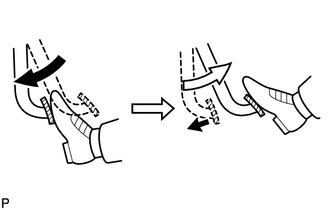
Fully depress the parking brake pedal.
-
Depress the parking brake pedal again.
-
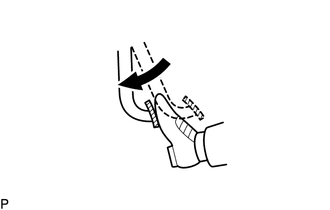
Slowly depress the parking brake pedal using the specified force, and count the number of clicks.
Parking brake pedal travel 7 to 10 clicks at 300 N (31 kgf, 68 lbf) Tech Tips
If the parking brake travel is not as specified, adjust the parking brake shoe clearance and parking brake travel.
-
-
INSPECT PARKING BRAKE LEVER TRAVEL
-
Slowly pull the parking brake lever to the fully applied position, counting the number of clicks.
Parking brake lever travel 8 to 11 clicks at 200 N (20 kgf, 45 lbf)
-
-
ADJUST PARKING BRAKE PEDAL TRAVEL
-
Completely release the parking brake pedal.
-
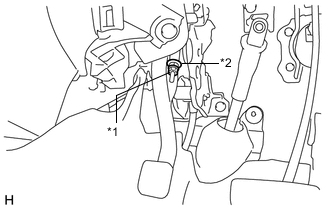
Text in Illustration *1 Lock Nut *2 No. 2 Wire Adjusting Nut Loosen the lock nut and adjusting nut to completely release the parking brake cable.
-
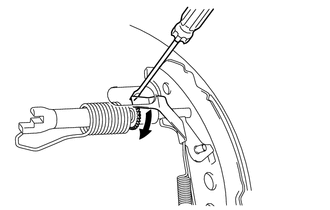
Remove the hole plug, and turn the adjuster to expand the shoe until the drum locks.
Text in Illustration 
Expand -
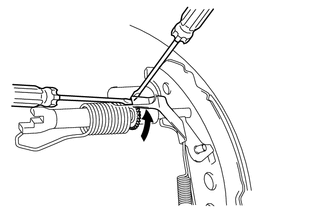
Hold the automatic adjust lever away from the adjuster, and contract the brake shoe by turning the adjust bolt using another screwdriver until the drum can rotate smoothly.
Text in Illustration Contract Standard 11 notches -
Check that there is no brake drag against the shoe.
-
Turn the adjusting nut until the parking brake pedal travel is corrected to be within the specified range.
Parking brake pedal travel 7 to 10 clicks at 300 N (31 kgf 68 lbf) -
Text in Illustration *1 Lock Nut *2 No. 2 Wire Adjusting Nut Using a wrench or an equivalent tool, hold the adjusting nut and tighten the lock nut.
- Torque:
- 5.4 N*m { 55 kgf*cm, 48 in.*lbf }
-
Operate the parking brake pedal 3 to 4 times, and check the parking brake pedal travel.
-
Check whether the parking brake drags or not.
-
-
ADJUST PARKING BRAKE LEVER TRAVEL (for Rear Drum Brake)
-
Remove the rear console box. Click here
-
Remove the hole plug, and turn the adjuster to expand the shoe until the drum locks.
Text in Illustration Expand -
Hold the automatic adjust lever away from the adjuster, and contract the brake shoe by turning the adjust bolt using another screwdriver until the drum can rotate smoothly.
Text in Illustration Contract Standard 11 notches -
Check that there is no brake drag against the shoe.
-
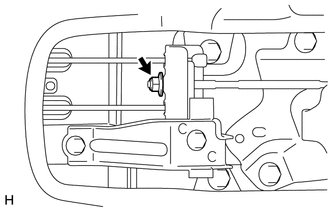
Turn the lock nut until the parking brake lever travel is corrected to within the specified range.
Parking brake lever travel 8 to 11 clicks at 200 N (20 kgf, 45 lbf) -
Operate the parking brake lever 3 to 4 times, and check the parking brake lever travel.
-
Install the rear console box. Click here
-
-
ADJUST PARKING BRAKE LEVER TRAVEL (for Rear Disc Brake)
-
Remove the rear console box. Click here
-
Turn the lock nut until the parking brake lever travel is corrected to within the specified range.
Parking brake lever travel 8 to 11 clicks at 200 N (20 kgf, 45 lbf) -
Operate the parking brake lever 3 to 4 times, and check the parking brake lever travel.
-
Check whether the parking brake drags or not.
-
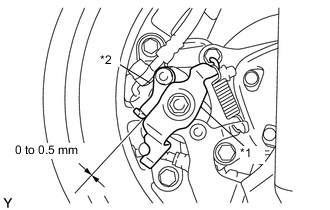
Text in Illustration *1 Operation Lever *2 Stopper Release the parking brake lever and check that the clearance measurement between the rear disc brake cylinder operation lever and the stopper is within the specified range.
Clearance 0 to 0.5 mm (0 to 0.02 in.) -
Install the rear console box. Click here
-
-
INSPECT BRAKE WARNING LIGHT
-
When operating the parking brake pedal, check that the brake warning light illuminates.
OK Brake warning light always illuminates at the first click.
-