CONTINUOUSLY VARIABLE TRANSAXLE SYSTEM Shift Paddle Switch Circuit
DESCRIPTION
When moving the shift lever into the M position using the transmission control switch, it is possible to switch the shift range position between "1" (first range) and "7" (seventh range).
Shifting up "+" once raises one shift range position, and shifting down "-" lowers one shift range position.
WIRING DIAGRAM
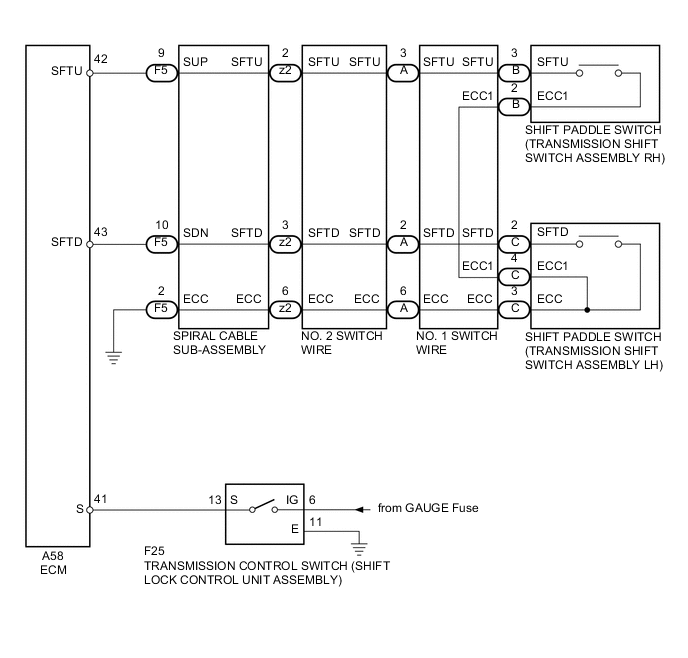
PROCEDURE
-
READ VALUE USING INTELLIGENT TESTER (SPORTS MODE SELECTION SW)
-
Connect the intelligent tester to the DLC3.
-
Turn the ignition switch to ON.
-
Enter the following menus: Powertrain / Engine and ECT / Data List.
Engine and ECT Tester Display Measurement Item / play Normal Conditions Diagnostic Note Sports Mode Selection SW Sport mode select switch status/
ON or OFF
-
ON: Shift lever in M, "+" or "-"
-
OFF: Shift lever not in M, "+" or "-"
- -
NG 
CHECK HARNESS AND CONNECTOR (BATTERY - TRANSMISSION CONTROL SWITCH) Click here
OK 
-
-
READ VALUE USING INTELLIGENT TESTER (SPORTS SHIFT UP SW AND SPORTS SHIFT DOWN SW)
-
Connect the intelligent tester to the DLC3.
-
Turn the ignition switch to ON.
-
Enter the following menus: Powertrain / Engine and ECT / Data List.
Engine and ECT Tester Display Measurement Item / play Normal Condition Diagnostic Note Sports Shift Up SW Sport shift up switch status /
ON or OFF
-
ON: Shift lever held in "+" (up-shift)
-
OFF: Shift lever not held in "+" (up-shift)
-
-
ON: "+" shift paddle operated and held (up-shift)
-
OFF: "+" shift paddle not operated (up-shift)
Sports Shift Down SW Sport shift down switch status /
ON or OFF
-
Shift lever held in "-" (down-shift): ON
-
Shift lever not held in "-" (down-shift): OFF
-
-
ON: "-" shift paddle operated and held (down-shift)
-
OFF: "-" shift paddle not operated (down-shift)
Result Result Proceed to NG A OK B -
B 
CHECK FOR HOW TO TROUBLESHOOT ECU CONTROLLED SYSTEMS (SYMPTOM SIMULATION) Click here
A
-
-
CHECK HARNESS AND CONNECTOR (SHIFT PADDLE SWITCH - ECM)
-
Disconnect the A58 ECM connector.
-
Measure the resistance according to the value(s) in the table below.
Standard Resistance Tester Connection Condition Specified Condition A58-42 (SFTU) - Body ground Pull continuously "+" (up shift) Below 1 Ω Release "+" (up shift) 10 kΩ or higher A58-43 (SFTD) - Body ground Pull continuously "-" (down shift) Below 1 Ω Release "-" (down shift) 10 kΩ or higher
NG
CHECK HARNESS AND CONNECTOR (ECM - SPIRAL CABLE SUB-ASSEMBLY) Click here
OK
-
-
REPLACE ECM
-
Replace the ECM Click here.
NEXT
-
-
PERFORM INITIALIZATION
Note
-
Performing reset memory will clear the learned values of both the yaw rate sensor (deceleration sensor 0 point calibration) and CVT oil pressure (CVT oil pressure calibration). Make sure to perform reset memory, yaw rate sensor 0 point calibration and CVT oil pressure calibration when replacing any of the parts shown in the following table:
Replaced Part
-
Continuously variable transaxle assembly
-
ECM
-
Skid control computer
-
Oil pressure sensor
-
Deceleration sensor
-
-
After performing reset memory, always perform yaw rate sensor (deceleration sensor 0 point) calibration first, and then CVT oil pressure calibration.
-
Always perform 0 point calibration with the vehicle on level ground.
-
Do not shake or vibrate the vehicle during 0 point calibration.
-
Using the intelligent tester, perform reset memory, deceleration sensor 0 point calibration and CVT oil pressure calibration Click here.
-
Check that no DTC is stored.
NEXT
END
-
-
CHECK HARNESS AND CONNECTOR (ECM - SPIRAL CABLE SUB-ASSEMBLY)
-
Disconnect the F5 spiral cable sub-assembly connector.
-
Measure the resistance according to the value(s) in the table below.
Standard Resistance (Check for Open) Tester Connection Condition Specified Condition F5-9 (SUP) - A58-42 (SFTU) Always Below 1 Ω F5-10 (SDN) - A58-43 (SFTD) Always Below 1 Ω F5-2 (ECC) - Body ground Always Below 1 Ω Standard Resistance (Check for Short) Tester Connection Condition Specified Condition F5-9 (SUP) - Body ground Always 10 kΩ or higher F5-10 (SDN) - Body ground Always 10 kΩ or higher A58-42 (SFTU) - Body ground Always 10 kΩ or higher A58-43 (SFTD) - Body ground Always 10 kΩ or higher
NG
REPAIR OR REPLACE HARNESS OR CONNECTOR
OK
-
-
INSPECT SPIRAL CABLE SUB-ASSEMBLY
-
Disconnect the F5 and z2 spiral cable sub-assembly connectors.
-
Measure the resistance according to the value(s) in the table below.
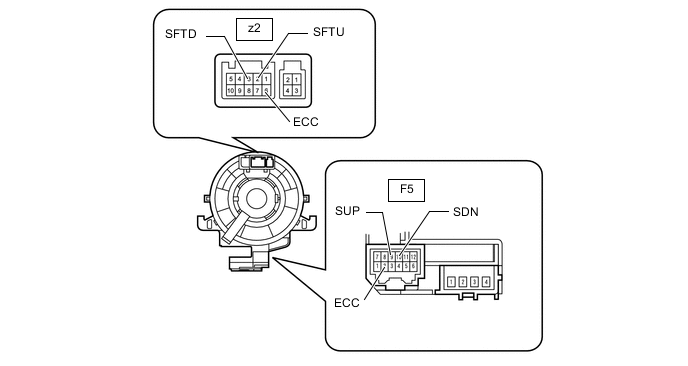
Standard Resistance Tester Connection Condition Specified Condition z2-6 (ECC) - F5-2 (ECC) Always Below 1 Ω z2-2 (SFTU) - F5-9 (SUP) Always Below 1 Ω z2-3 (SFTD) - F5-10 (SDN) Always Below 1 Ω Text in Illustration *a Component without harness connected
(Spiral Cable Sub-assembly)
NG
REPLACE SPIRAL CABLE SUB-ASSEMBLY Click here
OK
-
-
INSPECT NO. 2 SWITCH WIRE
-
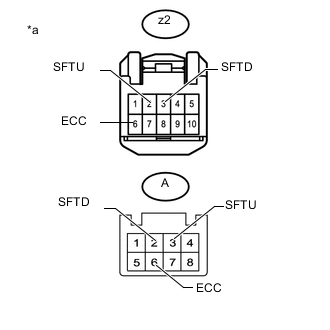
Text in Illustration *a Component without harness connected
(NO. 2 Switch Wire)
Measure the resistance according to the value(s) in the table below.
Standard Resistance Tester Connection Condition Specified Condition z2-2 (SFTU) - A-3 (SFTU) Always Below 2.5 Ω z2-3 (SFTD) - A-2 (SFTD) Always Below 2.5 Ω z2-6 (ECC) - A-6 (ECC) Always Below 2.5 Ω
NG
REPLACE NO. 2 SWITCH WIRE Click here
OK
-
-
INSPECT SHIFT PADDLE SWITCH (TRANSMISSION SHIFT SWITCH ASSEMBLY)
-
Disconnect the shift paddle switch (transmission shift switch assembly) connector.
-
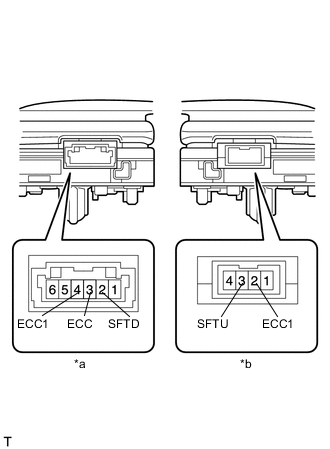
Text in Illustration *a Component without harness connected
(Shift Paddle Switch (Transmission Shift Switch Assembly LH))
*b Component without harness connected
(Shift Paddle Switch (Transmission Shift Switch Assembly RH))
Measure the resistance according to the value(s) in the table below.
Standard Resistance for RH Tester Connection Condition Specified Condition 3 (SFTU) - 2 (ECC1) Pull continuously "+" (Up shift) Below 2.5 Ω Release "+" (Up shift) 1 MΩ or higher for LH Tester Connection Condition Specified Condition 2 (SFTD) - 3 (ECC) Pull continuously "-" (Down shift) Below 2.5 Ω Release "-" (Down shift) 1 MΩ or higher 2 (SFTD) - 4 (ECC1) Pull continuously "-" (Down shift) Below 2.5 Ω Release "-" (Down shift) 1 MΩ or higher
OK
REPLACE NO. 1 SWITCH WIRE Click here
NG
REPLACE SHIFT PADDLE SWITCH (TRANSMISSION SHIFT SWITCH ASSEMBLY) Click here
-
-
CHECK HARNESS AND CONNECTOR (BATTERY - TRANSMISSION CONTROL SWITCH)
-
Disconnect the F25 transmission control switch connector.
-
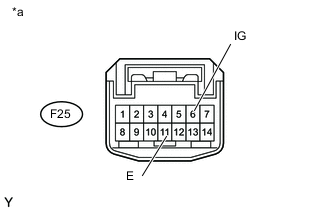
Text in Illustration *a Front view of wire harness connector
(to Transmission Control Switch)
Turn the ignition switch to ON.
-
Measure the voltage according to the value(s) in the table below.
Standard Voltage Tester Connection Condition Specified Condition F25-6 (IG) - F25-11 (E) Ignition switch ON 11 to 14V Ignition switch off Below 1V
NG
REPAIR OR REPLACE HARNESS OR CONNECTOR
OK
-
-
INSPECT TRANSMISSION CONTROL SWITCH (SHIFT LOCK CONTROL UNIT ASSEMBLY)
-
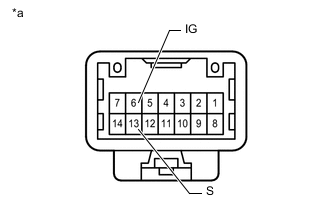
Text in Illustration *a Component without harness connected
(Transmission Control Switch (Shift lock control unit assembly))
Measure the resistance according to the value(s) in the table below.
Standard Resistance Tester Connection Condition Specified Condition 6 (IG) - 13 (S) Shift lever In M Below 1Ω Shift lever not In M 10 kΩ or higher
NG
REPLACE TRANSMISSION CONTROL SWITCH (SHIFT LOCK CONTROL UNIT ASSEMBLY) Click here
OK
-
-
CHECK HARNESS AND CONNECTOR (TRANSMISSION CONTROL SWITCH - ECM)
-
Connect the F25 transmission control switch connector.
-
Turn the ignition switch to ON.
-
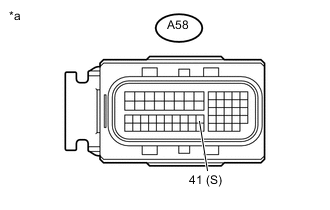
Text in Illustration *a Front view of wire harness connector
(to ECM)
Measure the voltage according to the value(s) in the table below.
Standard Voltage Tester Connection Condition Specified Condition A58-41 (S) - Body ground Shift lever In M 11 to 14V Shift lever not In M Below 1V
NG
REPAIR OR REPLACE HARNESS OR CONNECTOR
NEXT
-
-
REPLACE ECM
-
Replace the ECM Click here.
NEXT
-
-
PERFORM INITIALIZATION
NEXT
END