SFI SYSTEM, Diagnostic DTC:P0401
| DTC Code | DTC Name |
|---|---|
| P0401 | Exhaust Gas Recirculation Flow Insufficient Detected |
DESCRIPTION
Based on the driving conditions, the ECM regulates the volume of exhaust gas that is recirculated to the engine's combustion chambers and thus lowers the combustion temperature to reduce NOx emissions. The ECM monitors signals such as engine speed, coolant temperature, electric load, and vehicle speed. When the EGR permission conditions are fulfilled, the ECM controls the opening of the EGR valve linearly through signals to the EGR step motor.
| DTC No. | DTC Detection Condition | Trouble Area |
|---|---|---|
| P0401 | Change in intake manifold pressure is small when the EGR valve opened and closed during fuel cut operation (2 trip detection logic) |
|
MONITOR DESCRIPTION
The ECM monitors the pressure inside the intake manifold while opening and closing the EGR valve during fuel cut operation. If there is no change in the manifold absolute pressure sensor value, the ECM interprets this as a malfunction in the EGR valve assembly, illuminates the MIL and stores the DTC (2 trip detection logic).
MONITOR STRATEGY
| Required Sensors/Components (Main) | EGR valve assembly Manifold absolute pressure sensor |
| Required Sensors/Components (Related) | Engine coolant temperature sensor Vehicle speed sensor |
| Frequency of Operation | Once per driving cycle |
TYPICAL ENABLING CONDITIONS
| Engine speed | 1050 to 3500 rpm |
| Vehicle speed | 45 km/h (28 mph) or more |
| Intake air temperature | -10°C (14°F) or higher |
TYPICAL MALFUNCTION THRESHOLDS
| Manifold pressure change | Less than 2.0 kPa(gauge) [15.0 mmHg(gauge)] |
| At engine speed | 1100 rpm |
CONFIRMATION DRIVING PATTERN
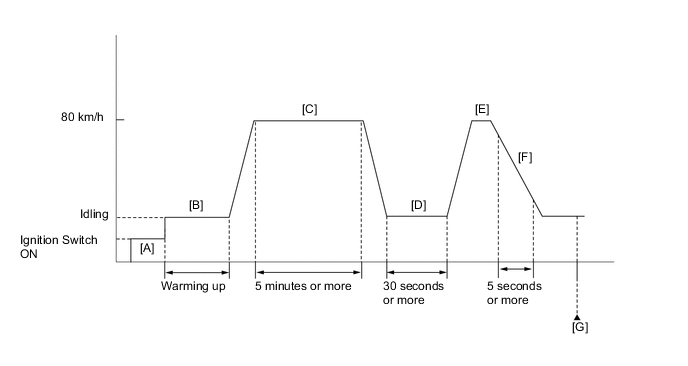
-
Connect the GTS to the DLC3.
-
Turn the ignition switch to ON and turn the GTS on.
-
Clear the DTCs (even if no DTCs are stored, perform the clear DTC procedure).
-
Turn the ignition switch off and wait for at least 30 seconds.
-
Turn the ignition switch to ON and turn the GTS on. [A]
-
Start the engine and warm it up (until the engine coolant temperature reaches 75°C [167°F]) or higher. [B]
Tech Tips
The A/C switch and all accessory switches should be off.
-
Drive the vehicle at 80 km/h (50 mph) for 5 minutes or more. [C]
CAUTION:
When performing the confirmation driving pattern, obey all speed limits and traffic laws.
-
Idle the engine for 30 seconds or more. [D]
-
Accelerate the vehicle to 80 km/h (50 mph) with the shift lever in S. [E]
CAUTION:
When performing the confirmation driving pattern, obey all speed limits and traffic laws.
-
Perform the fuel cut operation for 5 seconds or more, with the accelerator pedal fully released. [F]
Tech Tips
When the fuel cut is operating, "Idle Fuel Cut" in Data List is ON.
-
Enter the following menus: Powertrain / Engine and ECT / Trouble Code. [G]
-
Read the pending DTCs.
Tech Tips
-
If a pending DTC is output, the system is malfunctioning.
-
If a pending DTC is not output, perform the following procedure.
-
-
Enter the following menus: Powertrain / Engine and ECT / Utility / All Readiness.
-
Input the DTC P0401.
-
Check the DTC judgment result.
GTS Display Description NORMAL
-
DTC judgment completed
-
System normal
ABNORMAL
-
DTC judgment completed
-
System abnormal
INCOMPLETE
-
DTC judgment not completed
-
Perform driving pattern after confirming DTC enabling conditions
N/A
-
Unable to perform DTC judgment
-
Number of DTCs which do not fulfill DTC preconditions has reached ECU's memory limit
Tech Tips
-
If the judgment result shows NORMAL, the system is normal.
-
If the judgment result shows ABNORMAL, the system has malfunction.
-
If the DTC judgment result is INCOMPLETE or N/A, perform steps [D] and [F] again.
-
WIRING DIAGRAM
Refer to the DTC P0403 Click here.
CAUTION / NOTICE / HINT
Tech Tips
-
By using the Control the EGR Step Position Active Test, the operation of the EGR valve can be checked.
-
When the engine is idling steadily with the EGR valve fully closed, if the EGR valve is normal and it is opened using the Active Test, the Data List value changes as follows.
Data List Change in Data List when Number of Steps is Increased Using Control the EGR Step Position Active Test Engine Speed Idle becomes rough MAP Pressure rises -
Read freeze frame data using the GTS. The ECM records vehicle and driving condition information as freeze frame data the moment a DTC is stored. When troubleshooting, freeze frame data can help determine if the vehicle was moving or stationary, if the engine was warmed up or not, if the air fuel ratio was lean or rich, and other data from the time the malfunction occurred.
PROCEDURE
-
CHECK ANY OTHER DTCS OUTPUT (IN ADDITION TO P0401)
-
Connect the GTS to the DLC3.
-
Turn the ignition switch to ON.
-
Turn the GTS on.
-
Enter the following menus: Powertrain / Engine and ECT / Trouble Code.
-
Read DTCs.
Result Result Proceed to DTC P0401 is output A DTC P0401 and other DTCs are output B Tech Tips
If any DTCs other than P0401 are output, troubleshoot those DTCs first.
B 
GO TO DTC CHART Click here
A 
-
-
PERFORM ACTIVE TEST USING GTS (CONTROL THE EGR STEP POSITION)
-
Connect the GTS to the DLC3.
-
Turn the ignition switch to ON.
-
Turn the GTS on.
-
Start the engine and warm it up until the engine coolant temperature reaches 75°C (167°F) or more.
Tech Tips
The A/C switch and all accessory switches should be off.
-
Enter the following menus: Powertrain / Engine and ECT / Active Test / Control the EGR Step Position / All Data / MAP.
-
Check the engine idling condition and MAP values in the Data List while performing the Active Test.
Tech Tips
-
Do not leave the EGR valve open for 10 seconds or more during the Active Test.
-
Be sure to return the EGR valve to step 0 when the Active Test is completed.
-
Do not open the EGR valve 30 steps or more during the Active Test.
OK MAP and idling condition change in response to EGR step position. Standard - EGR Step Position (Active Test) 0 Steps 0 to 30 Steps Idling condition Steady idling Idling changes from steady to rough idling or engine stalls MAP
(Data List)
MAP value is 20 to 48 kPa(abs) [150 to 360 mmHg(abs)]
(EGR valve is fully closed)
MAP value is at least +10 kPa (75 mmHg) higher than when EGR valve is fully closed Tech Tips
During Active Test, if the idling condition does not change in response to EGR step position, then there is probably a malfunction in the EGR valve.
-
NG 
REPLACE EGR VALVE ASSEMBLY Click here
OK
-
-
INSPECT EGR VALVE ASSEMBLY
-
Check if the EGR valve are clogged with deposits.
-
Check if the EGR valve is closed.
OK EGR valve is closed and no deposits. Result Result Proceed to NG A OK B
B
CHECK FOR DEPOSIT (EGR DELIVERY CHAMBER AND EXHAUST MANIFOLD SUB-ASSEMBLY TO EGR VALVE ASSEMBLY) Click here
A
-
-
REPLACE EGR VALVE ASSEMBLY
-
Replace the EGR valve assembly Click here.
Tech Tips
Perform "Inspection After Repairs" after replacing the EGR valve assembly Click here.
NEXT
-
-
CHECK FOR DEPOSIT (EGR DELIVERY CHAMBER AND EXHAUST MANIFOLD SUB-ASSEMBLY TO EGR VALVE ASSEMBLY)
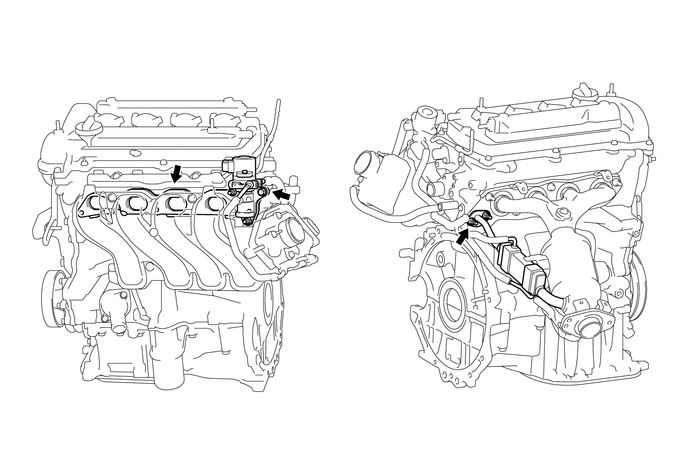
-
Check for exhaust leaks at each connection point.
-
Check for cracks, damage, and clogs in the pipes between the EGR delivery chamber, the cylinder head, the intake manifold, the EGR valve assembly and the exhaust manifold subassembly.
-
This check may require the removal of components.
-
Check if there is a build-up of deposits in the EGR valve of pipes.
OK No deposits Tech Tips
Perform "Inspection After Repair" after repairing or replacing the exhaust system Click here.
NG
REPAIR OR REPLACE MALFUNCTIONING PARTS, COMPONENTS AND AREAS
OK
-
-
INSPECT EGR COOLER (EXHAUST MANIFOLD SUB-ASSEMBLY)
-
Check for blockage of the EGR cooler (exhaust manifold sub-assembly).
NG
REPLACE EXHAUST MANIFOLD SUB-ASSEMBLY Click here
OK
-
-
READ VALUE USING GTS (MAP)
-
Connect the GTS to the DLC3.
-
Turn the ignition switch to ON.
-
Turn the GTS on.
-
Enter the following menus: Powertrain / Engine and ECT / Data List / All Data / MAP.
-
Read the MAP value.
Standard Engine condition GTS Display Ignition switch ON 80 to 110 kPa(abs) [600 to 825 mmHg(abs)] Tech Tips
Standard atmospheric pressure is 101 kPa(abs) [758 mmHg]. For every 100 m (328 ft) increase in altitude, pressure drops by 1 kPa (7.5 mmHg). The pressure also varies due to the weather (high atmospheric pressure, low atmospheric pressure).
-
Start the engine and warm it up until the engine coolant temperature reaches 75°C (167°F) or higher.
-
Enter the following menus: Powertrain / Engine and ECT / Data List / All Data / MAP.
-
Read the MAP value when idling the engine with the A/C switch and all accessory switches should be off and shift lever in P or N.
Standard Engine condition GTS Display Idling 20 to 48 kPa(abs) (150 to 360 mmHg(abs)) Result Result Proceed to NG A OK B
B
CONFIRM WHETHER MALFUNCTION HAS BEEN SUCCESSFULLY REPAIRED Click here
A
-
-
CHECK INTAKE SYSTEM
-
Check the intake system for vacuum leaks Click here.
OK No leaks in intake system. Tech Tips
Perform "Inspection After Repairs" after repairing or replacing the intake system Click here.
NG
REPAIR OR REPLACE INTAKE SYSTEM
OK
-
-
REPLACE MANIFOLD ABSOLUTE PRESSURE SENSOR
-
Replace the manifold absolute pressure sensor (See page EMISSION CONTROL (1NZ-FE) > VACUUM SENSOR > REMOVAL).
NEXT
-
-
CONFIRM WHETHER MALFUNCTION HAS BEEN SUCCESSFULLY REPAIRED
-
Connect the GTS to the DLC3.
-
Turn the ignition switch to ON.
-
Turn the GTS on.
-
Clear the DTCs Click here.
-
Turn the ignition switch off and wait for at least 30 seconds.
-
Turn the ignition switch to ON.
-
Turn the GTS on.
-
Drive the vehicle in accordance with the driving pattern described in Confirmation Driving Pattern.
-
Enter the following menus: Powertrain / Engine and ECT / Trouble Code / Pending.
-
Read the pending DTCs.
Tech Tips
-
If the pending DTC is output, the system is malfunctioning.
-
If a pending DTC is not output, perform the following procedure.
-
-
Enter the following menus: Powertrain / Engine and ECT / Utility / All Readiness.
-
Input the DTC: P0401.
-
Check the DTC judgment.
Result GTS Display Description NORMAL
-
DTC judgment completed
-
System normal
ABNORMAL
-
DTC judgment completed
-
System abnormal
INCOMPLETE
-
DTC judgment not completed
-
Perform driving pattern after confirming DTC enabling conditions
N/A
-
Unable to perform DTC judgment
-
Number of DTCs which do not fulfill DTC preconditions has reached ECU memory limit
-
NEXT
END
-