СИСТЕМА АВТОМАТИЧЕСКОЙ ТРАНСМИССИИ, Diagnostic DTC:P0781

Информация добавлена 08-08-2017 
| DTC Code | DTC Name |
|---|---|
| P0781 | 1-2 Shift (1-2 Shift Valve) |
DESCRIPTION
-
The 1-2 shift valve performs shifting to 1st gear and other gears.
| DTC No. | Detection Item | DTC Detection Condition | Trouble Area | MIL | Memory |
|---|---|---|---|---|---|
| P0781 | 1-2 Shift (1-2 Shift Valve) | Gear required by the ECM does not match the actual gear when driving (2-trip detection logic). |
|
Comes on | DTC stored |
MONITOR DESCRIPTION
This DTC indicates that the 1-2 shift valve in the valve body is locked in the direction that the spring compresses.
The ECM commands gear shifts by turning the shift solenoid valves ON/OFF and controls the oil pressure applied to the valves in the valve body.
The ECM calculates the actual transmission gear by comparing the signals from the input speed sensor NT and output speed sensor SP2. The ECM can detect mechanical problems in the shift solenoids, valve body and automatic transmission (clutch, brake, gear, etc.). If the ECM detects that the actual gear position and commanded gear position are different, it will illuminate the MIL and store the DTC.
PROCEDURE
-
CHECK DTC OUTPUT (IN ADDITION TO DTC P0781)
-
Connect the GTS to the DLC3.
-
Turn the engine switch on (IG).
-
Turn the GTS on.
-
Enter the following menus: Powertrain / Engine and ECT / Trouble Codes.
Powertrain > Engine and ECT > Trouble Codes -
Read the DTCs using the GTS.
Result Result Proceed to Only P0781 is output A P0781 and other DTCs are output B Tech Tips
If any other codes besides P0781 are output, perform troubleshooting for those DTCs first.
B 
GO TO DTC CHART Click here
A 
-
-
PERFORM ACTIVE TEST USING GTS (RUNNING TEST)
CAUTION:
This test should always be performed with at least 2 people.
Note
-
Perform the test while the ATF temperature is 50 to 80°C (122 to 176°F).
-
Perform the test with the A/C turned off.
Tech Tips
Using the GTS to perform Active Tests allows relays, VSVs, actuators and other items to be operated without removing any parts. This non-intrusive functional inspection can be very useful because intermittent operation may be discovered before parts or wiring is disturbed. Performing Active Tests early in troubleshooting is one way to save diagnostic time. Data List information can be displayed while performing Active Tests.
-
Connect the GTS to the DLC3.
-
Clear the DTCs Click here.
-
Warm up the engine.
-
Enter the following menus: Powertrain / Engine and ECT / Active Test.
-
According to the display on the GTS, perform the Active Test.
Tech Tips
While driving, the shift position can be forcibly changed with the GTS.Comparing the shift position commanded by the Active Test with the actual shift position enables you to confirm the problem Click here.
Powertrain > Engine and ECT > Active TestTester Display Control the Shift Position
Powertrain > Engine and ECT > Active TestTester Display Measurement Item Control Range Diagnostic Note Control the Shift Position Operate shift solenoid valve and set each shift position
-
Press "→" button: Shift up
-
Press "←" button: Shift down
Possible to check operation of the shift solenoid valves.
[Vehicle Condition]
50 km/h (31 mph) or less.
Tech Tips
-
This test can be conducted when the vehicle speed is 50 km/h (31 mph) or less.
-
The 4th to 5th up-shift must be performed with the accelerator pedal released.
-
The 5th to 4th down-shift must be performed with the accelerator pedal released.
-
Do not operate the accelerator pedal for at least 2 seconds after shifting and do not shift successively.
-
The shift position commanded by the ECM is shown in the Data List display on the GTS.
OK Gear position changes in accordance with the GTS command. Result Proceed to OK NG -
NG
REPAIR OR REPLACE TRANSMISSION VALVE BODY ASSEMBLY Click here
OK
-
-
PERFORM ACTIVE TEST USING GTS (SHIFT SOLENOID VALVE SLT)
Note
-
Perform the test while the ATF temperature is 50 to 80°C (122 to 176°F).
-
Be careful to prevent SST's hose from interfering with the exhaust pipe.
-
Perform the test with the A/C off.
Tech Tips
Using the GTS to perform Active Tests allows relays, VSVs, actuators and other items to be operated without removing any parts. This non-intrusive functional inspection can bevery useful because intermittent operation may be discovered before parts or wiring is disturbed. Performing Active Tests early in troubleshooting is one way to save diagnostic time. Data List information can be displayed while performing Active Tests.
-
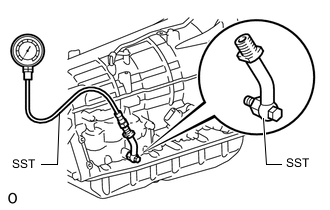
Remove the test plug from the transmission case and connect SST.
- SST
- 09992-00095 ( 09992-00231, 09992-00271 )
-
Connect the GTS to the DLC3.
-
Start the engine and warm it up.
-
Measure the line pressure with SST.
-
Turn the GTS on.
-
Enter the following menus: Powertrain / Engine and ECT / Active Test.
-
According to the display on the GTS, perform the Active Test.
-
Measure the line pressure.
Powertrain > Engine and ECT > Active TestTester Display Activate the Solenoid (SLT)
Powertrain > Engine and ECT > Active TestTester Display Measurement Item Control Range Diagnostic Note Activate the Solenoid (SLT) Operate shift solenoid SLT and raise line pressure ON or OFF
Tech Tips
-
OFF: Line pressure up (when Active Test "Activate the Solenoid (SLT)" is performed, ECM commands SLT solenoid to turn OFF)
-
ON: No action (normal operation)
[Vehicle Condition]
-
Vehicle stopped.
-
Engine idling.
Tech Tips
Activate the Solenoid (SLT) in the Active Test is performed to check the line pressure changes by connecting SST to the automatic transmission, which is used in the Hydraulic Test Click here as well. Note that the pressure values in the Active Test and Hydraulic Test are different.
OK The line pressure changes as specified when performing the Active Test. Result Proceed to OK NG -
NG
REPLACE SHIFT SOLENOID VALVE SLT Click here
OK
-
-
CLEAR DTC AND PERFORM RUNNING TEST
-
Clear the DTCs Click here.
Powertrain > Engine and ECT > Clear DTCs -
Check for DTCs again after conducting the Monitor Drive Pattern Click here.
OK No DTC code output.
Powertrain > Engine and ECT > Trouble CodesResult Proceed to OK NG
OK
END
NG
REPAIR OR REPLACE AUTOMATIC TRANSMISSION ASSEMBLY Click here
-