BACK DOOR REASSEMBLY
-
INSTALL BACK DOOR STAY BOLT LH
-
Clean the threaded portion on the vehicle body with a non-residue solvent.
-
Apply adhesive to the threads of the back door stay bolt.
Adhesive Toyota Genuine Adhesive 1324, Three Bond 1324 or equivalent -
Install the back door stay bolt.
- Torque:
- 22 N*m { 224 kgf*cm, 16 ft.*lbf }
-
-
INSTALL BACK DOOR STAY BOLT RH
Tech Tips
Use the same procedure as for the LH side.
-
INSTALL BACK DOOR STAY ASSEMBLY LH
Note
-
Avoid touching the piston rod as much as possible to prevent foreign matter from attaching to it. Be sure to hold the cylinder while servicing.
-
Do not wear cotton gloves or other similar materials when handling the piston rod. Fibers may attach to the rod and result in gas leaks.
-
Do not apply any horizontal load to the door stay in order to prevent the rod from deforming.
-
When reusing the back door stay assembly:
-
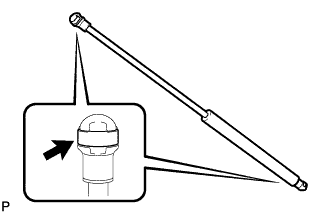
Install the 2 stop rings to the back door stay assembly.
-
-
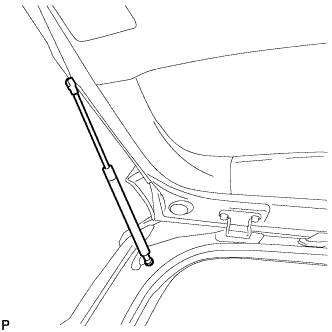
Install the back door stay assembly.
Note
Install the back door stay assembly while supporting the back door by hand.
-
Check that the back door stay assembly is engaged in the ball joint and that the back door stay assembly cannot be pulled out.
-
-
INSTALL BACK DOOR STAY ASSEMBLY RH
Tech Tips
Use the same procedure as for the LH side.
-
INSTALL REAR WIPER MOTOR ASSEMBLY (w/ Rear Wiper)
-
Install the rear wiper motor assembly with the 3 bolts.
- Torque:
- 5.5 N*m { 56 kgf*cm, 49 in.*lbf }
-
Connect the connector.
-
-
INSTALL REAR WIPER MOTOR GROMMET (w/ Rear Wiper)
-
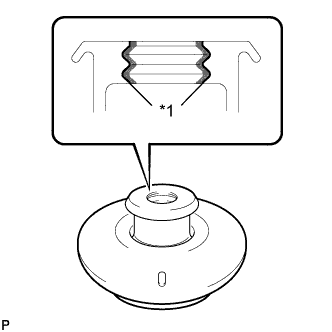
Text in Illustration *1 MP Grease Apply MP grease to the entire surface of the rear wiper motor grommet lip.
Tech Tips
Make sure that the hole does not get clogged with grease and the grooves on the lip are filled with grease.
-
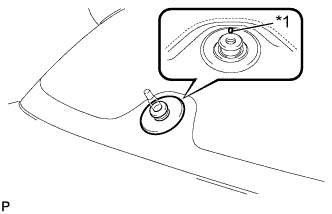
Text in Illustration *1 Alignment Mark Install the rear wiper motor grommet.
Tech Tips
Install the grommet with its alignment mark facing up.
-
-
INSTALL REAR WIPER ARM AND BLADE ASSEMBLY (w/ Rear Wiper)
-
Operate the wiper and stop the windshield wiper motor at the automatic stop position.
-
When reusing the rear wiper arm and blade assembly:
-
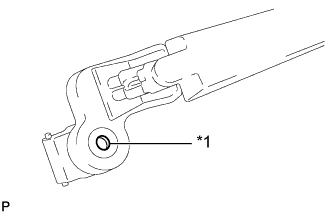
Text in Illustration *1 Wiper Arm Serrations Clean the wiper arm serrations.
-
-
When reusing the rear wiper motor assembly:
-
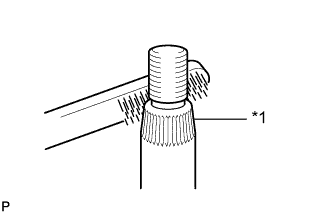
Text in Illustration *1 Wiper Pivot Serrations Clean the wiper pivot serrations with a wire brush.
-
-
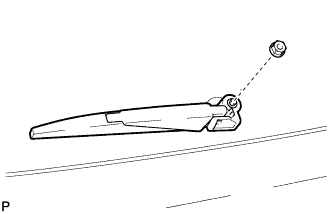
Temporarily install the rear wiper arm and blade assembly.
-
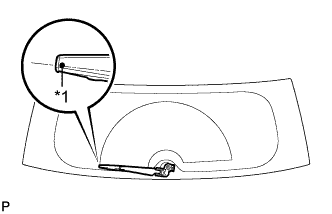
Text in Illustration *1 Ceramic Dot Install the rear wiper arm and blade assembly with the nut to the position as shown in the illustration.
- Torque:
- 5.5 N*m { 56 kgf*cm, 49 in.*lbf }
Tech Tips
Hold the wiper arm by hand while tightening the nut.
-
Turn the power switch on (IG).
-
Operate the rear wiper while spraying washer fluid onto the back door glass. Make sure that the rear wiper functions properly and the wiper does not come into contact with the vehicle body.
-
Lift the wiper arm twice after the wiper stops and check the wiper set position.
-
Turn the power switch off.
-
-
INSTALL REAR WIPER ARM HEAD CAP (w/ Rear Wiper)
-
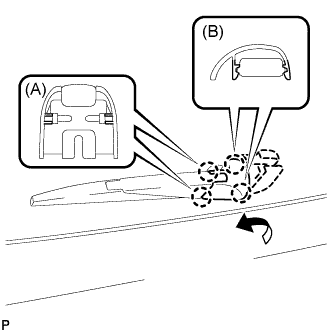
Engage the 2 claws (B) to the rear wiper arm and blade assembly.
-
Engage the 2 claws (A) to install the rear wiper arm head cap as shown in the illustration.
-
-
INSTALL REAR WASHER NOZZLE (w/ Rear Wiper)
-
Engage the 2 claws to install the rear washer nozzle.
-
Connect the washer hose.
-
-
INSPECT REAR WASHER NOZZLE (w/ Rear Wiper)
-
With the power switch on (READY), check that the center stream of washer fluid sprays on the windshield within the hatched area shown in the illustration.
Standard Washer fluid hits the windshield in the area shown in the illustration. 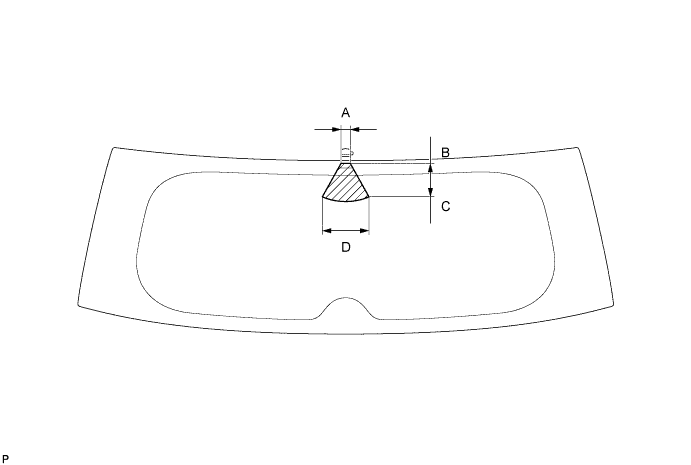
Standard Clearance Area Measurement A 22 mm (0.866 in.) B 6 mm (0.236 in.) C 72 mm (2.835 in.) D 108 mm (4.252 in.)
-
-
ADJUST REAR WASHER NOZZLE (w/ Rear Wiper)
-
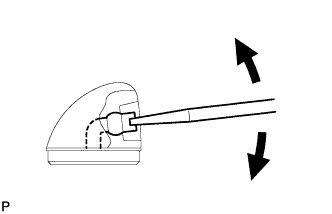
Using a screwdriver, adjust the direction of the rear washer nozzle.
Note
Do not use a safety pin or other pointed tools. Doing so may damage the inside of the washer nozzle.
Tech Tips
Use a thin-bladed screwdriver with an approximately 1 mm (0.0394 in.) thick tip.
-
-
INSTALL REAR SPOILER SUB-ASSEMBLY
-
Install the 4 new clips to the rear spoiler sub-assembly as shown in the illustration.
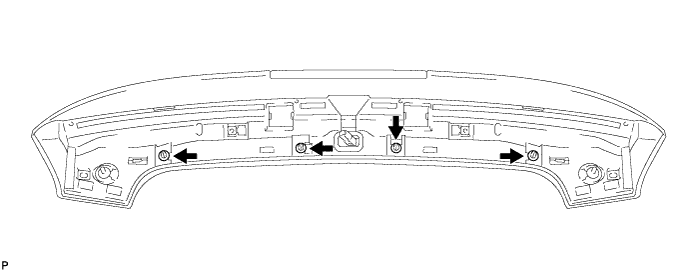
-
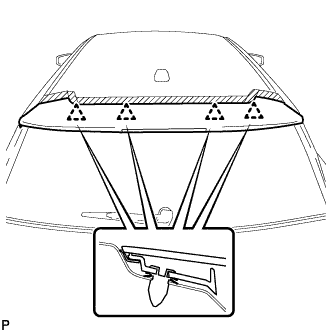
Engage the 4 clips and install the rear spoiler sub-assembly.
-
Connect the connector.
-
Install the 2 nuts and 2 bolts.
-
Install the 2 hole plugs.
-
-
INSTALL NO. 4 ANTENNA CORD SUB-ASSEMBLY
-
Engage the 2 grommets.
-
Engage the 5 clamps.
-
Connect the connector for back door.
-
Install the bolt for back door.
- Torque:
- 7.0 N*m { 71 kgf*cm, 62 in.*lbf }
-
Connect the connector for roof.
-
w/ Rear Wiper:
-
Connect the washer hose.
-
-
Install the bolt and No. 4 antenna cord subassembly.
-
-
INSTALL ROOF HEADLINING ASSEMBLY
-
INSTALL RADIO SETTING CONDENSER
-
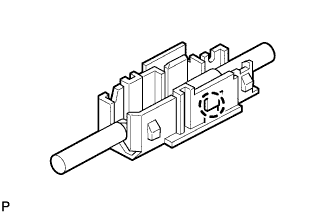
Engage the claw to install a new terminal cover to the wire harness.
-
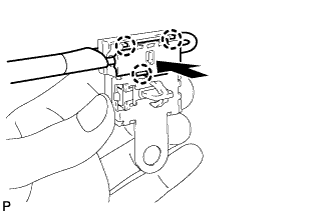
Engage the 3 claws to install the new terminal cover with wire harness to a new condenser.
-
Engage the clamp to temporarily install a new radio setting condenser with wire harness to the back door.
-
Install the new radio setting condenser with the bolt.
- Torque:
- 7.0 N*m { 71 kgf*cm, 62 in.*lbf }
-
-
INSTALL REAR TELEVISION CAMERA ASSEMBLY (w/ Rear Monitor)
-
Install the rear television camera assembly with the screw.
-
Install the bolt.
-
Connect the connector.
-
-
INSTALL AMPLIFIER ANTENNA ASSEMBLY
-
Connect the 2 connectors.
-
Install the amplifier antenna assembly with the bolt.
- Torque:
- 7.0 N*m { 71 kgf*cm, 62 in.*lbf }
-
-
INSTALL LICENSE PLATE LIGHT ASSEMBLY LH
-
Engage the 2 claws to install the license plate light assembly.
-
Connect the connector.
-
-
INSTALL LICENSE PLATE LIGHT ASSEMBLY RH
Tech Tips
Use the same procedure for the RH side and LH side.
-
INSTALL BACK DOOR OUTSIDE GARNISH SUB-ASSEMBLY
-
Install the new 2 clips (back door outside garnish clips) as shown in the illustration.
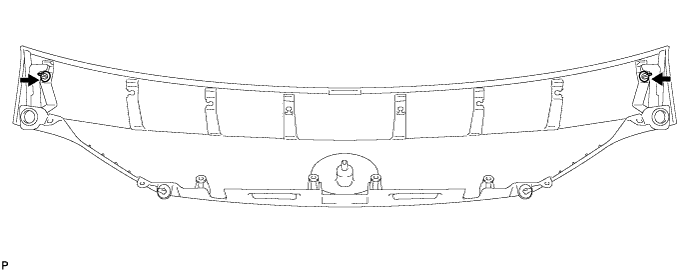
-
Install the new 6 clips (No. 2 back door outside garnish clips) as shown in the illustration.
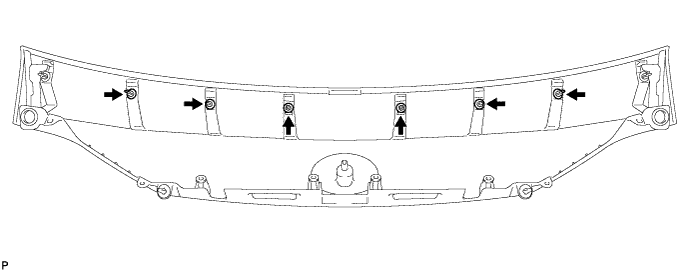
-
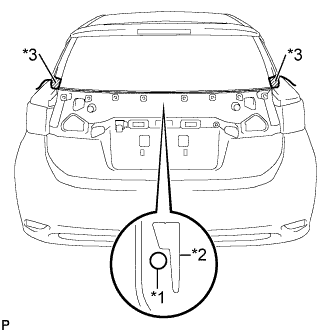
Text in Illustration *1 String *2 Back Window Lower Moulding *3 Masking Tape Pass a string behind the back window lower moulding and tape both ends with masking tape as shown in the illustration.
-
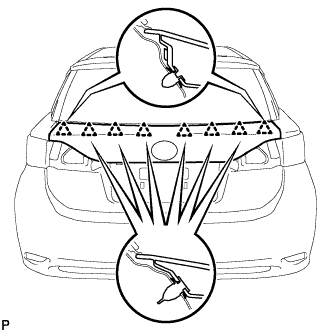
Engage the 8 clips to install the back door outside garnish sub-assembly.
Tech Tips
Make sure not to dislodge the string under the back window lower moulding.
-
Apply soapy water to the back window lower moulding.
-
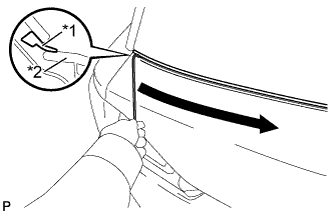
Text in Illustration *1 Back Window Lower Moulding *2 Back Door Outside Garnish Sub-assembly Pull out the string slowly, starting from one end and working to the other end, as shown in the illustration.
Note
Make sure not to damage the back window lower moulding.
-
Check that the back window lower moulding is not caught behind the back door outside garnish sub-assembly.
-
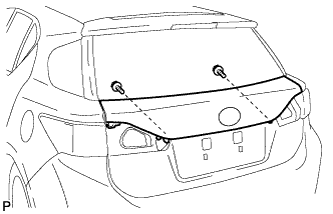
Install the 2 screws.
-
-
INSTALL BACK DOOR OPENER SWITCH ASSEMBLY
-
Install the back door opener switch assembly with the 2 bolts.
-
Connect the connector.
-
-
INSTALL REAR LIGHT ASSEMBLY LH
-
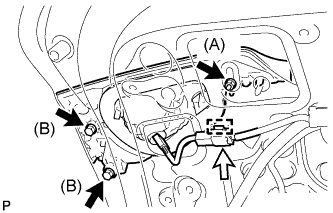
Install the rear light assembly with the 3 nuts.
- Torque:
- Nut (A)
- 5.0 N*m { 51 kgf*cm, 44 in.*lbf }
- Nut (B)
- 3.9 N*m { 40 kgf*cm, 35 in.*lbf }
-
Connect the connector and engage the clamp.
-
-
INSTALL REAR LIGHT ASSEMBLY RH
Tech Tips
Use the same procedure as for the LH side.
-
INSTALL BACK DOOR WEIGHT
-
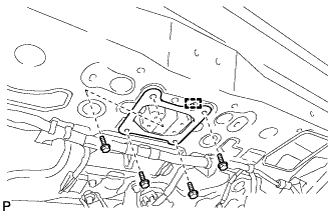
Engage the guide.
-
Install the back door weight with the 4 bolts.
-
-
INSTALL LOWER BACK DOOR STOPPER CUSHION
-
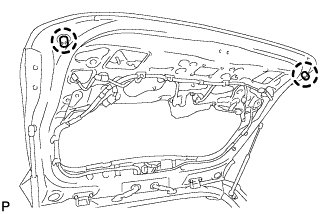
Engage the claws to install 2 new lower back door stopper cushions.
-
-
INSTALL BACK DOOR LOCK STRIKER ASSEMBLY
-
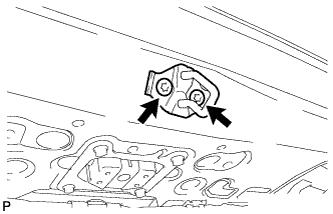
Using a T40 "TORX" socket wrench, install the back door lock striker assembly with the 2 screws.
- Torque:
- 23 N*m { 235 kgf*cm, 17 ft.*lbf }
-
-
INSTALL BACK DOOR LOCK STRIKER COVER
-
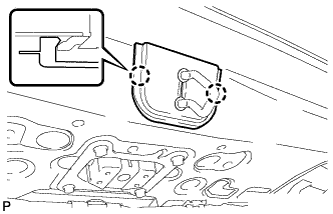
Engage the 2 claws to install the back door lock striker cover.
-
-
INSTALL BACK DOOR TRIM BOARD ASSEMBLY
-
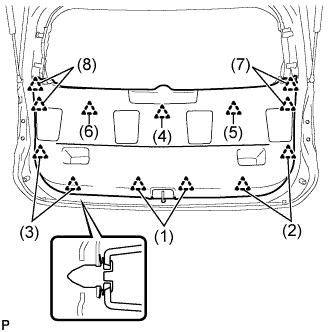
Engage the 13 clips to install the back door trim board assembly.
Tech Tips
Engage the clips in the order shown in the illustration.
-
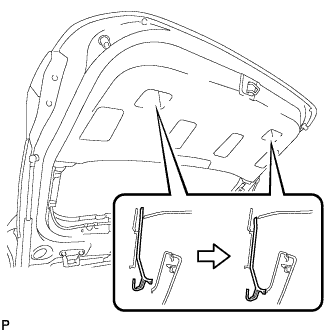
Slide the handle plate of the back door trim board to engage it.
-
-
INSTALL BACK DOOR SIDE GARNISH LH
-
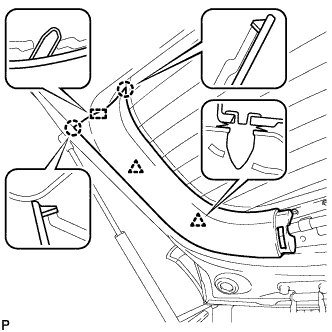
Engage the 2 clips, 2 claws and guide to install the back door side garnish LH.
-
-
INSTALL BACK DOOR SIDE GARNISH RH
-
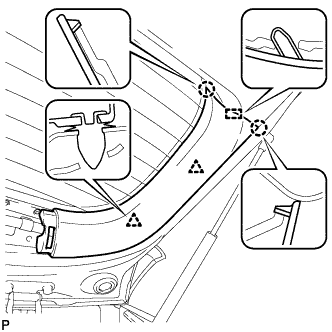
Engage the 2 clips, 2 claws and guide to install the back door side garnish RH.
-
-
INSTALL UPPER BACK DOOR TRIM PANEL ASSEMBLY
-
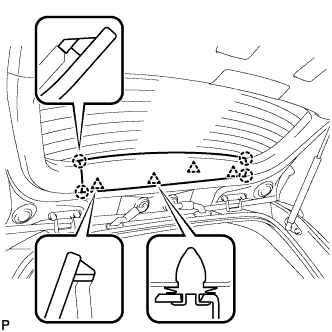
Engage the 4 clips and 4 claws to install the upper back door trim panel assembly.
-
-
ADJUST TELEVISION CAMERA (w/ Parking Assist Monitor System)