UPPER INSTRUMENT PANEL DISASSEMBLY
-
REMOVE AUTOMATIC LIGHT CONTROL SENSOR
-
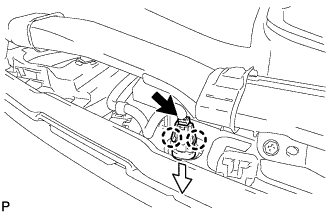
Disconnect the connector.
-
Disengage the 2 claws and remove the automatic light control sensor as shown in the illustration.
-
-
REMOVE NO. 1 DEFROSTER NOZZLE GARNISH
-
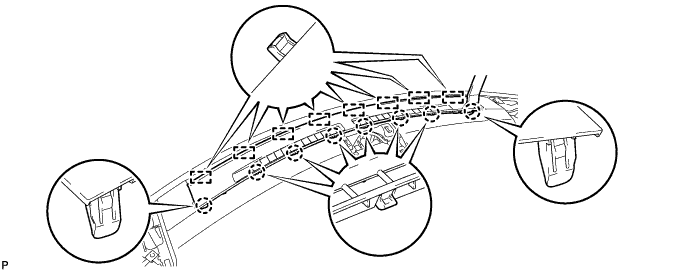
Using a moulding remover, disengage the 8 claws.
-
Disengage the 8 guides and remove the No. 1 defroster nozzle garnish.
-
-
REMOVE NO. 1 HEATER TO REGISTER DUCT SUB-ASSEMBLY
-
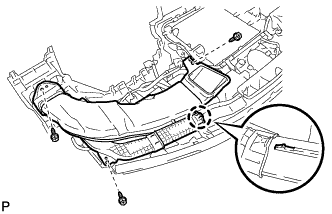
Remove the 3 screws <B>.
-
Disengage the claw and remove the No. 1 heater to register duct sub-assembly.
-
-
REMOVE NO. 3 HEATER TO REGISTER DUCT SUB-ASSEMBLY
Tech Tips
Use the same procedure described for the No. 1 heater to register duct sub-assembly.
-
REMOVE DEFROSTER NOZZLE ASSEMBLY
-
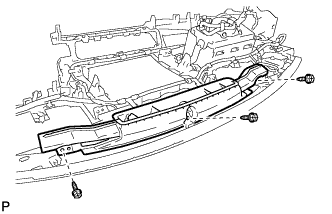
Remove the 3 screws <B> and defroster nozzle assembly.
-
-
REMOVE NAVIGATION ANTENNA ASSEMBLY (w/ Navigation System)
for LHD: Click here
for RHD: Click here
-
REMOVE NO. 2 INSTRUMENT PANEL WIRE
-
Using a clip remover, disengage each clamp and remove the No. 2 instrument panel wire.
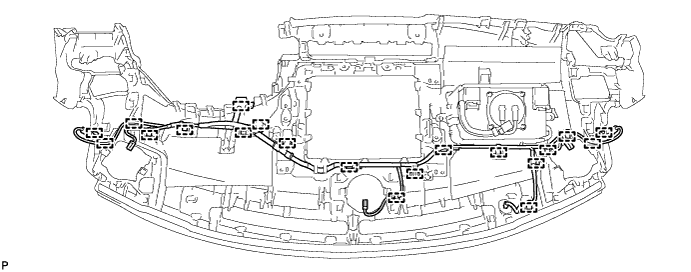
-
-
REMOVE INSTRUMENT PANEL PASSENGER AIRBAG ASSEMBLY
CAUTION:
When storing the instrument panel passenger airbag assembly, keep the airbag deployment side facing upward.
-
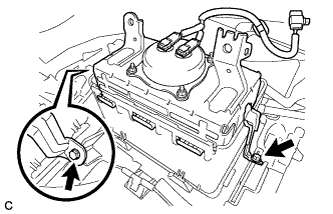
Remove the 2 screws.
-
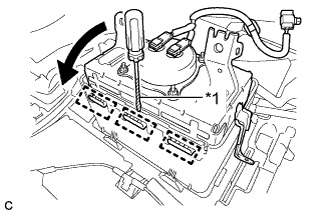
Text in Illustration *1 Protective Tape Using a screwdriver with the tip wrapped with protective tape, lean the instrument panel and disengage the 3 hooks as shown in the illustration.
Note
Do not damage the deployment surface of the instrument panel passenger airbag assembly.
-
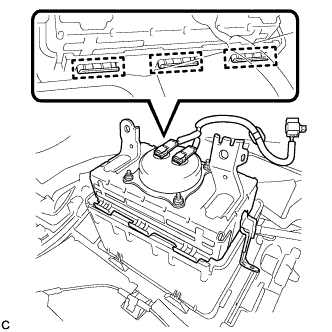
Disengage the 3 hooks to remove the instrument panel passenger airbag assembly from the upper instrument panel assembly.
-