BLOCKING SYSTEM Power Source Mode does not Change to ON (READY)
DESCRIPTION
If the power source mode does not change to on (READY) and no DTCs are output, the following conditions may apply:
-
There is a short circuit between the telephone transceiver assembly and the ID code box (immobiliser code ECU).
-
The blocking system is set.
WIRING DIAGRAM
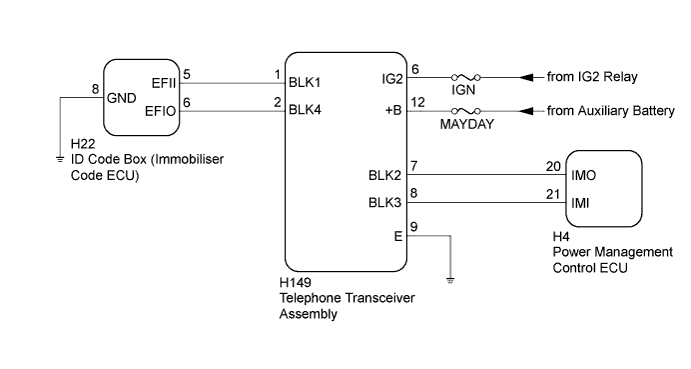
INSPECTION PROCEDURE
Note
-
Before troubleshooting this symptom, make sure no engine immobiliser system DTCs or blocking system DTCs are present. If present, troubleshoot the engine immobiliser system DTCs or blocking system DTCs first.
-
When replacing the telephone transceiver assembly and ID code box (immobiliser code ECU), refer to the Service Bulletin.
-
When the telephone transceiver assembly is replaced, it is necessary to set the contract mode.
-
Inspect the fuses for circuits related to this system before performing the following inspection procedure.
PROCEDURE
-
CHECK DTC OUTPUT
-
Clear the DTCs Click here.
-
Turn the power switch off.
-
Turn the power switch on (IG).
-
After 10 seconds have elapsed, check for DTCs.
Result Result Proceed to DTC is not output. A Hybrid control system DTC is output. B Engine immobiliser system DTC is output. C Entry and start system (for start function) DTC is output. D Blocking system DTC is output. E
B 
GO TO HYBRID CONTROL SYSTEM Click here
C
GO TO ENGINE IMMOBILISER SYSTEM Click here
D
GO TO ENTRY AND START SYSTEM (for Start Function) Click here
E
GO TO DIAGNOSTIC TROUBLE CODE CHART Click here
A 
-
-
CHECK WHETHER HYBRID CONTROL SYSTEM STARTS
-
Check that the hybrid control system starts normally.
OK Hybrid control system starts normally.
NG 
CHECK BLOCKING SYSTEM (SETTING) Click here
OK 
END
-
-
CHECK BLOCKING SYSTEM (SETTING)
-
Check the blocking system setting.
Tech Tips
Check with the customer's contracted service provider to determine whether the blocking system is set.
Result Result Proceed to Blocking system is unset. A Blocking system is set. B
B
UNSET BLOCKING SYSTEM
A
-
-
CHECK SECURITY INDICATOR LIGHT (ENGINE IMMOBILISER SYSTEM UNSET)
-
Get into the vehicle while carrying an electrical key transmitter sub-assembly.
-
Check that park (P) has been selected.
-
Press the power switch with the brake pedal released and check that the security indicator light changes from blinking to off at the same time the power source mode changes to on (ACC).
OK Security indicator light changes from blinking to off at the same time the power source mode changes to on (ACC). Tech Tips
It is determined that the engine immobiliser function is operating correctly if the security indicator light changes from blinking to off at the same time that the power source mode changes to on (ACC).
NG
GO TO ENGINE IMMOBILISER SYSTEM Click here
OK
-
-
CHECK WHETHER HYBRID CONTROL SYSTEM STARTS
-
Turn the power switch on (IG).
-
After 5 seconds have elapsed, start the hybrid control system.
OK Hybrid control system starts normally.
NG
CHECK TELEPHONE TRANSCEIVER ASSEMBLY Click here
OK
END
-
-
CHECK TELEPHONE TRANSCEIVER ASSEMBLY
-
Using an oscilloscope, check the waveform.

Text in Illustration *1 Waveform 1 *2 Waveform 2 *a Approximately 160 ms *b Approximately 510 ms *c Approximately 40 ms *d Approximately 60 ms Tester Connection Condition Tool Setting Specified Condition H149-1 (BLK1) - H149-9 (E) Check the waveform when the hybrid control system is started or the moment the power switch is turned on (IG) after the cable was disconnected and reconnected to the negative (-) auxiliary battery terminal. 2 V/DIV., 200 ms./DIV. Pulse generation (See waveform 1) H149-2 (BLK4) - H149-9 (E) Check the waveform when the hybrid control system is started or the moment the power switch is turned on (IG) after the cable was disconnected and reconnected to the negative (-) auxiliary battery terminal. 2 V/DIV., 200 ms./DIV. Pulse generation (See waveform 2) 
Text in Illustration *1 Waveform 1 *2 Waveform 2 *a Approximately 160 ms *b Approximately 510 ms *c Approximately 40 ms *d Approximately 60 ms Tester Connection Condition Tool Setting Specified Condition H149-7 (BLK2) - H149-9 (E) Check the waveform when the hybrid control system is started or the moment the power switch is turned on (IG) after the cable was disconnected and reconnected to the negative (-) auxiliary battery terminal. 2 V/DIV., 200 ms./DIV. Pulse generation (See waveform 1) H149-8 (BLK3) - H149-9 (E) Check the waveform when the hybrid control system is started or the moment the power switch is turned on (IG) after the cable was disconnected and reconnected to the negative (-) auxiliary battery terminal. 2 V/DIV., 200 ms./DIV. Pulse generation (See waveform 2) Note
-
The waveform shown in the illustration is an example for reference only. Noise, chattering, etc. are not shown.
-
Check if the waveforms are output in alphabetical order. If they are not, proceed to the step indicated for the incorrect waveform.
OK The waveforms are output normally (refer to illustration). Result Result Proceed to OK A Waveform A is abnormal
Waveform E is abnormal
B Waveform B is abnormal
Waveform F is abnormal
C Waveform C is abnormal D Waveform D is abnormal E -
B
CHECK HARNESS AND CONNECTOR (TELEPHONE TRANSCEIVER ASSEMBLY - ID CODE BOX (IMMOBILISER CODE ECU)) Click here
C
CHECK HARNESS AND CONNECTOR (TELEPHONE TRANSCEIVER ASSEMBLY - POWER MANAGEMENT CONTROL ECU) Click here
D
CHECK HARNESS AND CONNECTOR (TELEPHONE TRANSCEIVER ASSEMBLY - POWER MANAGEMENT CONTROL ECU) Click here
E
CHECK HARNESS AND CONNECTOR (TELEPHONE TRANSCEIVER ASSEMBLY - ID CODE BOX (IMMOBILISER CODE ECU) Click here
A
-
-
REREGISTRATION
-
Reregister the communication ID.
Tech Tips
Refer to the Service Bulletin.
NEXT
-
-
CHECK WHETHER HYBRID CONTROL SYSTEM STARTS
-
Check if the problem symptom occurs when the hybrid control system is started using a registered key.
OK Hybrid control system starts normally.
NG
REPLACE ID CODE BOX (IMMOBILISER CODE ECU) Click here
OK
END
-
-
CHECK HARNESS AND CONNECTOR (TELEPHONE TRANSCEIVER ASSEMBLY - ID CODE BOX (IMMOBILISER CODE ECU))
-
Disconnect the H149 telephone transceiver assembly connector.
-
Disconnect the H22 ID code box (immobiliser code ECU) connector.
-
Measure the resistance according to the value(s) in the table below.
Standard Resistance Tester Connection Condition Specified Condition H149-2 (BLK4) - H22-6 (EFIO) Always Below 1 Ω H149-2 (BLK4) - Body ground Always 10 kΩ or higher H22-6 (EFIO) - Body ground Always 10 kΩ or higher
NG
REPAIR OR REPLACE HARNESS OR CONNECTOR
OK
-
-
REPLACE ID CODE BOX (IMMOBILISER CODE ECU)
-
Temporarily replace the ID code box (immobiliser code ECU) with a new one.
Tech Tips
Refer to the Service Bulletin.
NEXT
-
-
PERFORM REGISTRATION
-
Perform the registration.
Tech Tips
Refer to the Service Bulletin.
NEXT
-
-
CHECK WHETHER HYBRID CONTROL SYSTEM STARTS
-
Check that the hybrid control system starts normally.
OK Hybrid control system starts normally.
NG
REPLACE TELEPHONE TRANSCEIVER ASSEMBLY
OK
END (ID CODE BOX (IMMOBILISER CODE ECU) WAS DEFECTIVE)
-
-
CHECK HARNESS AND CONNECTOR (TELEPHONE TRANSCEIVER ASSEMBLY - POWER MANAGEMENT CONTROL ECU)
-
Disconnect the H149 telephone transceiver assembly connector.
-
Disconnect the H4 power management control ECU connector.
-
Measure the resistance according to the value(s) in the table below.
Standard Resistance Tester Connection Condition Specified Condition H149-8 (BLK3) - H4-21 (IMI) Always Below 1 Ω H149-8 (BLK3) - Body ground Always 10 kΩ or higher H4-21 (IMI) - Body ground Always 10 kΩ or higher
NG
REPAIR OR REPLACE HARNESS OR CONNECTOR
OK
-
-
REPLACE TELEPHONE TRANSCEIVER ASSEMBLY
-
Temporarily replace the telephone transceiver assembly with a new one.
Tech Tips
Refer to the Service Bulletin.
NEXT
-
-
PERFORM REGISTRATION
-
Perform the registration.
Tech Tips
Refer to the Service Bulletin.
NEXT
-
-
CHECK WHETHER HYBRID CONTROL SYSTEM STARTS
-
Check that the hybrid control system starts normally.
OK Hybrid control system starts normally.
NG
REPLACE POWER MANAGEMENT CONTROL ECU Click here
OK
END (TELEPHONE TRANSCEIVER ASSEMBLY WAS DEFECTIVE)
-
-
REPLACE POWER MANAGEMENT CONTROL ECU
-
Temporarily replace the power management control ECU with a new one Click here.
Tech Tips
Refer to the Service Bulletin.
NEXT
-
-
CHECK DTC OUTPUT
-
Clear the DTCs Click here.
-
Turn the power switch off.
-
Turn the power switch on (IG).
-
After 10 seconds have elapsed, check for DTCs.
Result Result Proceed to DTC is not output. A Hybrid control system DTC is output. B Engine immobiliser system DTC is output. C Entry and start system (for start function) DTC is output. D Blocking system DTC is output. E
B
GO TO HYBRID CONTROL SYSTEM Click here
C
GO TO ENGINE IMMOBILISER SYSTEM Click here
D
GO TO ENTRY AND START SYSTEM (for Start Function) Click here
E
GO TO DIAGNOSTIC TROUBLE CODE CHART Click here
A
END (POWER MANAGEMENT CONTROL ECU WAS DEFECTIVE)
-
-
CHECK HARNESS AND CONNECTOR (TELEPHONE TRANSCEIVER ASSEMBLY - POWER MANAGEMENT CONTROL ECU)
-
Disconnect the H149 telephone transceiver assembly connector.
-
Disconnect the H4 power management control ECU connector.
-
Measure the resistance according to the value(s) in the table below.
Standard Resistance Tester Connection Condition Specified Condition H149-7 (BLK2) - H4-20 (IMO) Always Below 1 Ω H149-7 (BLK2) - Body ground Always 10 kΩ or higher H4-20 (IMO) - Body ground Always 10 kΩ or higher
NG
REPAIR OR REPLACE HARNESS OR CONNECTOR
OK
-
-
REPLACE POWER MANAGEMENT CONTROL ECU
-
Temporarily replace the power management control ECU with a new one Click here.
Tech Tips
Refer to the Service Bulletin.
NEXT
-
-
CHECK DTC OUTPUT
-
Clear the DTCs Click here.
-
Turn the power switch off.
-
Turn the power switch on (IG).
-
After 10 seconds have elapsed, check for DTCs.
Result Result Proceed to DTC is not output. A Hybrid control system DTC is output. B Engine immobiliser system DTC is output. C Entry and start system (for start function) DTC is output. D Blocking system DTC is output. E
B
GO TO HYBRID CONTROL SYSTEM Click here
C
GO TO ENGINE IMMOBILISER SYSTEM Click here
D
GO TO ENTRY AND START SYSTEM (for Start Function) Click here
E
GO TO DIAGNOSTIC TROUBLE CODE CHART Click here
A
-
-
CHECK WHETHER HYBRID CONTROL SYSTEM STARTS
-
Check that the hybrid control system starts normally.
OK Hybrid control system starts normally.
NG
REPLACE TELEPHONE TRANSCEIVER ASSEMBLY
OK
END (POWER MANAGEMENT CONTROL ECU WAS DEFECTIVE)
-
-
CHECK HARNESS AND CONNECTOR (TELEPHONE TRANSCEIVER ASSEMBLY - ID CODE BOX (IMMOBILISER CODE ECU)
-
Disconnect the H149 telephone transceiver assembly connector.
-
Disconnect the H22 ID code box (immobiliser code ECU) connector.
-
Measure the resistance according to the value(s) in the table below.
Standard Resistance Tester Connection Condition Specified Condition H149-1 (BLK1) - H22-5 (EFII) Always Below 1 Ω H149-1 (BLK1) - Body ground Always 10 kΩ or higher H22-5 (EFII) - Body ground Always 10 kΩ or higher
NG
REPAIR OR REPLACE HARNESS OR CONNECTOR
OK
-
-
REPLACE TELEPHONE TRANSCEIVER ASSEMBLY
-
Temporarily replace the telephone transceiver assembly with a new one.
Tech Tips
Refer to the Service Bulletin.
NEXT
-
-
PERFORM REGISTRATION
-
Perform the registration.
Tech Tips
Refer to the Service Bulletin.
NEXT
-
-
CHECK WHETHER HYBRID CONTROL SYSTEM STARTS
-
Check that the hybrid control system starts normally.
OK Hybrid control system starts normally.
NG
REPLACE ID CODE BOX (IMMOBILISER CODE ECU)
OK
END (TELEPHONE TRANSCEIVER ASSEMBLY WAS DEFECTIVE)
-