BLOCKING SYSTEM, Diagnostic DTC:B1573, B15CB
| DTC Code | DTC Name |
|---|---|
| B1573 | Short in Telephone Antenna Circuit |
| B15CB | Telematics Transceiver Antenna Disconnected |
DESCRIPTION
These DTCs are stored when a malfunction occurs in the instrument panel integration antenna assembly (telephone antenna) circuit.
| DTC No. | DTC Detection Condition | Trouble Area |
|---|---|---|
| B1573 | There is a short circuit in the instrument panel integration antenna assembly between the telephone transceiver assembly and telephone antenna, or at the points where it connects to the telephone transceiver assembly and instrument panel integration antenna assembly. |
|
| B15CB | There is an open circuit in the instrument panel integration antenna assembly between the telephone transceiver assembly and telephone antenna, or at the points where it connects to the telephone transceiver assembly and instrument panel integration antenna assembly. |
INSPECTION PROCEDURE
Note
-
When replacing the telephone transceiver assembly or instrument panel integration antenna assembly, refer to the Service Bulletin.
-
When the telephone transceiver assembly is replaced, it is necessary to set the contract mode.
PROCEDURE
-
CHECK CONNECTION OF CONNECTOR
-
Turn the power switch off.
-
Check that the connectors are properly connected to the telephone transceiver assembly and instrument panel integration antenna assembly (telephone antenna connector).
OK Connectors are properly connected.
NG 
CONNECT CONNECTOR CORRECTLY
OK 
-
-
CLEAR DTC
-
Clear the DTCs Click here.
NEXT
-
-
CHECK DTC OUTPUT
-
Check for DTCs Click here.
OK DTC B1573 and B15CB is not output.
NG 
CHECK CONNECTOR CONDITION Click here
OK 
END
-
-
CHECK CONNECTOR CONDITION
-
Turn the power switch off.
-
Disconnect the telephone transceiver assembly (telephone antenna) connector.

Text in Illustration *1 Telephone antenna - - *a Component without harness connected
(Telephone Transceiver Assembly)
- - -
Check that the connector pins are not bent.
OK Connector pins are not bent.
NG
REPAIR OR REPLACE INSTRUMENT PANEL INTEGRATION ANTENNA ASSEMBLY
OK
-
-
CHECK INSTRUMENT PANEL INTEGRATION ANTENNA ASSEMBLY (TELEPHONE ANTENNA)
-
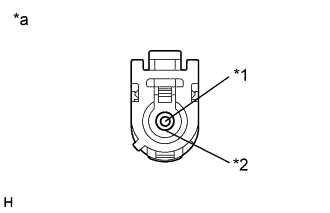
Text in Illustration *1 Core wire *2 Shield *a Component without harness connected
(Instrument Panel Integration Antenna Assembly (Telephone Antenna))
Disconnect the instrument panel integration antenna assembly (telephone antenna) connector.
-
Measure the resistance according to the value(s) in the table below.
Standard Resistance Tester Connection Condition Specified Condition Core wire - Shield Always 4 to 11 kΩ
NG
REPLACE INSTRUMENT PANEL INTEGRATION ANTENNA ASSEMBLY
OK
-
-
CLEAR DTC
-
Clear the DTCs Click here.
NEXT
-
-
CHECK DTC OUTPUT
-
Wiggle the instrument panel integration antenna assembly (telephone antenna).
-
Check for DTCs Click here.
OK DTC B1573 and B15CB is not output.
NG
REPLACE INSTRUMENT PANEL INTEGRATION ANTENNA ASSEMBLY Click here
OK
END
-
-
REPLACE INSTRUMENT PANEL INTEGRATION ANTENNA ASSEMBLY
-
Temporarily replace the instrument panel integration antenna assembly with a new or known good one.
Tech Tips
Refer to the Service Bulletin.
NEXT
-
-
CLEAR DTC
-
Clear the DTCs Click here.
NEXT
-
-
CHECK DTC OUTPUT
-
Check for DTCs Click here.
OK DTC B1573 and B15CB is not output.
NG
REPLACE TELEPHONE TRANSCEIVER ASSEMBLY
OK
END (INSTRUMENT PANEL INTEGRATION ANTENNA ASSEMBLY WAS DEFECTIVE)
-