PUSH-BUTTON START SYSTEM OPERATION CHECK
-
OPERATION DESCRIPTION
-
Push-button start function:
-
When the key is in the detection area inside the vehicle and the brake pedal is depressed, the hybrid control system is started by pressing the power switch.
-
When the key is in the detection area inside the vehicle and the brake pedal is not depressed, the power source mode is changed by pressing the power switch. The power source mode changes in the following order every time the power switch is pressed: off → on (ACC) → on (IG) → off.
-
After getting into the vehicle while carrying the key when the power switch is off, if the power switch is pressed while not depressing the brake pedal, the power source mode changes to on (ACC) and the power switch indicator illuminates in amber.
-
After getting into the vehicle while carrying the key when the power switch is off, if the brake pedal is depressed while park (P) is selected, the power switch indicator illuminates in green.
-
The hybrid control system starts if the power switch is pressed when the power switch indicator is illuminated in green.
-
-
Changing the power source mode when the key does not operate correctly due to wave interference or key battery depletion:
-
Unlock the door using the built-in mechanical key and get into the vehicle while carrying the key.
-
While depressing the brake pedal, hold the ornament side of the key against the power switch.
-
When a buzzer sound is heard from the buzzer in the combination meter, release the brake pedal within 10 seconds. By pressing the power switch while not depressing the brake pedal, the power source mode changes in the following order every time the power switch is pressed: off → on (ACC) → on (IG) → off.
-
-
Starting the hybrid control system when the key does not operate correctly due to wave interference or key battery depletion:
-
Unlock the door using the built-in mechanical key and get into the vehicle while carrying the key.
-
While depressing the brake pedal with park (P) selected, hold the ornament side of the key against the power switch.
-
When a buzzer sound is heard from the buzzer in the combination meter and the power switch indicator illuminates in green, press the power switch within 10 seconds while keeping the brake pedal depressed to start the hybrid control system.
-
-
-
CHECK PUSH-BUTTON START FUNCTION
-
Check the push-button start function:
-
Get into the vehicle while carrying the key with the power switch off. With park (P) selected, check that the power switch indicator illuminates in green when the brake pedal is depressed. Then check that the hybrid control system starts when the power switch is pressed after the power switch indicator illuminates in green.
-
While the brake pedal is released and the key is being carried, check that the power source mode changes in the following order when the power switch is pressed: off → on (ACC) → on (IG) → off.
Tech Tips
When the power switch is pressed with the power switch on (IG) and park (P) selected, the power source mode changes to off.
-
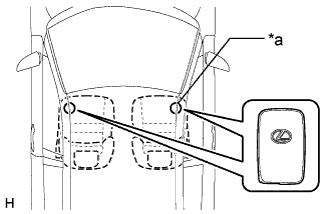
Text in Illustration *a Inspection Point Check the push-button start operation range for the front side. Place the key in either of the two locations making sure that the key is oriented as shown in the illustration, and then check that the hybrid control system can be started.
Note
-
Even if the key is in the vehicle interior key detection area, the key may not be properly detected if the key is on the instrument panel, in the glove box or on the floor.
-
If the key is within 0.2 m (0.66 ft.) of the shift position, communication may not be possible.
Tech Tips
Perform this inspection for both inspection points.
-
-
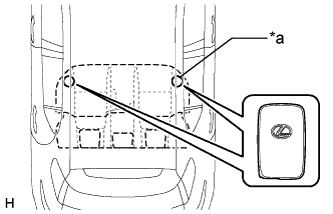
Text in Illustration *a Inspection Point Check the push-button start operation range for the rear side. Place the key in either of the two locations making sure that the key is oriented as shown in the illustration, and then check that the hybrid control system can be started.
Note
-
Even if the key is in the vehicle interior key detection area, the key may not be properly detected if the key is on the instrument panel, in the glove box or on the floor.
-
If the key is within 0.2 m (0.66 ft.) of the center of the rear seat, communication may not be possible.
Tech Tips
Perform this inspection for both inspection points.
-
-
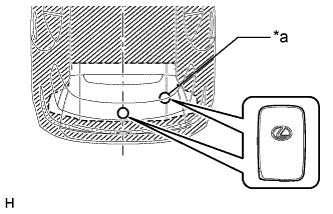
Text in Illustration *a Inspection Point Check the push-button start operation range for the luggage compartment. Place the key in either of the two locations making sure that the key is oriented as shown in the illustration, and then check that the hybrid control system can be started.
Tech Tips
Perform this inspection at both locations in the luggage compartment.
-
-
Check the push-button start cancel function.
-
Cancel the push-button start system and check that all the functions of the push-button start system no longer operate.
Tech Tips
-
Refer to the following procedures to cancel the push-button start system Click here.
-
While the push-button start system is canceled, the push-button start system can be operated by holding the key against the power switch.
-
-
While the push-button start cancel function is on, check that all functions of the push-button start system cannot be operated.
-
-
-
CHECK POWER SOURCE MODE CHANGING FUNCTION
-
Check the power switch.
-
Check that the power source mode changes according to the chart below.
Shift Position Brake Pedal Power Source Mode when Power Switch Pressed Park (P) selected Released Off → on (ACC) → on (IG) → off Park (P) selected Released On (READY) → off Park (P) selected Depressed Off → on (READY) Park (P) selected Depressed On (ACC) → on (READY) Park (P) selected Depressed On (IG) → on (READY) Park (P) selected Depressed On (READY) → off Park (P) not selected Released On (IG) → on (READY) Park (P) not selected Released On (READY) → off Park (P) not selected Depressed On (ACC) → off
-
-
-
CHECK POWER SOURCE MODE INDICATION
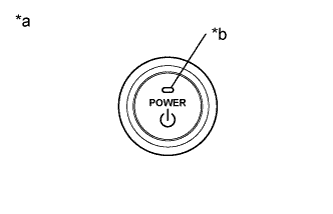
Text in Illustration *a Power Switch *b Indicator Light
-
Check the power switch indicator.
Indicator Inspection Power Switch Indicator Off
(Excludes condition in which hybrid control system can be started)
Off On (ACC)
(Excludes condition in which hybrid control system can be started)
Illuminated in amber On (IG)
(Excludes condition in which hybrid control system can be started)
Illuminated in amber Condition in which hybrid control system can be started* Illuminated in green Hybrid control system started Off Tech Tips
*: Conditions in which hybrid control system can be started is as follows: The hybrid control system can be started by pressing the power switch when all of the following conditions are met.
-
The key is verified*.
-
Park (P) is selected.
-
The stop light switch is on.
-
*: When the key is in the vehicle, the ID code sent as a result from communication between the key and certification ECU (smart key ECU assembly), and the ID code calculated by the certification ECU (smart key ECU assembly) are compared. If the ID codes match each other, the vehicle recognizes that the key is in the vehicle.
-
Indicator Condition Chart
Indicator Vehicle State Off Either condition is met:
-
The hybrid control system is starting.
-
The power switch is off and the vehicle is in a state in which the hybrid control system does not start if the power switch is pressed.
Illuminated in green All conditions below are met and the vehicle is in a state in which the hybrid control system can be started if the power switch is pressed:
The key is inside the vehicle, the stop light switch is on and park (P) is selected.
Illuminated in amber The power switch is on (ACC) or on (IG), and the vehicle is in a state in which the hybrid control system does not start if the power switch is pressed. Blinking in amber
(2 second intervals)
The power management control ECU has an internal malfunction.
The indicator starts blinking when the power management control ECU is determined to have an internal malfunction.
The indicator stops blinking when the ECU returns to normal or 15 seconds elapse after blinking starts.
-
-
-
-
KEY DIAGNOSTIC MODE (Using Intelligent Tester)
Tech Tips
With key diagnostic mode, it is possible to check if the key is operating properly with the selected electrical key antenna and within the selected detection area by the sounding of the wireless buzzer.
-
Enter the following menus: Body / Entry&Start / Utility / Key Communication Check.
-
Select a part to inspect from the following table.
Tester Display Inspection Range Overhead + Front Room*1 No. 1 indoor electrical key antenna assembly (front floor) Overhead + Rear Room*2 No. 2 indoor electrical key antenna assembly (rear floor) Overhead + Back Door (inside)*3 No. 3 indoor electrical key antenna (luggage compartment) -
Bring the key near the selected electrical key antenna and check that the wireless door lock buzzer sounds.
Tech Tips
The buzzer sounds in short, repeated beeps for all items except "Overhead + Rear Room"*2. For "Overhead + Rear Room"*2, the buzzer sounds in one long, continuous beep.
-
Text in Illustration *a Inspection Point *1: No. 1 indoor electrical key antenna assembly (front floor)
Tech Tips
Place the key on the front seat cushion of the driver seat or front passenger seat.
-
Text in Illustration *a Inspection Point *2: No. 2 indoor electrical key antenna assembly (rear floor)
Tech Tips
Place the key on the rear seat cushion.
-
Text in Illustration *a Inspection Point *3: No. 3 indoor electrical key antenna (luggage compartment)
Tech Tips
Place the key in the luggage compartment. Even if the key is in the luggage compartment, the buzzer may not sound.
-