ENTRY AND START SYSTEM (for Start Function) Power Source Mode does not Change to ON (IG)
DESCRIPTION
When the power switch is pushed with the key in the cabin, the power management control ECU receives signals to switch the power source mode.
Use this troubleshooting procedure when the power source mode does not change to on (IG) but does change to on (ACC).
Tech Tips
-
When the power management control ECU is replaced with a new one and the cable is connected to the negative (-) auxiliary battery terminal, the power source mode changes to on (IG).
-
When the auxiliary battery cable is disconnected and reconnected, the power source returns to the mode it was in before the auxiliary battery cable was disconnected.
WIRING DIAGRAM
Refer to DTC B2271 Click here.
INSPECTION PROCEDURE
Note
-
When using the intelligent tester with the power switch off, perform either of the following: 1) Turn a courtesy light switch on and off at intervals of 1.5 seconds or less until communication between the intelligent tester and vehicle begins, or 2) connect the intelligent tester to the vehicle, select the vehicle type under manual mode, and then enter the following menus:
for Power Source Control: Body / Power Source Control / DTC.
for Entry&Start: Body / Entry&Start / DTC.
-
Make sure that no DTCs are output. If any DTCs are output, proceed to the Diagnostic Trouble Code Chart Click here.
-
The entry and start system uses multiplex communication. First perform the inspections in "How to Proceed with Troubleshooting" to confirm that there are no communication malfunctions before proceeding with troubleshooting Click here.
-
If the entry and start system is disabled through the customize function, enable the system before performing troubleshooting Click here.
-
Inspect the fuses for circuits related to this system before performing the following inspection procedure.
-
After completing repairs, confirm that the problem does not occur.
Tech Tips
| Problem Symptom | Data List Item | Active Test Item |
|---|---|---|
| Power source mode does not change to on (IG) but does change to on (ACC) |
Power Source Control |
- |
PROCEDURE
-
CHECK HARNESS AND CONNECTOR (AUXILIARY BATTERY - POWER MANAGEMENT CONTROL ECU)
-
Disconnect the H3 and H4 connectors from the power management control ECU.
-
Measure the voltage according to the value(s) in the table below.
Standard Voltage Tester Connection Condition Specified Condition H3-1 (AM22) - Body ground Always 9.5 to 16 V H4-7 (AM21) - Body ground Always 9.5 to 16 V
NG 
REPAIR OR REPLACE HARNESS OR CONNECTOR
OK 
-
-
CHECK HARNESS AND CONNECTOR (POWER MANAGEMENT CONTROL ECU - BODY GROUND)
-
Measure the resistance according to the value(s) in the table below.
Standard Resistance Tester Connection Condition Specified Condition H3-5 (E01) - Body ground Always Below 1 Ω H3-6 (E1) - Body ground Always Below 1 Ω H4-4 (E12) - Body ground Always Below 1 Ω H4-5 (E02) - Body ground Always Below 1 Ω
NG
REPAIR OR REPLACE HARNESS OR CONNECTOR
OK
-
-
INSPECT NO.2 INTEGRATION RELAY (IG2 RELAY)
-
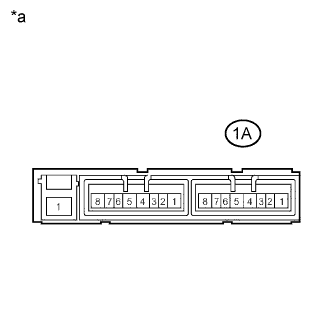
Text in Illustration *a Component without harness connected
(No.2 Integration Relay)
Remove the No.2 integration relay. Click here
-
Measure the resistance according to the value(s) in the table below.
Standard Resistance Tester Connection Condition Specified Condition 1A-2 - 1A-3 20°C (68°F) 130 to 230 Ω
NG
REPLACE NO.2 INTEGRATION RELAY Click here
OK
-
-
INSPECT INSTRUMENT PANEL JUNCTION BLOCK ASSEMBLY (IG1 NO. 1, IG1 NO. 2 AND IG1 NO. 3 RELAY)
-
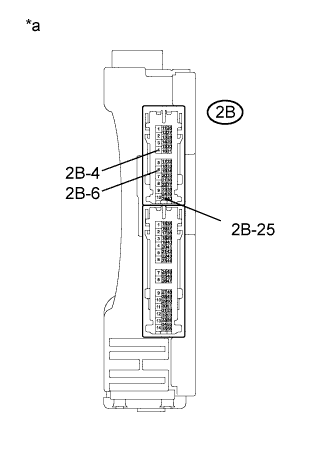
Text in Illustration *a Component without harness connected
(Instrument Panel Junction Block Assembly)
Remove the instrument panel junction block assembly Click here.
-
Measure the resistance according to the value(s) in the table below.
Standard Resistance Tester Connection Condition Specified Condition 2B-25 - 2B-4 20°C (68°F) 52.32 to 79.32 Ω 2B-25 - 2B-6 20°C (68°F) 52.32 to 79.32 Ω 2B-4 - 2B-6 Always Below 1 Ω
NG
REPLACE INSTRUMENT PANEL JUNCTION BLOCK ASSEMBLY Click here
OK
-
-
CHECK HARNESS AND CONNECTOR (POWER MANAGEMENT CONTROL ECU - INSTRUMENT PANEL J/B)
-
Measure the resistance according to the value(s) in the table below.
Standard Resistance Tester Connection Condition Specified Condition H4-2 (IG1D) - 2B-25 Always Below 1 Ω H4-2 (IG1D) - Body ground Always 10 kΩ or higher
NG
REPAIR OR REPLACE HARNESS OR CONNECTOR
OK
-
-
CHECK HARNESS AND CONNECTOR (INSTRUMENT PANEL JUNCTION BLOCK ASSEMBLY - BODY GROUND)
-
Measure the resistance according to the value(s) in the table below.
Standard Resistance Tester Connection Condition Specified Condition A20-2 (IG2D) - 1A-2 Always Below 1 Ω A20-2 (IG2D) - Body ground Always 10 kΩ or higher
NG
REPAIR OR REPLACE HARNESS OR CONNECTOR
OK
-
-
CHECK HARNESS AND CONNECTOR (POWER MANAGEMENT CONTROL ECU - NO.2 INTEGRATION RELAY)
-
Measure the resistance according to the value(s) in the table below.
Standard Resistance Tester Connection Condition Specified Condition A20-2 (IG2D) - 1A-2 Always Below 1 Ω A20-2 (IG2D) - Body ground Always 10 kΩ or higher
NG
REPAIR OR REPLACE HARNESS OR CONNECTOR
OK
-
-
CHECK HARNESS AND CONNECTOR (NO.2 INTEGRATION RELAY - BODY GROUND)
-
Measure the resistance according to the value(s) in the table below.
Standard Resistance Tester Connection Condition Specified Condition 1A-3 - Body ground Always Below 1 Ω
NG
REPAIR OR REPLACE HARNESS OR CONNECTOR
OK
-
-
CHECK POWER MANAGEMENT CONTROL ECU
-
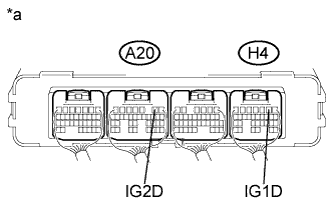
Text in Illustration *a Component with harness connected
(Power Management Control ECU)
Install the instrument panel junction block assembly Click here.
-
Install the No. 2 integration relay.
-
Reconnect the A20 and H4 connectors.
-
Measure the voltage according to the value(s) in the table below.
Standard Voltage Tester Connection Condition Specified Condition A20-2 (IG2D) - Body ground Power switch on (IG) Output voltage at terminal AM21 or AM22 is -2.5 V or more H4-2 (IG1D) - Body ground Power switch on (IG) Output voltage at terminal AM21 or AM22 is -2.5 V or more
NG
REPLACE POWER MANAGEMENT CONTROL ECU Click here
OK 
USE SIMULATION METHOD TO CHECK Click here
-