| DTC Code | DTC Name |
|---|---|
| B2284 | Brake Signal Malfunction |
DESCRIPTION
The power management control ECU receives brake signal information from 2 sources. It receives a signal from the stop light switch assembly via a direct line, and a signal from the skid control ECU assembly via CAN communication. If the information from these 2 sources is inconsistent, this DTC will be stored.
-
When the power management control ECU is replaced with a new one and the cable is connected to the negative (-) auxiliary battery terminal, the power source mode changes to on (IG).
-
When the auxiliary battery cable is disconnected and reconnected, the power source returns to the mode it was in before the auxiliary battery cable was disconnected.
| DTC No. | DTC Detection Condition | Trouble Area |
|---|---|---|
| B2284 | Stop light switch assembly operation information received by the power management control ECU from the stop light switch assembly via a direct line and stop light switch assembly information from the skid control ECU assembly via CAN are inconsistent. |
|
This DTC is stored when a mismatch between the brake signal from the direct line and the brake signal sent via CAN communication is detected.
| DTC Code | DTC Detection Condition | Trouble Area | DTC Output Confirmation Operation |
|---|---|---|---|
| B2284 | The brake signal information from the direct line and the brake signal information from the ECU via CAN communication are inconsistent (1-trip detection logic*). |
|
Connect the cable to the negative (-) auxiliary battery terminal, turn the brakes off for 20 seconds or more and then turn them on for 20 seconds or more. |
-
*: Only output while a malfunction is present and the power switch is on (IG)
| Vehicle Condition when Malfunction Detected | Fail-safe Function when Malfunction Detected |
|---|---|
| When the key is inside the vehicle, the hybrid control system does not start even though a hybrid control system start operation is performed (the power switch indicator does not illuminate in green). However, if the power switch is pressed and held for a certain period of time after the power source mode is changed to on (ACC), the hybrid control system can be started.
|
- |
INSPECTION PROCEDURE
Check the connector connection to the terminal to make sure that there is no abnormality such as a loose connection, deformation, etc.
-
When using the intelligent tester with the power switch off, perform either of the following: 1) Turn a courtesy light switch on and off at intervals of 1.5 seconds or less until communication between the intelligent tester and vehicle begins, or 2) connect the intelligent tester to the vehicle, select the vehicle type under manual mode, and then enter the following menus:
for Power Source Control: Body / Power Source Control / DTC.
for Entry&Start: Body / Entry&Start / DTC.
-
The push-button start system uses multiplex communication. First perform the inspections in "How to Proceed with Troubleshooting" to confirm that there are no communication malfunctions before proceeding with troubleshooting (Click here).
-
Inspect the fuses for circuits related to this system before performing the following inspection procedure.
-
After performing repairs, perform the operation that fulfills the DTC output confirmation operation, and then confirm that no DTCs are output again.
| DTC | Data List Item | Active Test Item |
|---|---|---|
| B2284 |
|
- |
PROCEDURE
- Click here
CHECK HARNESS AND CONNECTOR (AUXILIARY BATTERY - POWER MANAGEMENT CONTROL ECU)
-
Disconnect the H3 and H4 connectors from the power management control ECU.
-
Measure the voltage according to the value(s) in the table below.
Standard Voltage Tester Connection Condition Specified Condition H3-1 (AM22) - Body ground Always 9.5 to 16 V H4-7 (AM21) - Body ground Always 9.5 to 16 V
- OKClick here
- NGClick here
-
- Click here
CHECK HARNESS AND CONNECTOR (POWER MANAGEMENT CONTROL ECU - BODY GROUND)
-
Measure the resistance according to the value(s) in the table below.
Standard Resistance Tester Connection Condition Specified Condition H3-5 (E01) - Body ground Always Below 1 Ω H3-6 (E1) - Body ground Always Below 1 Ω H4-4 (E12) - Body ground Always Below 1 Ω H4-5 (E02) - Body ground Always Below 1 Ω
- OKClick here
- NGClick here
-
- Click here
INSPECT STOP LIGHT SWITCH ASSEMBLY
-
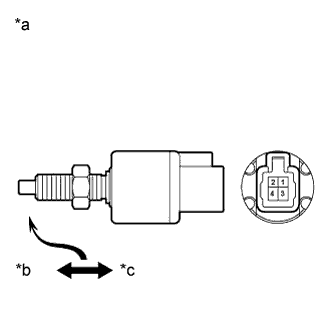
Remove the stop light switch assembly (Click here).
-
Measure the resistance according to the value(s) in the table below.
Standard Resistance Tester Connection Condition Specified Condition 1 - 2 Pushed 10 kΩ or higher 1 - 2 Not pushed Below 1 Ω Table 3. Text in Illustration *a Component without harness connected
(Stop Light Switch Assembly)
*b Free *c Pushed in
- OKClick here
- NGClick here
-
- Click here
CHECK HARNESS AND CONNECTOR (STOP LIGHT SWITCH ASSEMBLY - POWER MANAGEMENT CONTROL ECU)
-
Disconnect the A20 connector from the power management control ECU.
-
Measure the resistance according to the value(s) in the table below.
Standard Resistance Tester Connection Condition Specified Condition A20-23 (STP) - A25-1 Always Below 1 Ω A20-23 (STP) - Body ground Always 10 kΩ or higher
- OKClick here
- NGClick here
-
- Click here
READ VALUE USING INTELLIGENT TESTER (STOP LIGHT SWITCH ASSEMBLY)
-
Connect the intelligent tester to the DLC3.
-
Turn the power switch on (IG).
-
Turn the intelligent tester on.
-
Enter the following menus: Body / Power Source Control / Data List.
-
Read the Data List according to the display on the intelligent tester.
Table 4. Power Source Control Tester Display Measurement Item/Range Normal Condition Specified Condition Stop Light Switch1 Stop light switch1/ON or OFF ON: Brake pedal depressed
OFF: Brake pedal released
- OK ON (brake pedal is depressed) and OFF (brake pedal is released) appear on the screen.
- OKClick here
- NGClick here
-
- Click here
REPAIR OR REPLACE HARNESS OR CONNECTOR
- Click here
REPAIR OR REPLACE HARNESS OR CONNECTOR
- Click here
REPLACE STOP LIGHT SWITCH ASSEMBLYClick here
- Click here
REPAIR OR REPLACE HARNESS OR CONNECTOR
- Click here
REPLACE POWER MANAGEMENT CONTROL ECUClick here
- Click here
GO TO ELECTRONICALLY CONTROLLED BRAKE SYSTEM (DTC C1249/49)Click here