PUSH-BUTTON START SYSTEM, Diagnostic DTC:B2282
| DTC Code | DTC Name |
|---|---|
| B2282 | Vehicle Speed Signal Malfunction |
DESCRIPTION
This DTC is stored when a mismatch between the vehicle speed signal from the direct line sent by the combination meter and the vehicle speed signal sent via CAN communication is detected.
Tech Tips
-
When the power management control ECU is replaced with a new one and the cable is connected to the negative (-) auxiliary battery terminal, the power source mode changes to on (IG).
-
When the auxiliary battery cable is disconnected and reconnected, the power source returns to the mode it was in before the auxiliary battery cable was disconnected.
| DTC Code | DTC Detection Condition | Trouble Area | DTC Output Confirmation Operation |
|---|---|---|---|
| B2282 | Mismatch between the vehicle speed signal from the direct line sent by the combination meter and the vehicle speed signal sent via CAN communication (1-trip detection logic*). |
|
Drive the vehicle for 20 seconds at a vehicle speed of 25 km/h (16 mph) or more, and then drive the vehicle at a vehicle speed that is less than 5 km/h (3 mph) for 20 seconds. |
-
*: Only output while a malfunction is present and the power switch is on (IG)
| DTC Code | Vehicle Condition when Malfunction Detected | Fail-safe Function when Malfunction Detected |
|---|---|---|
| B2282 |
|
- |
WIRING DIAGRAM
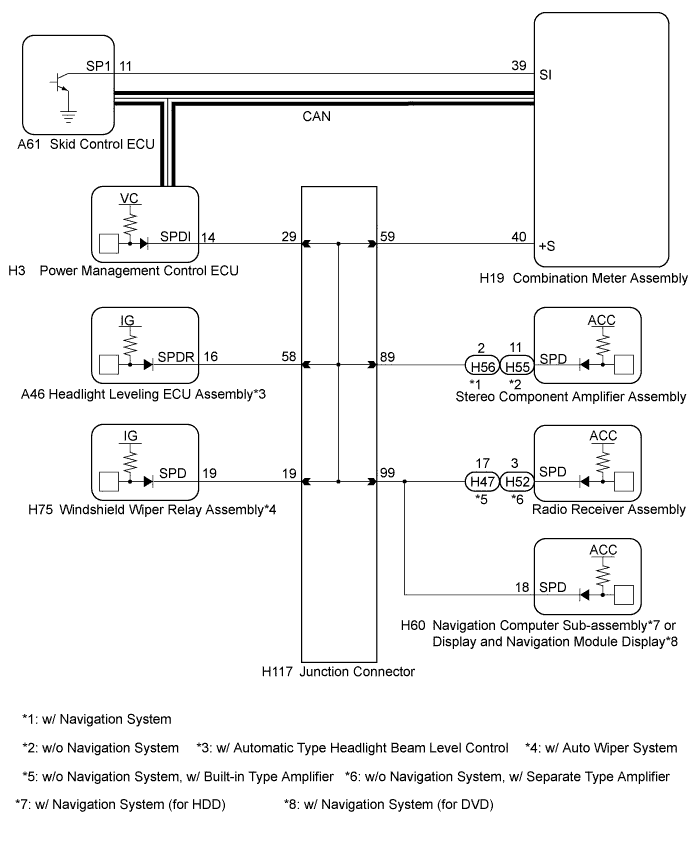
Tech Tips
-
A voltage of 12 V or 5 V is output from each ECU and then input to the combination meter. The signal is changed to a pulse signal at the transistor in the combination meter. Each ECU controls the respective system based on the pulse signal.
-
If a short occurs in an ECU, all systems in the diagram above will not operate normally.
INSPECTION PROCEDURE
Note
-
When using the intelligent tester with the power switch off, perform either of the following: 1) Turn a courtesy light switch on and off at intervals of 1.5 seconds or less until communication between the intelligent tester and vehicle begins, or 2) connect the intelligent tester to the vehicle, select the vehicle type under manual mode, and then enter the following menus:
for Power Source Control: Body / Power Source Control / DTC.
for Entry&Start: Body / Entry&Start / DTC.
-
The push-button start system uses multiplex communication. First perform the inspections in "How to Proceed with Troubleshooting" to confirm that there are no communication malfunctions before proceeding with troubleshooting Click here.
-
Inspect the fuses for circuits related to this system before performing the following inspection procedure.
-
After performing repairs, perform the operation that fulfills the DTC output confirmation operation, and then confirm that no DTCs are output again.
Tech Tips
| DTC | Data List Item | Active Test Item |
|---|---|---|
| B2282 |
Power Source Control
Combination Meter |
- |
PROCEDURE
-
CHECK CAN COMMUNICATION SYSTEM
-
Check if CAN communication DTCs are output.
Tech Tips
If any DTCs for the CAN communication system are output, inspect those DTCs first.
OK CAN communication DTC is not output.
NG 
GO TO CAN COMMUNICATION SYSTEM (DIAGNOSTIC TROUBLE CODE CHART) Click here
OK 
-
-
CHECK SPEEDOMETER OPERATION
-
Connect the intelligent tester to the DLC3.
-
Turn the power switch on (IG).
-
Turn the intelligent tester on.
-
Enter the following menus: Body / Combination Meter / Data List.
-
Check the Data List for proper functioning of the vehicle speed signal.
Combination Meter Tester Display Measurement Item/Range Normal Condition Diagnostic Note Vehicle Speed Meter Vehicle speed/Min.: 0, Max.: 255 Almost same as actual speed (When driving) - OK Vehicle speed displayed on the intelligent tester is almost the same as the actual vehicle speed measured using a speedometer tester (calibrated chassis dynamometer).
NG
GO TO METER / GAUGE SYSTEM (Speedometer Malfunction) Click here
OK
-
-
READ VALUE USING INTELLIGENT TESTER
-
Enter the following menus: Body / Power Source Control / Data List.
-
Read the Data List according to the display on the intelligent tester.
Power Source Control Tester Display Measurement Item/Range Normal Condition Diagnostic Note Vehicle speed signal Vehicle speed signal/Stop or Run Stop: Vehicle stopped
Run: Vehicle running
- OK Stop (vehicle is stopped) and Run (vehicle is running) appear on the screen.
NG 
OK 
REPLACE POWER MANAGEMENT CONTROL ECU Click here
-
-
CHECK HARNESS AND CONNECTOR (AUXILIARY BATTERY - POWER MANAGEMENT CONTROL ECU)
-
Disconnect the H3 and H4 connectors from the power management control ECU.
-
Measure the voltage according to the value(s) in the table below.
Standard Voltage Tester Connection Condition Specified Condition H3-1 (AM22) - Body ground Always 9.5 to 16 V H4-7 (AM21) - Body ground Always 9.5 to 16 V
NG
REPAIR OR REPLACE HARNESS OR CONNECTOR
OK
-
-
CHECK HARNESS AND CONNECTOR (POWER MANAGEMENT CONTROL ECU - BODY GROUND)
-
Measure the resistance according to the value(s) in the table below.
Standard Resistance Tester Connection Condition Specified Condition H3-5 (E01) - Body ground Always Below 1 Ω H3-6 (E1) - Body ground Always Below 1 Ω H4-4 (E12) - Body ground Always Below 1 Ω H4-5 (E02) - Body ground Always Below 1 Ω
NG
REPAIR OR REPLACE HARNESS OR CONNECTOR
OK
-
-
CHECK HARNESS AND CONNECTOR (COMBINATION METER ASSEMBLY - POWER MANAGEMENT CONTROL ECU)
-
Disconnect the H19 connector from the combination meter assembly.
-
Measure the resistance according to the value(s) in the table below.
Standard Resistance Tester Connection Condition Specified Condition H3-14 (SPDI) - H19-40 (+S) Always Below 1 Ω H3-14 (SPDI) - Body ground Always 10 kΩ or higher
NG
CHECK HARNESS AND CONNECTOR (COMBINATION METER ASSEMBLY - JUNCTION CONNECTOR) Click here
OK
-
-
INSPECT COMBINATION METER ASSEMBLY
-
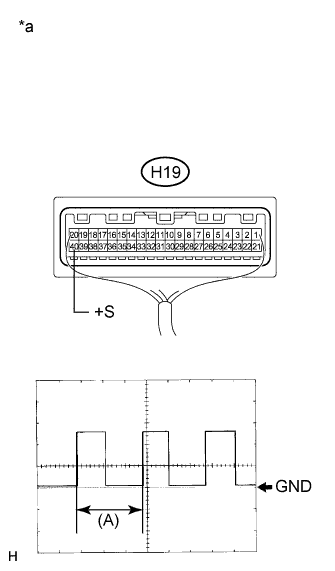
Text in Illustration *a Component with harness connected
(Combination Meter Assembly)
Remove the combination meter assembly Click here.
-
Reconnect the H19 connector to the combination meter assembly.
-
Reconnect the H3 connector to the power management control ECU.
-
Connect an oscilloscope to terminal H19-40 (+S) and body ground.
-
Turn the power switch on (IG).
-
Turn wheel slowly.
-
Check the signal waveform according to the condition(s) in the table below.
Item Condition Tool setting 5 V/DIV., 20 ms/DIV. Vehicle condition Driving at approx. 20 km/h (12 mph) OK The waveform is similar to that shown in the illustration. Tech Tips
When the system is functioning normally, one wheel revolution generates 4 pulses. As the vehicle speed increases, the width indicated by (A) in the illustration narrows.
NG
GO TO METER / GAUGE SYSTEM (Speed Signal Circuit) Click here
OK
REPLACE POWER MANAGEMENT CONTROL ECU Click here
-
-
CHECK HARNESS AND CONNECTOR (COMBINATION METER ASSEMBLY - JUNCTION CONNECTOR)
-
Disconnect the H117 connector.
-
Measure the resistance according to the value(s) in the table below.
Standard Resistance Tester Connection Condition Specified Condition H19-40 (+S) - H117-59 Always Below 1 Ω H19-40 (+S) - Body ground Always 10 kΩ or higher
NG
REPAIR OR REPLACE HARNESS OR CONNECTOR
OK
-
-
CHECK HARNESS AND CONNECTOR (POWER MANAGEMENT CONTROL ECU - JUNCTION CONNECTOR)
-
Measure the resistance according to the value(s) in the table below.
Standard Resistance Tester Connection Condition Specified Condition H3-14 (SPDI) - H117-29 Always Below 1 Ω H3-14 (SPDI) - Body ground Always 10 kΩ or higher
NG
REPAIR OR REPLACE HARNESS OR CONNECTOR
OK
REPLACE JUNCTION CONNECTOR
-