DOOR CONTROL TRANSMITTER INSTALLATION
-
INSTALL TRANSMITTER BATTERY (for Standard)
-
for Type A:
-
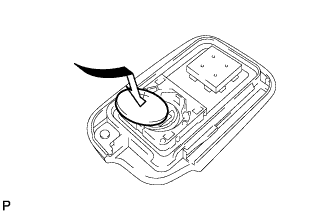
Install a new battery (lithium battery: CR1632) with the positive (+) side facing upward as shown in the illustration.
Note
-
Be sure that the positive (+) side and the negative (-) side of the transmitter battery are matched correctly.
-
Be careful not to bend the electrodes while installing the battery.
-
Keep the interior of the transmitter case free of dust, water and oil.
-
To prevent the transmitter from being damaged, be sure to touch a grounded metal surface with your bare hands to discharge any static electricity before replacing the transmitter battery.
-
-
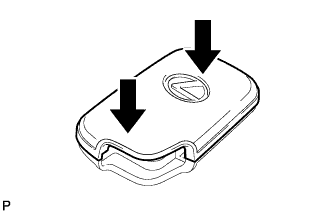
Install the cover by pressing down on it as shown in the illustration.
-
-
for Type B:
-
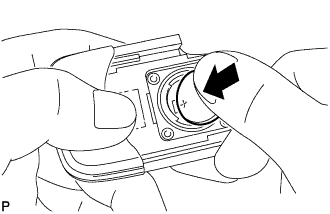
Install a new battery (lithium battery: CR1632) with the positive (+) side facing upward, as shown in the illustration.
Note
-
Do not bend the electrodes while installing the battery.
-
Keep the interior of the transmitter case free of dust, water and oil.
-
To prevent the transmitter from being damaged, be sure to touch a grounded metal surface with your bare hands to discharge any static electricity before replacing the transmitter battery.
-
-
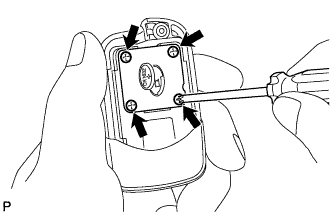
Install the battery cover with the 4 screws.
-
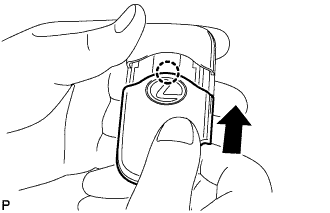
Engage the claw to install the slide transmitter housing cover as shown in the illustration.
-
-
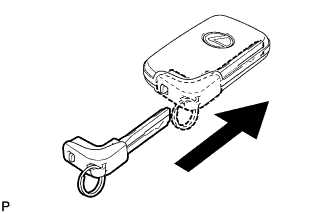
Insert the mechanical key into the transmitter.
-
-
INSTALL TRANSMITTER (CARD KEY) BATTERY (for Card Type)
-
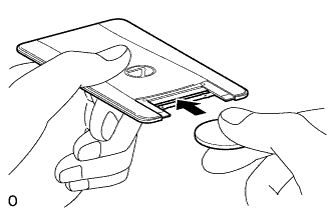
Push in and install a new transmitter battery (lithium battery: CR2412) while being careful of the following: 1) the orientation of the battery positive (+) and negative (-) terminals; and 2) being sure to insert the battery between the 2 terminals and deep into the card, in the direction shown by the arrow in the illustration.
Note
-
Insert the battery so that its positive (+) side is facing the LEXUS mark.
-
Do not deform the terminals.
-
If the terminals are dirty, wipe the terminals with a soft cloth before installing the battery.
Tech Tips
Check if the card terminals are damaged or if the card interior has foreign matter.
-
-
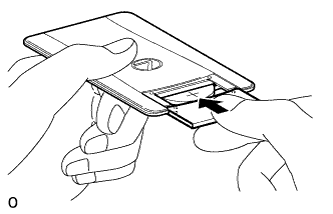
Install the transmitter cover so that it clips onto the case.
Note
-
Push on the transmitter cover until its attachment hooks attach securely.
-
When the transmitter cover is removed and installed many times, be careful as the cover may become loose.
-
-