MAYDAY BATTERY REMOVAL
-
DISCONNECT FRONT DOOR OPENING TRIM WEATHERSTRIP
Tech Tips
Use the same procedure for the RH and LH side Click here.
-
REMOVE INSTRUMENT SIDE PANEL
-
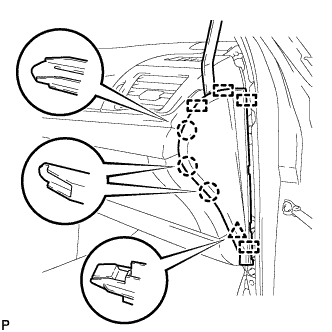
Using a moulding remover, disengage the 3 claws, clip and 4 guides, and remove the instrument side panel RH.
-
Disconnect the connector.
-
-
REMOVE NO. 3 INSTRUMENT CLUSTER FINISH PANEL GARNISH (for Metal Finish Panel and Urethane Panel)
-
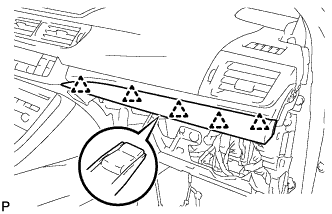
Disengage the 5 clips and remove the No. 3 instrument cluster finish panel garnish.
-
-
REMOVE NO. 3 INSTRUMENT CLUSTER FINISH PANEL GARNISH (for Wood Panel and Bamboo Panel)
-
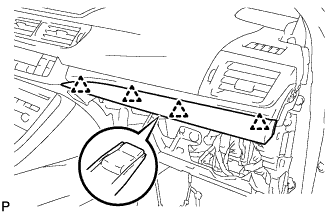
Disengage the 4 clips and remove the No. 3 instrument cluster finish panel garnish.
-
-
REMOVE LOWER CENTER INSTRUMENT PANEL FINISH PANEL
-
Open the glove compartment door.
-
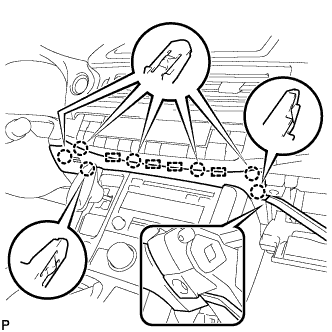
Using a moulding remover, disengage the 7 claws and 4 guides, and remove the lower center instrument panel finish panel as shown in the illustration.
-
-
REMOVE AIR CONDITIONING CONTROL ASSEMBLY
-
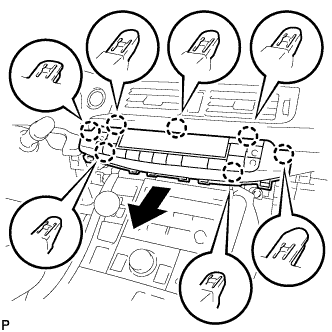
Disengage the 7 claws and remove the air conditioning control assembly as shown in the illustration.
-
Disconnect the connector.
-
-
REMOVE MAYDAY BATTERY WITH BRACKET
-
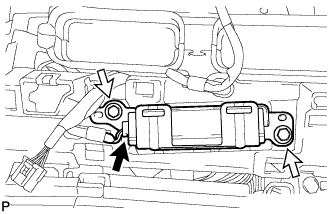
Disconnect the connector.
-
Remove the 2 bolts and mayday battery with bracket.
-
-
REMOVE NO. 1 TELEPHONE BRACKET
-
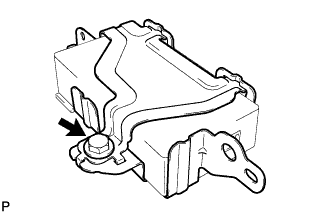
Remove the bolt and No. 1 telephone bracket from the No. 3 telephone bracket.
-
-
REMOVE MAYDAY BATTERY