G-BOOK SYSTEM Telematics Transceiver Malfunction
INSPECTION PROCEDURE
Tech Tips
When replacing the navigation computer sub-assembly or telematics transceiver, perform the vehicle contract setting Click here.
PROCEDURE
-
CHECK COMMUNICATION SERVICE CONDITION
-
Move the vehicle.
-
If the vehicle is outside the communication service area, move the vehicle to a communication service area, wait for a while and perform the operation again.
-
NEXT 
-
-
CHECK DTC
-
Clear the DTCs Click here.
-
Recheck for DTCs and check if the same DTC is output again.
Result Result Proceed to DTCs are output A No DTCs are output B
B 
DCM CHECK Click here
A 
GO TO DTC CHART Click here
-
-
DCM CHECK
-
DCM Check
-
Enter diagnostic mode Click here.
-
Select "Failure Diagnosis" on the Service Menu screen.
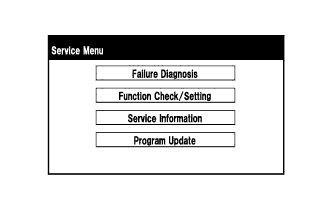
-
Select "DCM Check" on the Failure Diagnosis screen to perform the DCM Check.

Result Result Proceed to
-
DCM Check cannot be performed
-
"OK" is displayed for the result of DCM Check
A
-
"No Service" is displayed for the result of DCM Check
-
"RESTRICTION" is displayed for the result of DCM Check
B "OFF LINE" is displayed for the result of DCM Check C "NO CARRIER" is displayed for the result of DCM Check D "ERROR" is displayed for the result of DCM Check E Tech Tips
If the vehicle is moved while the screen is displayed, select "DCM Check" again to renew the result.
-
-
B 
MOVE VEHICLE
C
CHECK CONTRACT FLAG Click here
D
CONTACT G-BOOK SUPPORT CENTER
E
CHECK PROBLEM SYMPTOM (IG OFF to ACC) Click here
A
-
-
CONTACT G-BOOK SUPPORT CENTER
-
Check the contract flag.
-
Enter diagnostic mode Click here.
-
Select "Service Information" on the Service Menu screen.
-
Select "G-BOOK Information for Contract" on the Service Information screen.
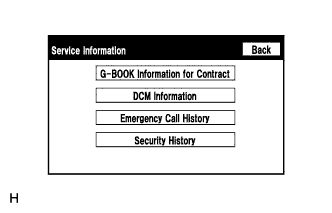
-
Check the flag information item.
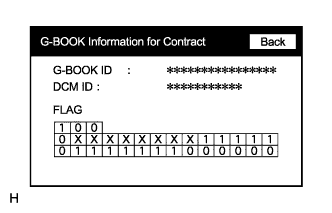
-
-
Check the device information.
-
Select "DCM Information" on the Service Information screen.
-
Check the following items on the DCM Information screen.
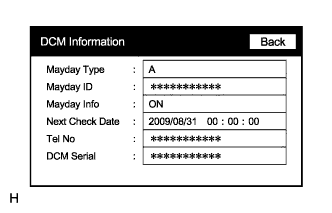
Item Content Tel No Check if the DCM phone number is displayed. If the number is displayed, record it. DCM Serial Record the DCM serial number.
-
-
Contact the G-BOOK support center.
-
Contact the G-BOOK support center and inform them about the following:
-
Phenomenon: Communication has been initialized but communication is not possible.
-
Flag information
-
Telephone number (Tel No): Not displayed / Displayed number
-
Serial number (DCM Serial): Displayed number
-
VIN
Tech Tips
The G-BOOK support center will perform an investigation and provide the results.
-
-
Check for problem symptoms after receiving a call from the G-BOOK support center.
Result Result Proceed to Problem symptom recurs A System returns to normal B
-
B
END
A
-
-
INSPECT NAVIGATION COMPUTER SUB-ASSEMBLY (USBV, USBG)
-
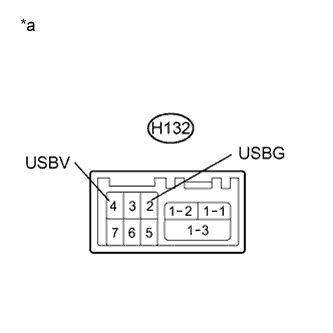
Text in Illustration *a Component without harness connected
(Navigation Computer Sub-assembly)
Disconnect the H132 navigation computer sub-assembly connector.
-
Measure the resistance according to the value(s) in the table below.
Standard Resistance Tester Connection Condition Specified Condition H132-2 (USBG) - Body ground Always Below 1 Ω -
Measure the voltage according to the value(s) in the table below.
Standard Voltage Tester Connection Condition Specified Condition H132-4 (USBV) - H132-2 (USBG) Power switch on (ACC) 4.5 to 5.25 V
NG
REPLACE NAVIGATION COMPUTER SUB-ASSEMBLY Click here
OK
-
-
CHECK HARNESS AND CONNECTOR (NAVIGATION COMPUTER SUB-ASSEMBLY - TELEMATICS TRANSCEIVER)
-
Check the installation condition.
-
Check the USB communication cable (digital communication cable) between the navigation computer sub-assembly and the telematics transceiver for any installation or connection problems.
-
-
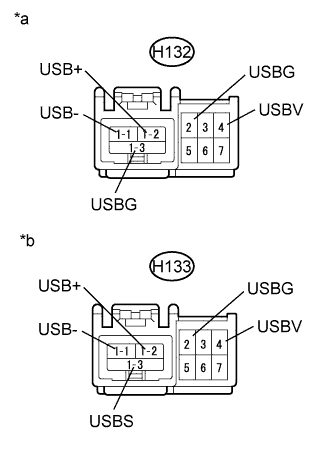
Text in Illustration *a Front view of wire harness connector
(to Navigation Computer Sub-assembly)
*b Front view of wire harness connector
(to Telematics Transceiver)
Disconnect the H132 navigation computer sub-assembly connector.
-
Disconnect the H133 telelmatics transceiver connector.
-
Measure the resistance according to the value(s) in the table below.
Standard Resistance Tester Connection Condition Specified Condition H132-4 (USBV) - H133-4 (USBV) Always Below 1 Ω H132-2 (USBG) - H133-2 (USBG) Always Below 1 Ω H133-4 (USBV) - Body ground Always 10 kΩ or higher H133-2 (USBG) - Body ground Always 10 kΩ or higher Standard Resistance (USB Cable) Tester Connection Condition Specified Condition H132-1-2 (USB+) - H133-1-2 (USB+) Always Below 1 Ω H132-1-1 (USB-) - H133-1-1 (USB-) Always Below 1 Ω H132-1-3 (USBG) - H133-1-3 (USBS) Always Below 1 Ω H133-1-2 (USB+) - Body ground Always 10 kΩ or higher H133-1-1 (USB-) - Body ground Always 10 kΩ or higher H133-1-3 (USBS) - Body ground Always 10 kΩ or higher
NG
REPAIR OR REPLACE HARNESS OR CONNECTOR
OK
-
-
CHECK RECEPTION LEVEL
-
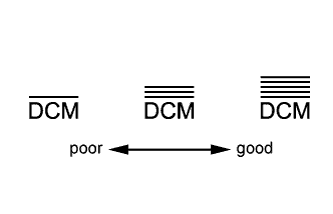
Check the reception level.
-
Check the reception level of the DCM.
Tech Tips
-
Check if the reception level is significantly lower by comparing it to a China Telecom cellular phone.
-
If there is no China Telecom cellular phone available, move the vehicle to a location where the reception level indicator shows 3 bars or more.
-
If a problem occurred because the G-BOOK contract has not been completed, proceed to the contract procedure and check the DCM reception level on the screen during the contract procedure.
Result Result Proceed to
-
The reception level is not lower than a China Telecom cellular phone.
-
3 or more bars are displayed for the reception level.
A
-
The reception level is lower than a China Telecom cellular phone.
-
Cannot reach 3 or more bars for the reception level even after moving the vehicle.
B -
-
B
INSPECT ROOF ANTENNA ASSEMBLY Click here
A
-
-
REPLACE TELEMATICS TRANSCEIVER
-
Replace the telematics transceiver with a known good one and check if the same problem occurs again Click here
OK The system returns to normal.
NG
REPLACE NAVIGATION COMPUTER SUB-ASSEMBLY Click here
OK
END
-
-
INSPECT ROOF ANTENNA ASSEMBLY
-
Check the installation condition.
-
Check the roof antenna assembly for any installation problems.
OK The roof antenna assembly is installed correctly.
-
-
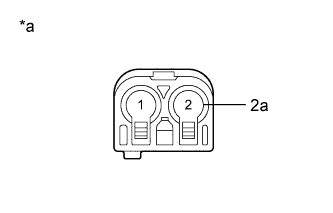
Text in Illustration *a Component without harness connected
(Roof Antenna Assembly)
Measure the resistance according to the value(s) in the table below.
Standard Resistance Tester Connection Condition Specified Condition 2 - 2a Always 4 to 11 kΩ
NG
REPLACE ROOF ANTENNA ASSEMBLY Click here
OK
-
-
INSPECT NO. 3 ANTENNA CORD SUB-ASSEMBLY
-
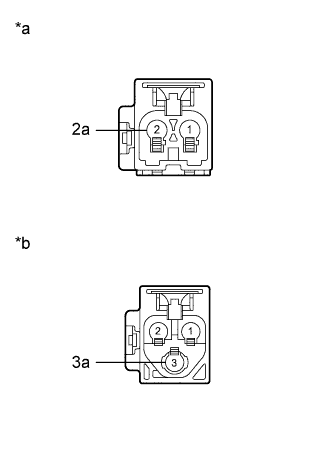
Text in Illustration *a Front view of No. 3 antenna cord sub-assembly connector
(to Roof Antenna Assembly)
*b Front view of No. 3 antenna cord sub-assembly connector
(to No. 2 Antenna Cord Sub-assembly)
Disconnect the No. 3 antenna cord sub-assembly connector from the roof antenna assembly.
-
Disconnect the No. 3 antenna cord sub-assembly connector from the vehicle side wire harness.
-
Measure the resistance according to the value(s) in the table below.
Standard Resistance Tester Connection Condition Specified Condition 2 - 3 Always Below 1 Ω 2a - 3a Always Below 1 Ω 2 - Body ground Always 10 kΩ or higher 2a - Body ground Always 10 kΩ or higher
NG
REPLACE NO. 3 ANTENNA CORD SUB-ASSEMBLY Click here
OK
-
-
INSPECT NO. 2 ANTENNA CORD SUB-ASSEMBLY
-
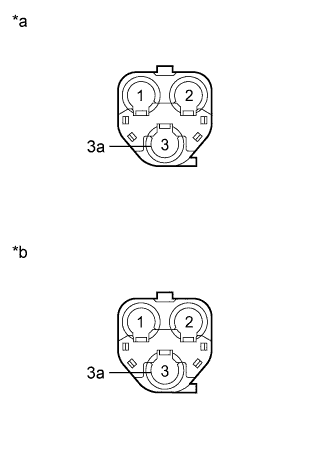
Text in Illustration *a Front view of No. 2 antenna cord sub-assembly connector
(to No. 3 Antenna Cord Sub-assembly)
*b Front view of No. 2 antenna cord sub-assembly connector
(to Vehicle Side Wire Harness)
Disconnect the No. 2 antenna cord sub-assembly connector from the No. 3 antenna cord sub-assembly.
-
Disconnect the No. 2 antenna cord sub-assembly connector from the vehicle side wire harness.
-
Measure the resistance according to the value(s) in the table below.
Standard Resistance Tester Connection Condition Specified Condition 3 - 3 Always Below 1 Ω 3a - 3a Always Below 1 Ω 3 - Body ground Always 10 kΩ or higher 3a - Body ground Always 10 kΩ or higher
NG
REPLACE NO. 2 ANTENNA CORD SUB-ASSEMBLY Click here
OK
-
-
CHECK HARNESS AND CONNECTOR
-
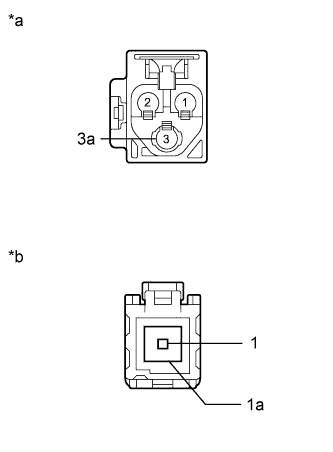
Text in Illustration *a Front view of wire harness connector
(to No. 2 Antenna Cord Sub-assembly)
*b Front view of wire harness connector
(to Telematics Transceiver)
Disconnect the vehicle side wire harness connector from the No. 2 antenna cord sub-assembly.
-
Disconnect the vehicle side wire harness connector from the telematics transceiver.
-
Measure the resistance according to the value(s) in the table below.
Standard Resistance Tester Connection Condition Specified Condition 3 - 1 Always Below 1 Ω 3a - 1a Always Below 1 Ω 3 - Body ground Always 10 kΩ or higher 3a - Body ground Always 10 kΩ or higher
NG
REPAIR OR REPLACE HARNESS OR CONNECTOR
OK
-
-
REPLACE TELEMATICS TRANSCEIVER
-
Replace the telematics transceiver with a known good one and check if the same problem occurs again Click here.
-
Recheck for DTCs and check if the same DTC is output again Click here.
OK No DTCs are output.
NG
REPLACE NAVIGATION COMPUTER SUB-ASSEMBLY Click here
OK
END
-
-
CHECK CONTRACT FLAG
-
Check the contract flag.
-
Enter diagnostic mode Click here.
-
Select "Service Information" on the Service Menu screen.
-
Select "G-BOOK Information for Contract" on the Service Information screen.
-
Check if the flag information shown in the illustration indicates "1".
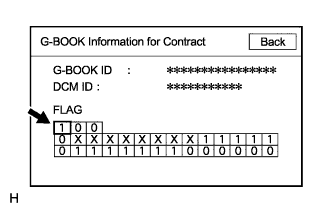
-
Turn the power switch off and then on (ACC).
-
Check again if the flag information shown in the illustration indicates "1".
-
-
Recheck the problem symptom.
-
Select G-BOOK.com and perform the contract procedure again.
-
Check for the problem symptom.
Result Result Proceed to Contract flag indicates "1" and the system returns to normal. A Contract flag indicates "1" but the problem symptom recurs. B Contract flag does not indicate "1" and the problem symptom recurs. C
-
B
REPLACE TELEMATICS TRANSCEIVER Click here
C
CONTACT G-BOOK SUPPORT CENTER
A
END
-
-
CHECK PROBLEM SYMPTOM (IG OFF to ACC)
-
Check for the problem symptom.
-
Turn the power switch off and then on (ACC).
-
Check if the problem symptom recurs.
Result Result Proceed to System returns to normal. A System does not return to normal. B
-
B
REPLACE TELEMATICS TRANSCEIVER Click here
A
END
-