- Click here
INSTALL HARD DISK DRIVE (for Two Screw Type)
-
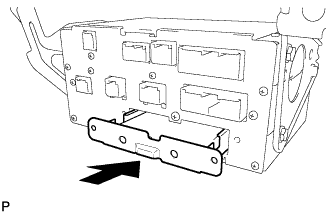
Insert the hard disk drive as shown in the illustration.
-
Install the hard disk drive with the 2 screws.
-
- Click here
INSTALL HARD DISK DRIVE (for One Screw Type)
-
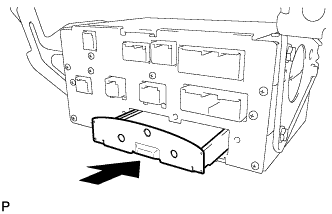
Insert the hard disk drive as shown in the illustration.
-
Install the hard disk drive with the screw.
-
- Click here
INSTALL DISPLAY AND NAVIGATION MODULE DISPLAY ASSEMBLY WITH BRACKET
-
Connect each connector and install the display and navigation module display assembly with bracket.
-
Install the 4 bolts.
-
- Click here
INSTALL RADIO RECEIVER ASSEMBLY WITH BRACKET
-
Connect each connector.
-
Install the radio receiver assembly with bracket with the 4 bolts.
-
- Click here
INSTALL AIR CONDITIONING CONTROL ASSEMBLY
-
Connect the connector.
-
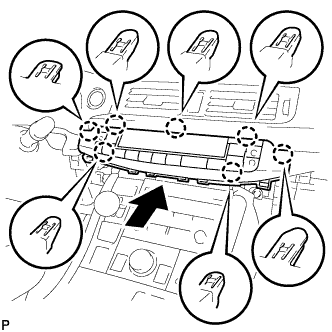
Engage the 7 claws to install the air conditioning control assembly.
-
- Click here
INSTALL INTEGRATION CONTROL AND PANEL ASSEMBLY
-
Connect each connector.
-
Engage the clamp.
-
Engage the 2 guides and 6 claws to install the integration control and panel assembly.
-
- Click here
INSTALL UPPER CONSOLE PANEL SUB-ASSEMBLY
-
Connect each connector.
-
Engage the clamp.
-
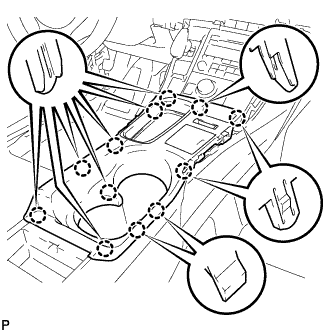
Engage the 12 claws to install the upper console panel sub-assembly.
Note:When installing the upper console panel sub-assembly, make sure not to pinch the wire harness connected to the front end of the remote touch (w/ Navigation System).
-
Close the console compartment door.
-
- Click here
INSTALL UPPER NO. 1 CONSOLE PANEL GARNISH
-
Engage the 3 guides, clip and 4 claws to install the upper No. 1 console panel garnish.
-
- Click here
INSTALL UPPER NO. 2 CONSOLE PANEL GARNISH
-
Engage the 2 guides, clip and 5 claws to install the upper No. 2 console panel garnish.
-
- Click here
INSTALL LOWER CENTER INSTRUMENT PANEL FINISH PANEL
-
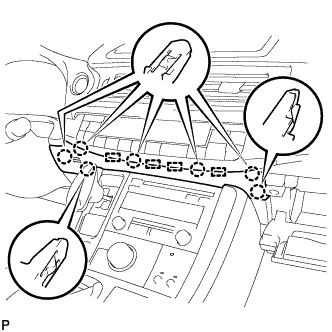
Engage the 4 guides and 7 claws to install the lower center instrument panel finish panel.
-
Close the glove compartment door.
-
- Click here
INSTALL NO. 3 INSTRUMENT CLUSTER FINISH PANEL GARNISH (for Metal Finish Panel and Urethane Panel)
-
Engage the 5 clips to install the No. 3 instrument cluster finish panel garnish.
-
- Click here
INSTALL NO. 3 INSTRUMENT CLUSTER FINISH PANEL GARNISH (for Wood Panel and Bamboo Panel)
-
Engage the 4 clips to install the No. 3 instrument cluster finish panel garnish.
-
- Click here
INSTALL INSTRUMENT SIDE PANEL
-
Connect the connector.
-
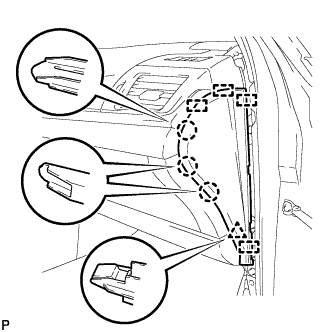
Engage the 4 guides, clip and 3 claws to install the instrument side panel RH.
-
- Click here
INSTALL FRONT DOOR OPENING TRIM WEATHERSTRIP
for LHD: (Click here)
for RHD: (Click here)
- Click here
CONNECT CABLE TO NEGATIVE BATTERY TERMINAL
Note:When disconnecting the cable, some systems need to be initialized after the cable is reconnected (Click here).
- Click here
INSTALL REAR FLOOR BOARD UPPER NO. 3 PLATE
-
Engage the 4 claws and 2 guides to install the rear floor board upper No. 3 plate.
-
- Click here
INSTALL DECK FLOOR BOX RH
-
Engage the 6 guides.
-
Install the deck floor box RH with the clip.
-
- Click here
INSTALL REAR NO. 3 FLOOR BOARD
-
Install the rear No. 3 floor board.
-
- Click here
INSTALL REAR DECK FLOOR BOX
-
Install the rear deck floor box.
-
- Click here
INSTALL REAR NO. 2 FLOOR BOARD
-
Install the rear No. 2 floor board.
-
- Click here
INSPECT HARD DISK DRIVE