DVD PLAYER REMOVAL
-
REMOVE REAR CONSOLE BOX ASSEMBLY
-
REMOVE SHIFT LEVER KNOB SUB-ASSEMBLY
-
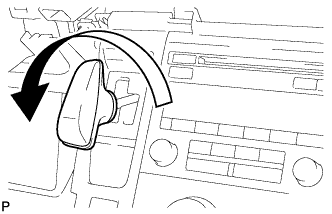
Turn the shift lever knob counterclockwise and remove the shift lever knob sub-assembly.
-
-
REMOVE INTEGRATION CONTROL AND PANEL ASSEMBLY
-
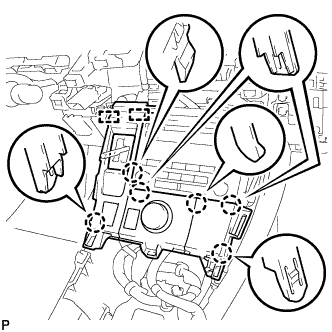
Disengage the 6 claws and 2 guides.
-
Disengage the clamp.
-
Disconnect each connector and remove the integration control and panel assembly.
-
-
REMOVE CONSOLE BOX INSERT
-
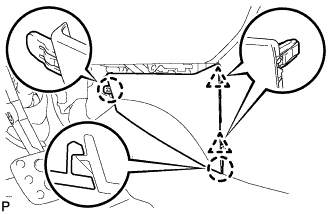
Disengage the 2 clips and 2 claws, and remove the console box insert.
-
-
REMOVE CONSOLE BOX LH
-
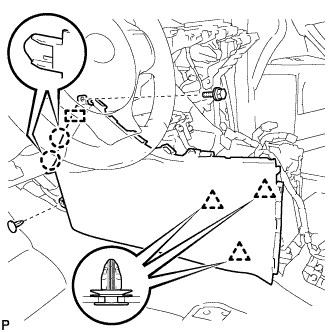
Remove the bolt <A>.
-
Using a clip remover, remove the clip.
-
Using a clip remover, disengage the 3 clips.
-
Disengage the 2 claws and guide, and remove the console box LH.
-
-
REMOVE FRONT NO. 2 CONSOLE BOX INSERT
-
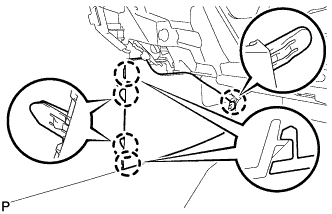
Disengage the 5 claws and remove the front No. 2 console box insert.
-
-
REMOVE CONSOLE BOX RH
-
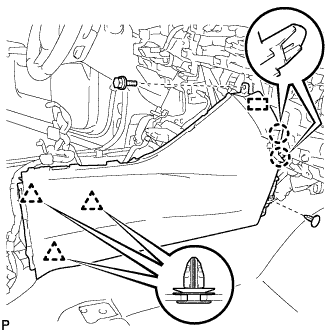
Remove the bolt <A>.
-
Using a clip remover, remove the clip.
-
Using a clip remover, disengage the 3 clips.
-
Disengage the 2 claws and guide, and remove the console box RH.
-
-
REMOVE NO. 3 CONSOLE BOX MOUNTING BRACKET
-
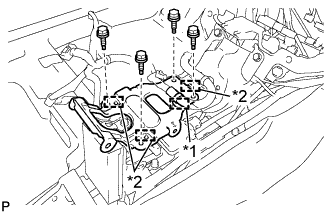
Text in Illustration *1 Clamp *2 Guide Disengage the clamp.
-
Remove the 4 bolts <A>.
-
Disengage the 3 guides and remove the No. 3 console box mounting bracket.
-
-
REMOVE MULTI-MEDIA MODULE ASSEMBLY
-
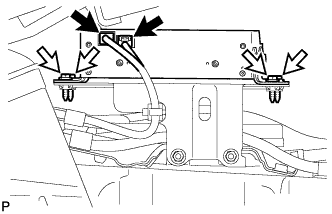
Disconnect the 2 connectors.
-
Remove the 4 bolts and multi-media module assembly.
-
-
REMOVE NO. 3 DISK PLAYER BRACKET
-
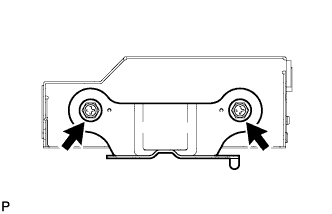
Remove the 2 bolts and No. 3 disk player bracket.
-
-
REMOVE NO. 4 DISK PLAYER BRACKET
-
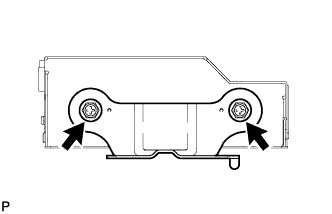
Remove the 2 bolts and No. 4 disk player bracket.
-
-
REMOVE NAVIGATION MODULE BOARD