NAVIGATION SYSTEM (for HDD) DVD Image Signal Circuit between Navigation ECU and Multi-display
DESCRIPTION
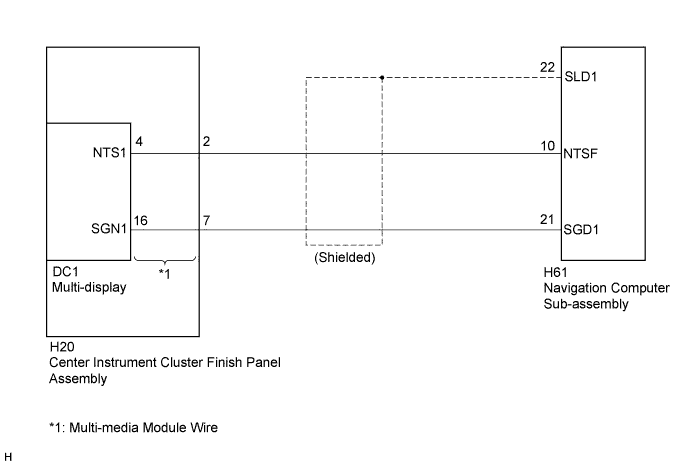
This circuit sends a DVD image signal from the navigation computer sub-assembly to the multi-display.
WIRING DIAGRAM
INSPECTION PROCEDURE
PROCEDURE
-
CHECK HARNESS AND CONNECTOR
-
Disconnect the H61 navigation computer sub-assembly connector.
-
Disconnect the H20 multi-media module wire connector.
-
Measure the resistance according to the value(s) in the table below.
Standard Resistance Tester Connection Condition Specified Condition H61-10 (NTSF) - H20-2 (NTS1) Always Below 1 Ω H61-21 (SGD1) - H20-7 (SGN1) Always Below 1 Ω H61-10 (NTSF) - Body ground Always 10 kΩ or higher H61-21 (SGD1) - Body ground Always 10 kΩ or higher H61-22 (SLD1) - Body ground Always 10 kΩ or higher
NG 
REPAIR OR REPLACE HARNESS OR CONNECTOR
OK 
-
-
INSPECT MULTI-MEDIA MODULE WIRE
-
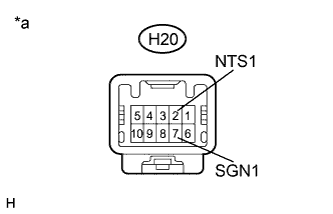
Disconnect the H20 multi-media module wire connector.
-
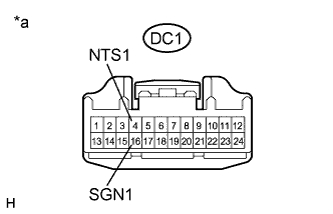
Disconnect the DC1 multi-media module wire connector.
-
Measure the resistance according to the value(s) in the table below.
Standard Resistance Tester Connection Condition Specified Condition H20-2 (NTS1) - DC1-4 (NTS1) Always Below 1 Ω H20-7 (SGN1) - DC1-16 (SGN1) Always Below 1 Ω Text in Illustration *a Component without harness connected
(Multi-media Module Wire)
NG
REPLACE MULTI-MEDIA MODULE WIRE Click here
OK
-
-
INSPECT NAVIGATION COMPUTER SUB-ASSEMBLY (DVD IMAGE SIGNAL)
-
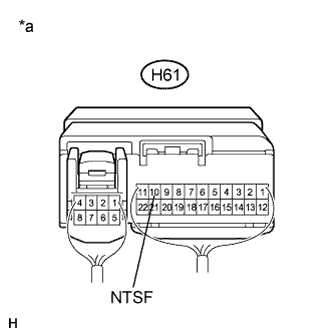
Reconnect the H61 navigation computer sub-assembly connector.
-
Check the waveform according to the table below.
-
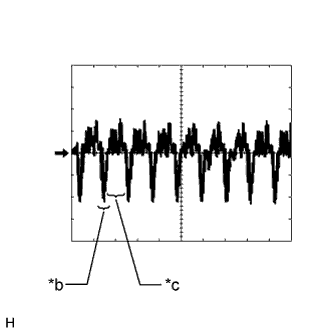
Text in Illustration *a Component with harness connected
(Navigation Computer Sub-assembly)
*b Synchronization Signal *c Video Waveform Oscilloscope waveform
Item Content Measurement terminal H61-10 (NTSF) - Body ground Measurement setting 200 mV/DIV., 10 μs/DIV. Condition DVD is playing on multi-display Tech Tips
The video waveform changes according to the image output from the navigation computer sub-assembly to the multi-display, but the synchronization signal does not change.
NG
REPLACE NAVIGATION COMPUTER SUB-ASSEMBLY Click here
OK 
PROCEED TO NEXT SUSPECTED AREA SHOWN IN PROBLEM SYMPTOMS TABLE Click here
-