MULTI-DISPLAY SWITCH INSPECTION
-
MULTI-DISPLAY SWITCH
-
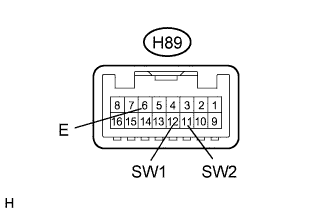
Measure the resistance according to the value(s) in the table below.
Standard Resistance (for LHD) Tester Connection Condition Specified Condition H89-12 (SW1) - H89-6 (E) "OPEN/CLOSE" switch not pressed 10 kΩ or higher H89-12 (SW1) - H89-6 (E) "OPEN/CLOSE" switch pressed Below 1 Ω H89-11 (SW2) - H89-6 (E) "TILT" switch not pressed 10 kΩ or higher H89-11 (SW2) - H89-6 (E) "TILT" switch pressed Below 1 Ω Standard Resistance (for RHD) Tester Connection Condition Specified Condition H89-11 (SW2) - H89-6 (E) "OPEN/CLOSE" switch not pressed 10 kΩ or higher H89-11 (SW2) - H89-6 (E) "OPEN/CLOSE" switch pressed Below 1 Ω H89-12 (SW1) - H89-6 (E) "TILT" switch not pressed 10 kΩ or higher H89-12 (SW1) - H89-6 (E) "TILT" switch pressed Below 1 Ω -
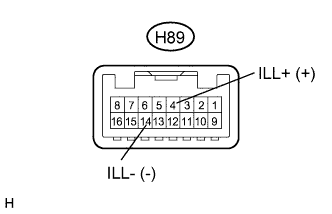
Check the illumination
-
Connect a positive (+) lead to terminal ILL+ and a negative (-) lead from the auxiliary battery to terminal ILL- of the multi-display switch connector.
-
Check that the multi-display switch illumination comes on.
OK Multi-display switch illumination comes on.
-
-