MULTI-DISPLAY REMOVAL
-
REMOVE CENTER INSTRUMENT PANEL REGISTER ASSEMBLY
-
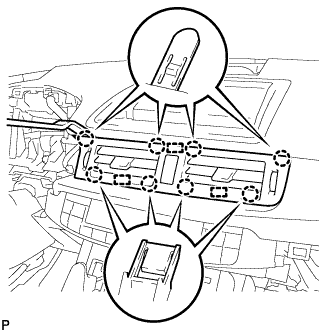
Using a moulding remover, disengage the 8 claws and 3 guides.
-
Disconnect the connector and remove the center instrument panel register assembly.
-
-
REMOVE INSTRUMENT CLUSTER FINISH PANEL SUB-ASSEMBLY
-
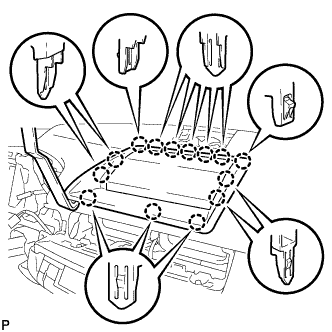
Using a moulding remover, disengage the 14 claws.
-
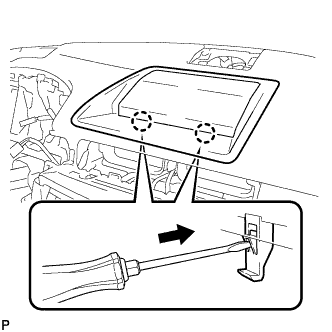
Using a screwdriver, disengage the 2 claws and remove the instrument cluster finish panel sub-assembly as shown in the illustration.
-
-
REMOVE MULTI-DISPLAY SUB-ASSEMBLY
-
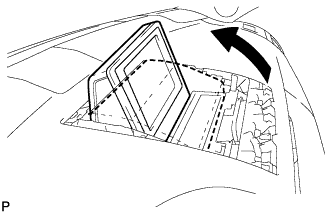
Push the outside part of the multi-display and tilt it as shown in the illustration.
-
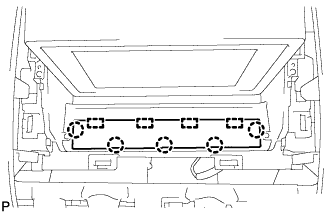
Disconnect the 5 claws.
-
Disengage the 4 guides and remove the instrument panel finish panel end.
-
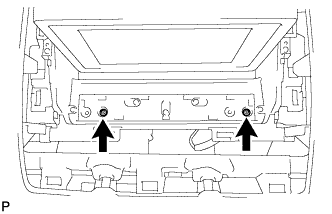
Remove the 2 screws.
-
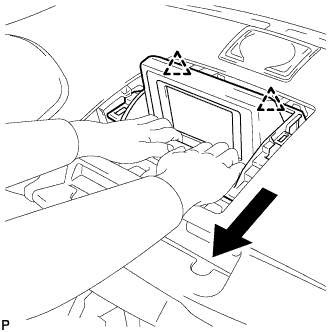
Disengage the 2 clips as shown in the illustration.
-
Disengage the clamp.
-
Disconnect earth connector and remove the multi-display sub-assembly.
-