NAVIGATION SYSTEM (for HDD), Diagnostic DTC:B15B0
| DTC Code | DTC Name |
|---|---|
| B15B0 | Display Screen Malfunction |
DESCRIPTION
This DTC is stored when a malfunction occurs in the navigation computer sub-assembly, multi-display or display module board.
Tech Tips
-
The trouble area cannot be determined by checking DTCs with the intelligent tester. It is necessary to display the "System Check Mode" screen to determine the trouble area.
-
If the picture circuit is faulty, the navigation computer sub-assembly or the multi-display stores the DTC.
-
If the multi-display open/close function is malfunctioning, the display module board stores the DTC.
| DTC No. | DTC Detection Condition | Trouble Area |
|---|---|---|
| B15B0 | Picture circuit (TFT unit) malfunction |
|
| Multi-display open/close function malfunction |
|
INSPECTION PROCEDURE
Note
When replacing the navigation computer sub-assembly, perform vehicle contract setting (w/ G-BOOK System) Click here.
PROCEDURE
-
CLEAR DTC
-
Clear the DTC Click here.
NEXT 
-
-
CHECK FOREIGN OBJECT
-
Check the area around the center instrument cluster finish panel assembly for obstacles or protrusions which may interrupt opening/closing of the multi-display, and also check for foreign objects stuck in moving parts. If any foreign objects are present, remove them.
NEXT
-
-
CHECK DTC
Tech Tips
-
The trouble area cannot be determined by checking DTCs with the intelligent tester. It is necessary to display the "System Check Mode" screen to determine the trouble area.
-
If the picture circuit is faulty, the multi-display or the navigation computer sub-assembly stores the DTC.
-
If the multi-display open/close function is malfunctioning, the display module board stores the DTC.
-
If the multi-display does not open when the power switch is turned on (ACC), manually open the multi-display and display the "System Check Mode" screen.
-
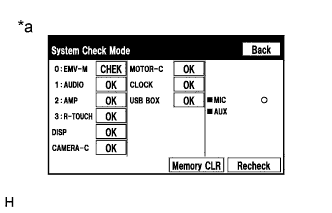
Text in Illustration *a Example Display the "System Check Mode" screen Click here.
-
Check result on the "System Check Mode" screen.
Result Result Proceed to The trouble area cannot be determined using the "System Check Mode" screen due to a multi-display malfunction. A DTC "B15B0" is output from "EMV-M". B DTC "B15B0" is output from "DISP". C The trouble area cannot be determined using the "System Check Mode" screen because the multi-display does not open when the power switch is turned on (ACC). D DTC "B15B0" is output from "MOTOR-C". D No DTCs are output. E
B 
REPLACE NAVIGATION COMPUTER SUB-ASSEMBLY Click here
C
REPLACE MULTI-DISPLAY Click here
D 
CHECK CENTER INSTRUMENT CLUSTER FINISH PANEL ASSEMBLY (DRIVING PART USED FOR DRIVEN PART OF MULTI-DISPLAY) Click here
E
USE SIMULATION METHOD TO CHECK Click here
A
-
-
REPLACE MULTI-DISPLAY
-
Replace the multi-display Click here.
-
Clear the DTCs Click here.
-
Recheck for DTCs and check if the same DTCs are output again.
OK No DTCs are output.
NG
REPLACE NAVIGATION COMPUTER SUB-ASSEMBLY Click here
OK 
END
-
-
CHECK CENTER INSTRUMENT CLUSTER FINISH PANEL ASSEMBLY (DRIVING PART USED FOR DRIVEN PART OF MULTI-DISPLAY)
-
Check that there is no damage on the driving parts that drive the multi-display and that no foreign objects are caught Click here.
Result Result Proceed to Damage on the driving parts. A Foreign objects are caught between the driving parts. B No damage on the driving parts and no foreign objects are caught between the driving parts. C
B
REMOVE FOREIGN OBJECT Click here
C
REPLACE MULTI-DISPLAY CONTROLLER SUB-ASSEMBLY Click here
A
-
-
REPLACE DAMAGED DRIVING PART
-
Replace damaged driving parts Click here.
-
Clear the DTCs Click here.
-
Recheck for DTCs and check if the same DTCs are output again.
OK No DTCs are output.
NG
REPLACE MULTI-DISPLAY CONTROLLER SUB-ASSEMBLY Click here
OK
END
-
-
REMOVE FOREIGN OBJECT
-
Remove foreign objects caught between the driving parts.
-
Clear the DTCs Click here.
-
Recheck for DTCs and check if the same DTCs are output again.
OK No DTCs are output.
NG
REPLACE MULTI-DISPLAY CONTROLLER SUB-ASSEMBLY Click here
OK
END
-
-
REPLACE MULTI-DISPLAY CONTROLLER SUB-ASSEMBLY
-
Replace the multi-display controller sub-assembly Click here.
-
Clear the DTCs Click here.
-
Recheck for DTCs and check if the same DTCs are output again.
OK No DTCs are output.
NG
REPLACE SENSOR WIRE Click here
OK
END
-
-
REPLACE SENSOR WIRE
-
Replace the sensor wire Click here.
-
Clear the DTCs Click here.
-
Recheck for DTCs and check if the same DTCs are output again.
OK No DTCs are output.
NG
REPLACE DISPLAY MODULE BOARD Click here
OK
END
-