NAVIGATION SYSTEM (for HDD), Diagnostic DTC:B159E, B1568
| DTC Code | DTC Name |
|---|---|
| B159E | No Response from Clock Device |
| B1568 | Clock Device Disconnected |
DESCRIPTION
The navigation computer sub-assembly and center cluster module circuit are connected by the AVC-LAN communication line.
When an AVC-LAN communication error occurs between the navigation computer sub-assembly and center cluster module circuit, these DTCs will be stored.
| DTC No. | DTC Detection Condition | Trouble Area |
|---|---|---|
| B159E | No response to the diagnostic memory request from the master unit. |
|
| B1568*1 | A device that is listed in the AVC-LAN connected device record of the master unit is missing. |
Tech Tips
-
*1: Even if no fault is present, this DTC may be stored depending on the auxiliary battery condition or hybrid system start voltage.
-
The navigation computer sub-assembly is the master unit.
WIRING DIAGRAM
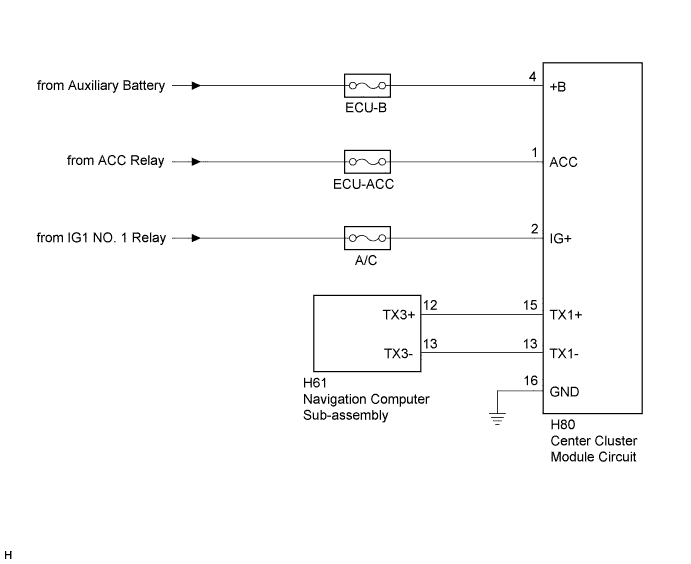
INSPECTION PROCEDURE
Note
-
When replacing the navigation computer sub-assembly, perform vehicle contract setting (w/ G-BOOK System) Click here.
-
Inspect the fuses for circuits related to this system before performing the following inspection procedure.
PROCEDURE
-
CHECK OPTIONAL COMPONENTS (INCLUDING ASSOCIATED WIRING)
-
Check for optional components
-
Check that optional components (including associated wiring) which generate radio waves are not installed.
Result Result Proceed to Optional components (including associated wiring) are installed. A Optional components (including associated wiring) are not installed. B Tech Tips
-
Electrical noise from radio waves generated by optional components or the wiring for those components may affect AVC-LAN communication.
-
These DTCs may be stored when an AVC-LAN communication error occurs due to electrical noise.
-
-
B 
CHECK DTC Click here
A 
-
-
REMOVE OPTIONAL COMPONENTS (INCLUDING ASSOCIATED WIRING)
-
Remove optional components (including associated wiring).
Note
Do not remove optional components or associated wiring without the permission of the customer.
NEXT
-
-
CHECK DTC
-
Clear the DTCs Click here.
-
Recheck for DTCs and check if the same DTCs are output again.
OK No DTCs are output.
NG
CHECK HARNESS AND CONNECTOR (CENTER CLUSTER MODULE CIRCUIT) Click here
OK 
END
-
-
CHECK HARNESS AND CONNECTOR (CENTER CLUSTER MODULE CIRCUIT)
-
Disconnect the H80 center cluster module circuit connector.
-
Measure the resistance according to the value(s) in the table below.
Standard Resistance Tester Connection Condition Specified Condition H80-16 (GND) - Body ground Always Below 1 Ω -
Measure the voltage according to the value(s) in the table below.
Standard Voltage Tester Connection Condition Specified Condition H80-4 (+B) - H80-16 (GND) Power switch off 11 to 14 V H80-1 (ACC) - H80-16 (GND) Power switch on (ACC) 11 to 14 V H80-2 (IG+) - H80-16 (GND) Power switch on (IG) 11 to 14 V
NG 
REPAIR OR REPLACE HARNESS OR CONNECTOR
OK
-
-
CHECK HARNESS AND CONNECTOR
-
Disconnect the H80 center cluster module circuit connector.
-
Disconnect the H61 navigation computer sub-assembly connector.
-
Measure the resistance according to the value(s) in the table below.
Standard Resistance Tester Connection Condition Specified Condition H80-15 (TX1+) - H61-12 (TX3+) Always Below 1 Ω H80-13 (TX1-) - H61-13 (TX3-) Always Below 1 Ω H80-15 (TX1+) - Body ground Always 10 kΩ or higher H80-13 (TX1-) - Body ground Always 10 kΩ or higher
NG
REPAIR OR REPLACE HARNESS OR CONNECTOR
OK
-
-
REPLACE CENTER CLUSTER MODULE CIRCUIT
-
Replace the center cluster module circuit Click here.
-
Clear the DTCs Click here.
-
Recheck for DTCs and check if the same DTCs are output again.
OK No DTCs are output.
NG
REPLACE NAVIGATION COMPUTER SUB-ASSEMBLY Click here
OK
END
-