NAVIGATION SYSTEM (for HDD) PRECAUTION
-
PRECAUTION FOR DISCONNECTING CABLE FROM NEGATIVE AUXILIARY BATTERY TERMINAL
Note
-
After the power switch is turned off, the navigation computer sub-assembly (HDD navigation system) records various types of memory and settings. As a result, after turning the power switch off, make sure to wait for the time specified in the following table before disconnecting the cable from the negative (-) auxiliary battery terminal.
Waiting Time before Disconnecting Cable from Negative (-) Auxiliary Battery Terminal Specification Waiting Time w/o Telematics transceiver 60 sec. w/ Telematics transceiver 120 sec. -
When disconnecting the cable from the negative (-) auxiliary battery terminal, initialize the following systems after the cable is reconnected.
System Name See Procedure Parking Assist Monitor System Power Door Lock Control System
-
-
PRECAUTIONS FOR G-BOOK (w/ G-BOOK System)
-
The navigation computer sub-assembly functions as the G-BOOK device, it also holds the G-BOOK ID.
Note
When replacing the navigation computer sub-assembly, perform vehicle contract setting Click here.
-
Necessary data for the G-BOOK system is stored in the HDD that is built into the navigation computer sub-assembly.
Note
Download necessary data after replacing the hard disk drive Click here.
-
-
PRECAUTIONS FOR NAVIGATION COMPUTER SUB-ASSEMBLY
-
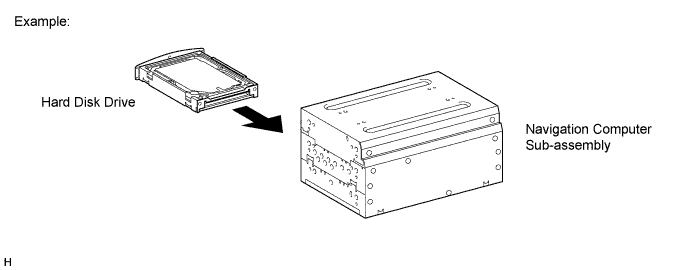
An HDD is built into the navigation computer sub-assembly to store map and other data, and is used for the navigation system. Therefore, care must be taken for the following points when handling:
-
When it is necessary to replace the navigation computer sub-assembly, be sure to replace it with a new one.
Note
If a used navigation computer sub-assembly is installed as a replacement part, the customer's HDD will not be recognized.
-
Do not apply any vibration or shock to the navigation computer sub-assembly.
Note
-
Do not drop or subject the navigation computer sub-assembly to severe impacts.
-
Do not use the navigation computer sub-assembly if it has been dropped or subjected to a severe impact.
-
Do not store the navigation computer sub-assembly without the HDD installed. (Only remove the HDD from the navigation computer sub-assembly when the replacement navigation computer sub-assembly or HDD is ready.)
-
-
Do not remove the navigation computer sub-assembly if there is a risk that condensation may occur.
Note
If the temperature of the navigation computer sub-assembly changes rapidly, condensation may occur inside the unit. This may cause a malfunction of the HDD. Therefore, when the navigation computer sub-assembly is removed from the instrument panel, it needs to be kept inside the vehicle or in an environment with an equivalent temperature and humidity.
-
Take measures to prevent static electricity.
Note
Touching the terminals of a connector can cause static electricity to be transmitted to the internal circuits. This may cause a malfunction of the HDD.
-
Keep the navigation computer sub-assembly away from magnets or magnetized items.
Note
Keep the navigation computer sub-assembly away from speakers, motors, magnetized tools and other magnetic items.
-
-
-
PRECAUTIONS FOR HARD DISK DRIVE (HDD)
-
Map and other data for the navigation system is stored on the Hard Disk Drive (HDD). Make sure to follow the following instructions when replacing the HDD:
-
The HDD must only be replaced with a new one. Do not attempt to install a used HDD from another vehicle.
Note
The navigation computer sub-assembly can recognize only a new HDD.
-
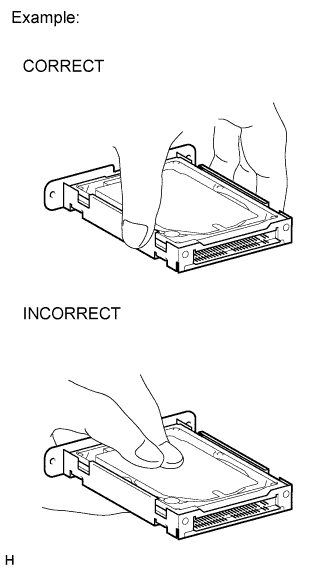
Do not touch the HDD cover.
Note
When removing or installing the HDD, only hold it by the areas shown in the illustration.
-
Do not apply any vibration or shock to the HDD.
Note
-
Do not drop or subject the HDD to sever impacts.
-
Do not use the HDD if it has been dropped or subjected to a sever impact.
-
Do not store the HDD by itself if it has been removed from the navigation computer sub-assembly. (Only remove the HDD from the navigation computer sub-assembly when the replacement navigation computer sub-assembly or HDD is ready.)
-
-
Do not remove the HDD if there is a risk that condensation may occur.
Note
If the temperature of the HDD changes rapidly, condensation may occur inside the unit. This may cause a malfunction of the HDD. Therefore, when the navigation computer sub-assembly is removed from the instrument panel, it needs to be kept inside the vehicle or in an environment with an equivalent temperature and humidity.
-
Take measures to prevent static electricity.
Note
Touching the terminals of a connector can cause static electricity to be transmitted to the internal circuits. This may cause a malfunction of the HDD.
-
Keep the HDD away from magnets or magnetized items.
Note
Keep the HDD away from speakers, motors, magnetized tools and other magnetic items.
-
Inspect after HDD replacement.
Note
Make sure to perform Check Hard Disk Drive in Operation Check to confirm that there are no HDD abnormalities after removal or installation Click here.
-
-
-
PRECAUTIONS FOR CENTER INSTRUMENT CLUSTER FINISH PANEL ASSEMBLY
Note
The center instrument cluster finish panel assembly has driving parts that drive the multi-display. Depending on the condition of the driving parts, the multi-display may not open, close or tilt properly. Therefore, make sure to follow the notices below when disassembling and assembling the center instrument cluster finish panel assembly.
-
When disassembling the center instrument cluster finish panel assembly, remove it without damaging the driving parts or catching foreign objects, and store it.
-
When assembling the center instrument cluster finish panel assembly, install it without damaging the driving parts or catching foreign objects.
-