| DTC Code | DTC Name |
|---|---|
| Illumination Circuit |
DESCRIPTION
Power is supplied to the steering pad switch assembly and multi-display switch illumination when the light control switch is in the tail or head position.
INSPECTION PROCEDURE
-
Inspect the fuse for circuits related to this system before performing the following inspection procedure.
-
The vehicle is equipped with a Supplemental Restraint System (SRS). Before servicing (including removal or installation of parts), be sure to read Precaution for Supplemental Restraint System (Click here).
PROCEDURE
- Click here
CHECK ILLUMINATION
-
Check if the illumination for the steering pad switch assembly, multi-display switch, glove box or others (hazard switch, etc.) comes on when the light control switch is turned to the tail or head position.
Result Result Proceed to Illumination comes on for all components except steering pad switch. A Illumination comes on for all components except multi-display switch. B No illumination comes on (steering pad switch assembly, multi-display switch, glove box, hazard switch, etc.). C
-
- Click here
CHECK HARNESS AND CONNECTOR (ILLUMINATION SIGNAL)
-
Disconnect the H30 spiral with sensor cable sub-assembly connector.
-
Measure the voltage according to the value(s) in the table below.
Standard Voltage Tester Connection Condition Specified Condition H30-13 (IL+2) - Body ground Light control switch in the tail or head position 11 to 14 V
- OKClick here
- NGClick here
-
- Click here
INSPECT SPIRAL WITH SENSOR CABLE SUB-ASSEMBLY
-
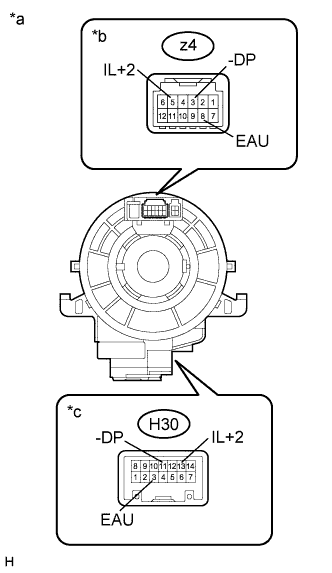
Disconnect the z4 steering pad switch assembly and H30 spiral with sensor cable sub-assembly connectors.
-
Measure the resistance according to the value(s) in the table below.
Standard Resistance Tester Connection Condition Specified Condition z4-8 (EAU) - H30-3 (EAU) Center Below 1 Ω 2.5 rotations to the left 2.5 rotations to the right z4-5 (IL+2) - H30-13 (IL+2) Center Below 1 Ω 2.5 rotations to the left 2.5 rotations to the right z4-3 (-DP) - H30-11 (-DP) Center Below 1 Ω 2.5 rotations to the left 2.5 rotations to the right -
After setting the spiral with sensor cable sub-assembly to the center position, rotate the spiral with sensor cable sub-assembly 2.5 times clockwise. Then while rotating the spiral with sensor cable as shown in the table below.
Standard Resistance Tester Connection Condition Specified Condition z4-8 (EAU) - H30-3 (EAU) Always Below 1 Ω z4-5 (IL+2) - H30-13 (IL+2) Always Below 1 Ω z4-3 (-DP) - H30-11 (-DP) Always Below 1 Ω Note:
-
The spiral with sensor cable sub-assembly is an important part of the SRS airbag system. Incorrect removal or installation of the spiral with sensor cable sub-assembly may prevent the airbag from deploying. Refer to the pages shown in the brackets.
-
As the spiral with sensor cable may break, do not rotate the spiral with sensor cable sub-assembly more than the specified amount.
Table 1. Text in Illustration *a Component without harness connected
(Spiral with Sensor Cable Sub-assembly)
*b Steering Pad Switch Assembly Side *c Vehicle Side -
- OKClick here
- NGClick here
-
- Click here
CHECK HARNESS AND CONNECTOR
-
Disconnect the H60 display and navigation module display connector.
-
Disconnect the H30 spiral with sensor cable sub-assembly connector.
-
Measure the resistance according to the value(s) in the table below.
Standard Resistance Tester Connection Condition Specified Condition H60-23 (SWG) - H30-3 (EAU) Always Below 1 Ω H30-11 (-DP) - Body ground Always Below 1 Ω H60-23 (SWG) - Body ground Always 10 kΩ or higher
- OKClick here
- NGClick here
-
- Click here
INSPECT DISPLAY AND NAVIGATION MODULE DISPLAY
-
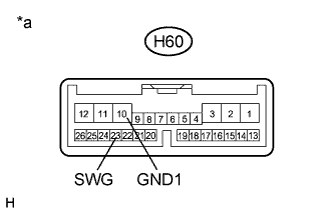
Disconnect the H60 display and navigation module display connector.
-
Measure the resistance according to the value(s) in the table below .
Standard Resistance Tester Connection Condition Specified Condition H60-10 (GND1) - H60-23 (SWG) Always Below 1 Ω Table 2. Text in Illustration *a Component without harness connected
(Display and Navigation Module Display)
- OKClick here
- NGClick here
-
- Click here
INSPECT STEERING PAD SWITCH ASSEMBLY
-
Disconnect the z4 steering pad switch assembly connector.
-
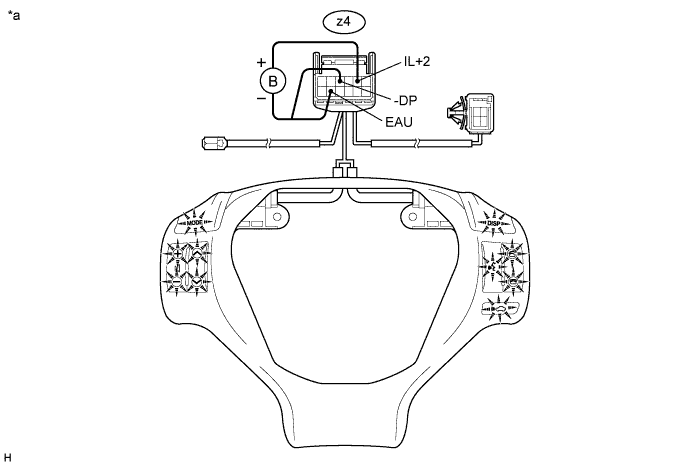
Check that the steering pad switch assembly illuminates according to the table below.
OK Connection Specified Condition Auxiliary battery positive (+) → z4-5 (IL+2)
Auxiliary battery negative (-) → z4-8 (EAU)
Switches of steering pad switch LH side illuminates. Auxiliary battery positive (+) → z4-5 (IL+2)
Auxiliary battery negative (-) → z4-3 (-DP)
Switches of steering pad switch RH side illuminates. Table 3. Text in Illustration *a Component without harness connected
(Steering Pad Switch Assembly)
- -
- OKClick here
- NGClick here
-
- Click here
PROCEED TO NEXT SUSPECTED AREA SHOWN IN PROBLEM SYMPTOMS TABLEClick here
- Click here
INSPECT MULTI-DISPLAY SWITCH (MULTI-DISPLAY SWITCH ILLUMINATION)
-
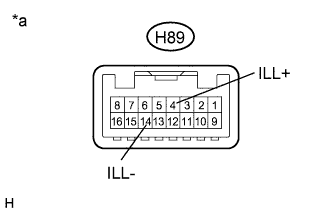
Disconnect the H89 multi-display switch connector.
-
Connect a positive (+) lead to terminal ILL+ and a negative (-) lead from the auxiliary battery to terminal ILL- of the multi-display switch connector.
-
Check that the multi-display switch illumination comes on.
OK Multi-display switch illumination comes on. Table 4. Text in Illustration *a Component without harness connected
(Multi-display Switch)
- OKClick here
- NGClick here
-
- Click here
CHECK HARNESS AND CONNECTOR (ILLUMINATION SIGNAL)
-
Disconnect the H89 multi-display switch connector.
-
Measure the voltage according to the value(s) in the table below.
Standard Voltage Tester Connection Condition Specified Condition H89-4 (ILL+) - Body ground Light control switch in the tail or head position 11 to 14 V
- OKClick here
- NGClick here
-
- Click here
CHECK HARNESS AND CONNECTOR
-
Disconnect the H89 multi-display switch connector.
-
Disconnect the H19 combination meter assembly connector.
-
Measure the resistance according to the value(s) in the table below.
Standard Resistance Tester Connection Condition Specified Condition H89-14 (ILL-) - H19-10 (ILL-) Always Below 1 Ω H89-14 (ILL-) - Body ground Always 10 kΩ or higher
- OKClick here
- NGClick here
-
- Click here
GO TO METER / GAUGE SYSTEMClick here
- Click here
GO TO LIGHTING SYSTEMClick here
- Click here
REPAIR OR REPLACE HARNESS OR CONNECTOR
- Click here
REPLACE SPIRAL WITH SENSOR CABLE SUB-ASSEMBLYClick here
- Click here
REPAIR OR REPLACE HARNESS OR CONNECTOR
- Click here
REPLACE DISPLAY AND NAVIGATION MODULE DISPLAYClick here
- Click here
REPLACE STEERING PAD SWITCH ASSEMBLYClick here
- Click here
REPLACE MULTI-DISPLAY SWITCHClick here
- Click here
REPAIR OR REPLACE HARNESS OR CONNECTOR
- Click here
REPAIR OR REPLACE HARNESS OR CONNECTOR