NAVIGATION SYSTEM (for DVD) Voice Guidance does not Function
INSPECTION PROCEDURE
PROCEDURE
-
CHECK NAVIGATION SETTING
-
Display the "Voice Settings" screen.
-
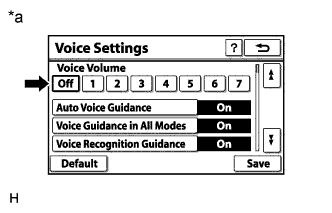
Text in Illustration *a Example Check that "Voice Volume" is not "Off".
OK Voice volume is not "Off".
NG 
TURN VOICE VOLUME EXCEPT "Off"
OK 
-
-
CHECK NAVIGATION SETTING
-
Display the "Voice Settings" screen.
-
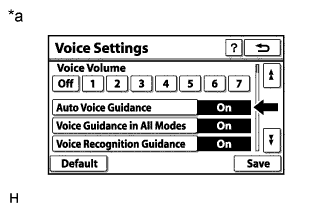
Text in Illustration *a Example Check that "Auto Voice Guidance" is not "Off".
OK Auto voice guidance is not "Off".
NG
TURN AUTO VOICE GUIDANCE "On"
OK
-
-
CHECK NAVIGATION SETTING
-
Display the "Voice Settings" screen.
-
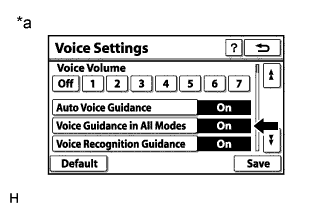
Text in Illustration *a Example Check that "Voice Guidance in All Modes" is not "Off".
OK Voice guidance in all modes is not "Off".
NG
TURN VOICE GUIDANCE IN ALL MODES "On"
OK
-
-
CHECK MAP DISC
-
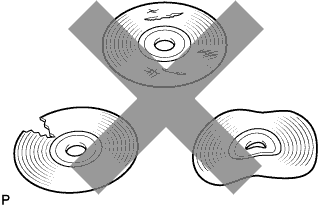
Check that the map disc is not deformed or cracked.
OK No deformations or cracks on the map disc
NG
REPLACE MAP DISC
OK
-
-
CHECK CABIN
-
Check that condensation is not likely to occur in the cabin, and that the temperature is not high or extremely low in the cabin.
Tech Tips
-
A humid cabin and a rapid change in temperature may lead to condensation. Condensation in the cabin may cause a short circuit.
-
The navigation system may not operate normally when the temperature is -20°C (-4°F) or lower, or 65°C (149°F) or higher.
OK Condensation is not likely being produced and the temperature is not high or extremely low. -
NG
SET CABIN TO APPROPRIATE TEMPERATURE
OK
-
-
CHECK AUDIO FUNCTION
-
Check that sound can be heard from a front speaker.
OK Sound can be heard.
NG
PROCEED TO NEXT SUSPECTED AREA SHOWN IN PROBLEM SYMPTOMS TABLE Click here
OK 
REPLACE DISPLAY AND NAVIGATION MODULE DISPLAY Click here
-