NAVIGATION SYSTEM (for DVD), Diagnostic DTC:B1584
| DTC Code | DTC Name |
|---|---|
| B1584 | Panel Switch Malfunction |
DESCRIPTION
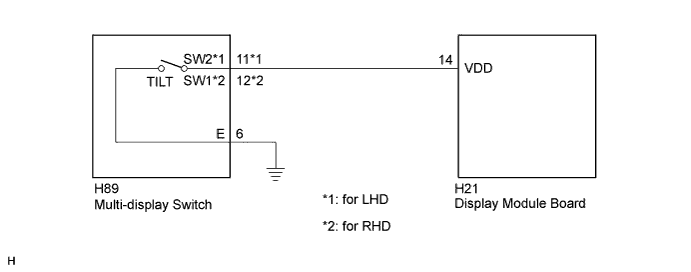
When the power switch is on (ACC), if the display module board judges that the "TILT" switch in the multi-display switch is stuck, this DTC will be stored.
| DTC No. | DTC Detection Condition | Trouble Area |
|---|---|---|
| B1584 | Multi-display switch malfunction |
|
WIRING DIAGRAM
INSPECTION PROCEDURE
PROCEDURE
-
CHECK DTC
-
Clear the DTC Click here.
-
Recheck for DTCs and check if the same DTC is output again.
OK No DTCs are output.
NG 
INSPECT MULTI-DISPLAY SWITCH Click here
OK 
END
-
-
INSPECT MULTI-DISPLAY SWITCH
-
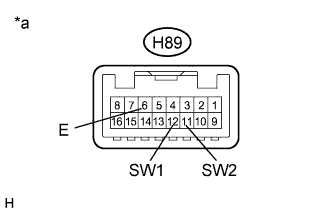
Text in Illustration *a Component without harness connected
(Multi-display Switch)
Disconnect the H89 multi-display switch connector.
-
Measure the resistance according to the value(s) in the table below.
Standard Resistance for LHD Tester Connection Condition Specified Condition H89-11 (SW2) - H89-6 (E) "TILT" switch not pressed 10 kΩ or higher H89-11 (SW2) - H89-6 (E) "TILT" switch pressed Below 1 Ω for RHD Tester Connection Condition Specified Condition H89-12 (SW1) - H89-6 (E) "TILT" switch not pressed 10 kΩ or higher H89-12 (SW1) - H89-6 (E) "TILT" switch pressed Below 1 Ω
NG 
REPLACE MULTI-DISPLAY SWITCH Click here
OK 
-
-
CHECK HARNESS AND CONNECTOR
-
Disconnect the H89 multi-display switch connector.
-
Disconnect the H21display module board.
-
Measure the resistance according to the value(s) in the table below.
Standard Resistance for LHD Tester Connection Condition Specified Condition H89-11 (SW2) - H21-14 (VDD) Always Below 1 Ω H89-11 (SW2) - Body ground Always 10 kΩ or higher H89-6 (E) - Body ground Always Below 1 Ω for RHD Tester Connection Condition Specified Condition H89-12 (SW1) - H21-14 (VDD) Always Below 1 Ω H89-12 (SW1) - Body ground Always 10 kΩ or higher H89-6 (E) - Body ground Always Below 1 Ω
NG
REPAIR OR REPLACE HARNESS OR CONNECTOR
OK
REPLACE DISPLAY MODULE BOARD Click here
-