INSTRUMENT PANEL SPEAKER REMOVAL
-
REMOVE NO. 2 INSTRUMENT PANEL SPEAKER PANEL SUB-ASSEMBLY (for LH Side)
-
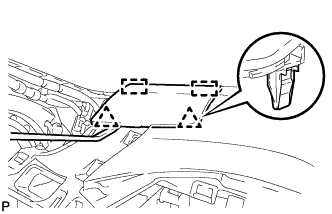
Using a moulding remover, disengage the 2 clips and 2 guides, and remove the No. 2 instrument panel speaker panel sub-assembly.
-
-
REMOVE NO. 1 INSTRUMENT PANEL SPEAKER PANEL SUB-ASSEMBLY (for RH Side)
Tech Tips
Use the same procedure described for the LH side.
-
REMOVE FRONT NO. 2 SPEAKER ASSEMBLY
-
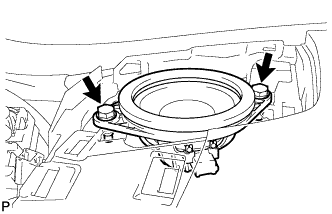
Remove the 2 bolts.
-
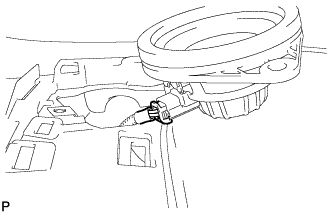
Lift the front No. 2 speaker assembly and disconnect the connector to remove the speaker.
Note
Do not touch the speaker cone.
-
-
REMOVE NO. 1 SPEAKER OPENING COVER ASSEMBLY (w/ Front Center Speaker)
-
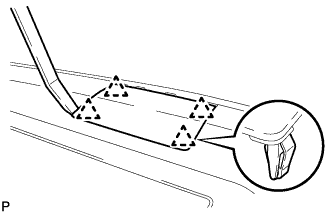
Using a moulding remover, disengage the 4 clips and remove the No. 1 speaker opening cover assembly.
-
-
REMOVE FRONT NO. 4 SPEAKER ASSEMBLY (w/ Front Center Speaker)
-
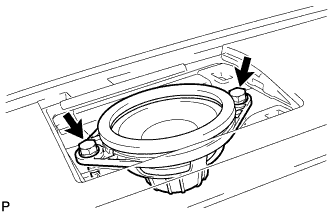
Remove the 2 bolts.
-
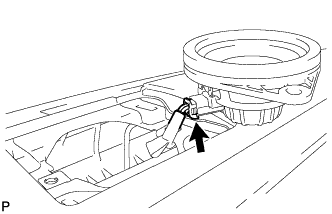
Lift the front No. 4 speaker assembly and disconnect the connector to remove the speaker.
Note
Do not touch the speaker cone.
-