MICROPHONE INSTALLATION
-
INSTALL AMPLIFIER MICROPHONE ASSEMBLY
-
Engage the 2 claws and install the amplifier microphone assembly to map knob guide.
-
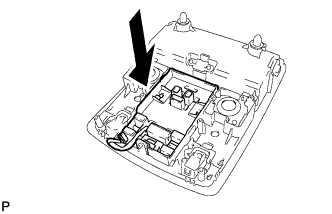
Install the map knob guide as shown in the illustration.
-
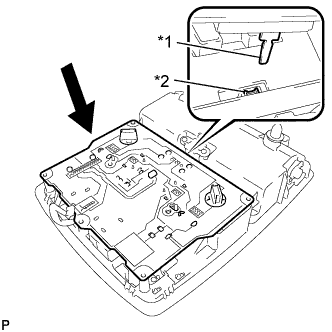
Text in Illustration *1 Switch lever *2 Switch knob Install the board so that the switch lever securely engages with the hole of the switch knob as shown in the illustration.
-
Install the cover with the 7 screws.
-
Engage the guide and connect the connector.
-
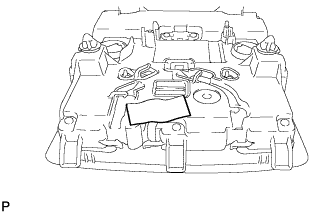
Put the tape back to the positions shown in the illustration in order to secure the cord to the map light assembly.
-
-
CONNECT THEFT WARNING RADAR SENSOR (w/ Intrusion Sensor)
-
w/o Sliding Roof:
-
Engage the 2 clamps.
-
Install the 2 screws and connect the connector.
-
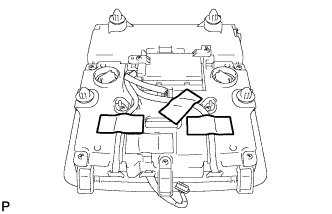
Put the tape back to the positions shown in the illustration in order to secure the cord to the map light assembly.
-
-
w/ Sliding Roof:
-
Engage the 6 clamps.
-
Install the 2 screws and connect the connector.
-
-
-
INSTALL MAP LIGHT ASSEMBLY
-
Connect the connector.
-
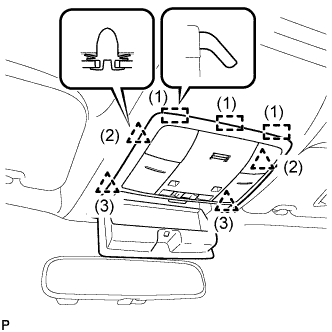
Engage the 3 guides and 4 clips to install the map light assembly as shown in the illustration.
-
Close the overhead console.
-