REAR AXLE CARRIER INSTALLATION
Tech Tips
-
Use the same procedure for the RH side and LH side.
-
The procedure listed below is for the LH side.
-
INSTALL REAR AXLE CARRIER SUB-ASSEMBLY
-
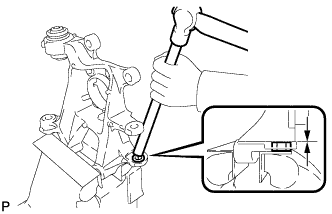
Hold the rear axle carrier sub-assembly between aluminum plates in a vise.
Note
Do not overtighten the vise.
-
Using a brass bar and a hammer, push out the bushing until it is positioned as shown in the illustration.
Tech Tips
Pushing out the bushing makes it easier to install the rear axle carrier sub-assembly.
-
Use a jack and wooden block to keep the rear No. 2 suspension arm assembly level.
CAUTION:
Do not jack up the rear No. 2 suspension arm assembly too high as the vehicle may fall.
Note
-
When jacking up the rear No. 2 suspension arm assembly, be sure to jack it up slowly.
-
Make sure to perform this operation with the vehicle kept as low as possible.
-
-
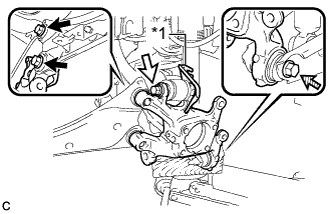
Text in Illustration *1 No. 2 Flexible Hose Bracket 
Bolt (A) 
Bolt (B) 
Bolt (C) Temporarily install the rear axle carrier sub-assembly to the rear No. 2 suspension arm assembly with the bolt (C) and nut.
Note
-
Insert the bolt with the threaded end facing the front of the vehicle.
-
Since a stopper nut is used, turn the bolt.
-
-
Temporarily install the rear axle carrier sub-assembly and No. 2 flexible hose bracket to the rear upper control arm assembly with the bolt (B) and nut.
Note
-
Insert the bolt with the threaded end facing the rear of the vehicle.
-
Since a stopper nut is used, turn the bolt.
-
-
Install the rear axle carrier sub-assembly to the rear trailing arm assembly with the 2 bolts (A).
- Torque:
- 200 N*m { 2039 kgf*cm, 148 ft.*lbf }
-
Fully tighten the bolt (B) and bolt (C).
- Torque:
- 90 N*m { 918 kgf*cm, 66 ft.*lbf }
Note
Since stopper nuts are used, turn the bolts.
-
Slowly lower the rear No. 2 suspension arm assembly.
-
-
TEMPORARILY TIGHTEN REAR NO. 1 SUSPENSION ARM ASSEMBLY
-
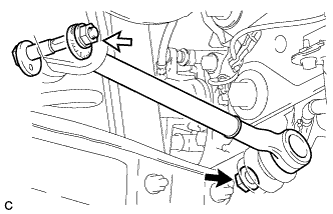
Temporarily tighten the rear No. 1 suspension arm assembly to the rear axle assembly with a new nut (A).
Text in Illustration Nut (A) Nut (B) -
Using the rear suspension toe adjust cam sub-assembly, No. 2 camber adjust cam and nut (B), temporarily install the rear No. 1 suspension arm assembly to the rear suspension member sub-assembly.
Note
-
Insert the rear suspension toe adjust cam sub-assembly from the rear of the vehicle.
-
Hold the rear suspension toe adjust cam sub-assembly while rotating the nut.
-
-
Fully tighten the nut (A).
- Torque:
- 100 N*m { 1020 kgf*cm, 74 ft.*lbf }
-
-
INSTALL REAR AXLE HUB AND BEARING ASSEMBLY
-
Install the rear axle hub and bearing assembly and rear disc brake dust cover sub-assembly to the rear axle carrier sub-assembly with the 4 bolts.
- Torque:
- 90 N*m { 918 kgf*cm, 66 ft.*lbf }
-
-
INSTALL REAR HEIGHT CONTROL SENSOR SUB-ASSEMBLY (w/ Height Control Sensor)
-
Engage the 2 guides and install the rear height control sensor sub-assembly with the 2 bolts.
- Torque:
- 8.0 N*m { 82 kgf*cm, 71 in.*lbf }
-
Connect the connector.
-
Engage the clamp.
-
-
CONNECT REAR SPEED SENSOR WIRE
-
Connect the rear speed sensor wire connector to the rear speed sensor.
-
-
INSTALL REAR DISC
-
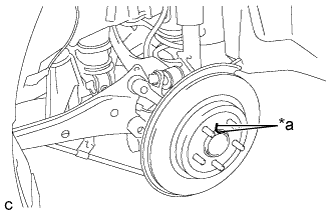
Text in Illustration *a Matchmark Align the matchmarks of the disc and axle hub, and install the disc.
Note
When replacing the disc with a new one, select the installation position where the rear disc has minimal runout.
-
-
INSTALL REAR DISC BRAKE CALIPER ASSEMBLY
-
Install the rear disc brake caliper assembly with the 2 bolts.
- Torque:
- 57 N*m { 585 kgf*cm, 42 ft.*lbf }
-
Install the rear flexible hose to the No. 2 flexible hose bracket with the bolt.
- Torque:
- 19 N*m { 192 kgf*cm, 14 ft.*lbf }
-
-
CONNECT NO. 3 PARKING BRAKE CABLE ASSEMBLY
-
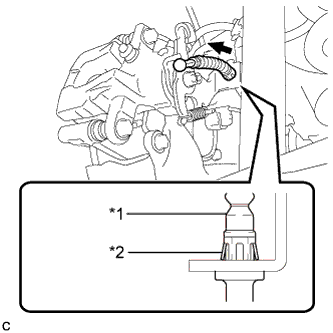
Text in Illustration *1 No. 3 Parking Brake Cable Assembly *2 Clip Install the No. 3 parking brake cable assembly to the rear disc brake cylinder assembly.
Tech Tips
Be sure to engage the No. 3 parking brake cable assembly clip onto the rear disc brake cylinder assembly as shown in the illustration.
-
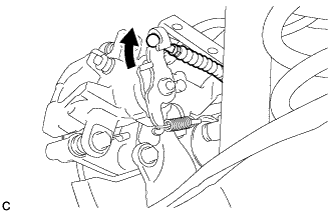
Connect the No. 3 parking brake cable assembly to the rear disc brake cylinder assembly.
-
Install the No. 3 parking brake cable assembly with the bolt.
- Torque:
- 6.0 N*m { 61 kgf*cm, 53 in.*lbf }
-
-
INSTALL PARKING BRAKE LEVER PROTECTOR
-
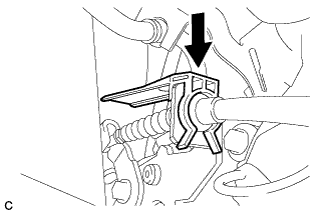
Install the parking brake lever protector to the No. 3 parking brake cable assembly.
-
-
ADJUST PARKING BRAKE
-
INSTALL LOWER INSTRUMENT PANEL FINISH PANEL SUB-ASSEMBLY (for LHD)
-
Connect each connector.
-
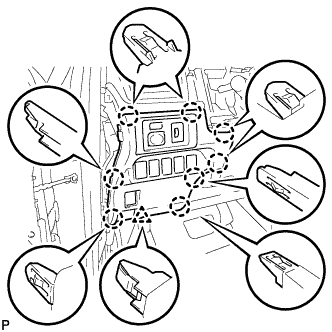
Engage the 8 claws and clip to install the lower instrument panel finish panel sub-assembly.
-
-
INSTALL INSTRUMENT SIDE PANEL LH (for LHD)
-
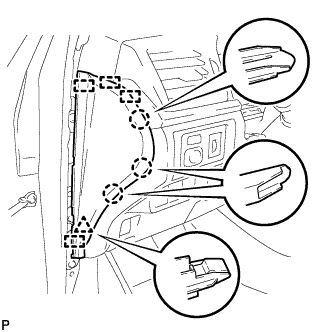
Engage the 4 guides, clip and 3 claws to install the instrument side panel LH.
-
-
INSTALL FRONT DOOR OPENING TRIM WEATHERSTRIP LH (for LHD)
-
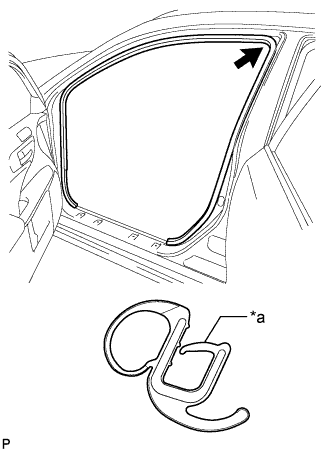
Text in Illustration *a Alignment Mark (Orange) Align the alignment mark (orange) on the weatherstrip with the protruding portion on the body indicated by the arrow in the illustration, and install the front door opening trim weatherstrip LH.
Note
After installation, check that the corners fit correctly.
-
-
INSTALL NO. 1 INSTRUMENT PANEL UNDER COVER SUB-ASSEMBLY (for LHD)
-
Connect each connector.
-
Engage the clamp.
-
Engage the clip.
-
Install the No. 1 instrument panel under cover sub-assembly with the 2 screws <E>.
-
-
INSTALL NO. 2 AIR DUCT SUB-ASSEMBLY (for RHD)
-
Engage the 2 claws to install the No. 2 air duct sub-assembly.
-
-
INSTALL NO. 1 INSTRUMENT PANEL UNDER COVER SUB-ASSEMBLY (for RHD)
-
Connect each connector.
-
Engage the clamp.
-
Engage the 2 clips.
-
Install the No. 1 instrument panel under cover sub-assembly with the screw <E>.
-
-
INSTALL REAR FLOOR SIDE MEMBER COVER (w/ Floor Under Cover)
-
for LH Side:
-
Install the rear floor side member cover LH with the 2 bolts, nut and 2 clips.
-
-
for RH Side:
-
Install the rear floor side member cover RH with the bolt, nut and 2 clips.
-
-
-
INSTALL REAR SUSPENSION ARM COVER
-
Insert the 2 claws of the rear suspension arm cover into the rear No. 2 suspension arm assembly.
-
Install the rear suspension arm cover with the 2 bolts.
- Torque:
- 12 N*m { 122 kgf*cm, 9 ft.*lbf }
Note
Make sure that the 2 claws of the rear suspension arm cover are inserted.
-
-
INSTALL REAR WHEEL
- Torque:
- 103 N*m { 1050 kgf*cm, 76 ft.*lbf }
-
FULLY TIGHTEN REAR NO. 1 SUSPENSION ARM ASSEMBLY
-
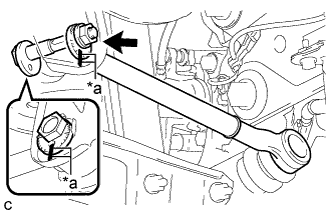
Text in Illustration *a Matchmarks Align the matchmarks on the No. 2 camber adjust cam, rear suspension toe adjust cam sub-assembly and rear suspension member sub-assembly.
-
Fully tighten the nut to install the rear No. 1 suspension arm assembly.
- Torque:
- 100 N*m { 1020 kgf*cm, 74 ft.*lbf }
Note
-
Hold the rear suspension toe adjust cam sub-assembly while rotating the nut.
-
Make sure that the vehicle is unloaded when fully tightening the nut.
-
-
CONNECT CABLE TO NEGATIVE AUXILIARY BATTERY TERMINAL
-
Connect the cable to the negative (-) auxiliary battery terminal Click here.
-
Connect the reservoir level switch connector.
-
Clear the DTCs Click here.
-
-
INSPECT AND ADJUST REAR WHEEL ALIGNMENT
-
HEIGHT CONTROL SENSOR SIGNAL INITIALIZATION (w/ Height Control Sensor)
-
INSPECT AND ADJUST HEADLIGHT AIMING (w/ Height Control Sensor)
-
CHECK FOR SPEED SENSOR SIGNAL