REAR AXLE HUB INSTALLATION
Tech Tips
-
Use the same procedure for the RH side and LH side.
-
The procedure listed below is for the LH side.
-
INSTALL REAR AXLE HUB AND BEARING ASSEMBLY
-
Install the rear axle hub and bearing assembly and rear disc brake dust cover sub-assembly to the rear axle carrier sub-assembly with the 4 bolts.
- Torque:
- 90 N*m { 918 kgf*cm, 66 ft.*lbf }
-
-
CONNECT REAR SPEED SENSOR WIRE
-
Connect the rear speed sensor wire connector to the rear speed sensor.
-
-
INSPECT REAR AXLE HUB BEARING LOOSENESS
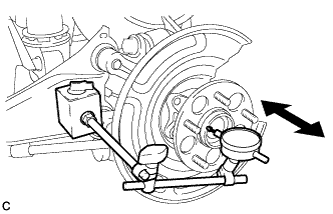
-
Using a dial indicator, check for looseness near the center of the rear axle hub.
Maximum looseness 0.05 mm (0.00197 in.) Note
-
Ensure that the dial indicator is set perpendicular to the measurement surface.
-
Keep the magnet of the dial indicator away from the rear axle hub and bearing assembly.
Tech Tips
If the looseness exceeds the maximum, replace the rear axle hub and bearing assembly.
-
-
-
INSPECT REAR AXLE HUB RUNOUT
-
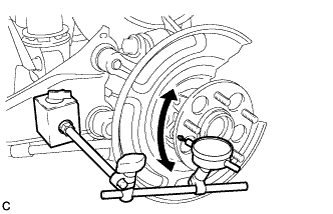
Using a dial indicator, check for runout on the surface of the rear axle hub outside the rear axle hub bolt.
Maximum runout 0.05 mm (0.00197 in.) Note
-
Ensure that the dial indicator is set perpendicular to the measurement surface.
-
Make sure to install the tip of the dial indicator towards the outside of the rear axle hub bolt.
-
Keep the magnet of the dial indicator away from the rear axle hub and bearing.
Tech Tips
If the runout exceeds the maximum, replace the rear axle hub and bearing assembly.
-
-
-
INSTALL REAR DISC
-
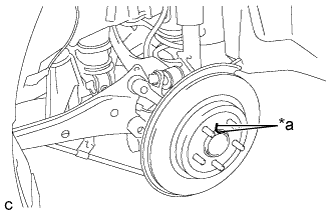
Text in Illustration *a Matchmark Align the matchmarks of the disc and axle hub, and install the disc.
Note
When replacing the disc with a new one, select the installation position where the rear disc has minimal runout.
-
-
INSTALL REAR DISC BRAKE CALIPER ASSEMBLY
-
Install the rear disc brake caliper assembly with the 2 bolts.
- Torque:
- 57 N*m { 585 kgf*cm, 42 ft.*lbf }
-
Install the rear flexible hose to the No. 2 flexible hose bracket with the bolt.
- Torque:
- 19 N*m { 192 kgf*cm, 14 ft.*lbf }
-
-
CONNECT NO. 3 PARKING BRAKE CABLE ASSEMBLY
-
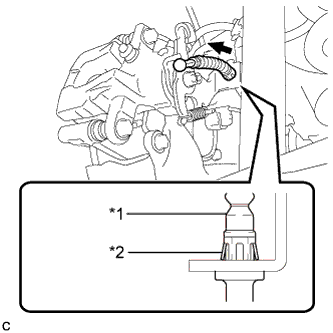
Text in Illustration *1 No. 3 Parking Brake Cable Assembly *2 Clip Install the No. 3 parking brake cable assembly to the rear disc brake cylinder assembly.
Tech Tips
Be sure to engage the No. 3 parking brake cable assembly clip onto the rear disc brake cylinder assembly as shown in the illustration.
-
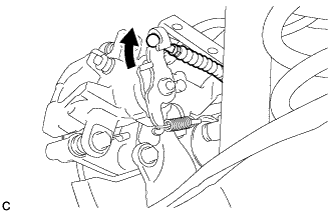
Connect the No. 3 parking brake cable assembly to the rear disc brake cylinder assembly.
-
Install the No. 3 parking brake cable assembly with the bolt.
- Torque:
- 6.0 N*m { 61 kgf*cm, 53 in.*lbf }
-
-
INSTALL PARKING BRAKE LEVER PROTECTOR
-
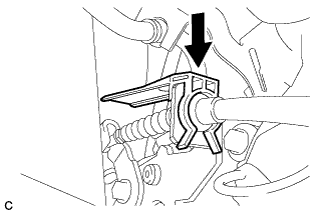
Install the parking brake lever protector to the No. 3 parking brake cable assembly.
-
-
INSTALL REAR SUSPENSION ARM COVER
-
Insert the 2 claws of the rear suspension arm cover into the rear No. 2 suspension arm assembly.
-
Install the rear suspension arm cover with the 2 bolts.
- Torque:
- 12 N*m { 122 kgf*cm, 9 ft.*lbf }
Note
Make sure that the 2 claws of the rear suspension arm cover are inserted.
-
-
ADJUST PARKING BRAKE
-
INSTALL LOWER INSTRUMENT PANEL FINISH PANEL SUB-ASSEMBLY (for LHD)
-
Connect each connector.
-
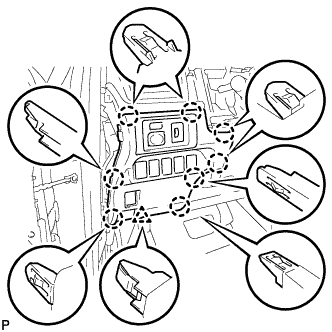
Engage the 8 claws and clip to install the lower instrument panel finish panel sub-assembly.
-
-
INSTALL INSTRUMENT SIDE PANEL LH (for LHD)
-
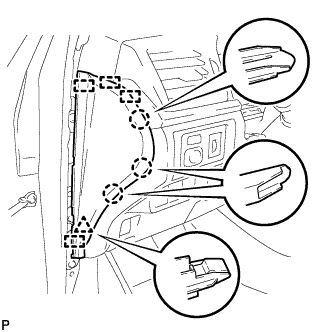
Engage the 4 guides, clip and 3 claws to install the instrument side panel LH.
-
-
INSTALL FRONT DOOR OPENING TRIM WEATHERSTRIP LH (for LHD)
-
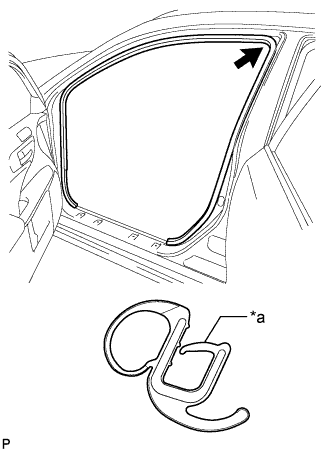
Text in Illustration *a Alignment Mark (Orange) Align the alignment mark (orange) on the weatherstrip with the protruding portion on the body indicated by the arrow in the illustration, and install the front door opening trim weatherstrip LH.
Note
After installation, check that the corners fit correctly.
-
-
INSTALL NO. 1 INSTRUMENT PANEL UNDER COVER SUB-ASSEMBLY (for LHD)
-
Connect each connector.
-
Engage the clamp.
-
Engage the clip.
-
Install the No. 1 instrument panel under cover sub-assembly with the 2 screws <E>.
-
-
INSTALL NO. 2 AIR DUCT SUB-ASSEMBLY (for RHD)
-
Engage the 2 claws to install the No. 2 air duct sub-assembly.
-
-
INSTALL NO. 1 INSTRUMENT PANEL UNDER COVER SUB-ASSEMBLY (for RHD)
-
Connect each connector.
-
Engage the clamp.
-
Engage the 2 clips.
-
Install the No. 1 instrument panel under cover sub-assembly with the screw <E>.
-
-
INSTALL REAR WHEEL
- Torque:
- 103 N*m { 1050 kgf*cm, 76 ft.*lbf }
-
CONNECT CABLE TO NEGATIVE AUXILIARY BATTERY TERMINAL
-
Connect the cable to the negative (-) auxiliary battery terminal Click here.
-
Connect the reservoir level switch connector.
-
Clear the DTCs Click here.
-
-
CHECK FOR SPEED SENSOR SIGNAL