POWER SWITCH INSPECTION
-
INSPECT POWER SWITCH
-
Measure the resistance according to the value(s) in the table below.
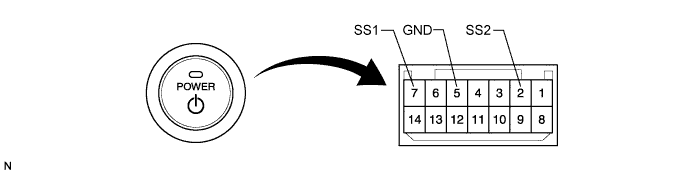
Standard Resistance Tester Connection Switch Condition Specified Condition 7 (SS1) - 5 (GND) Pushed Below 1 Ω 2 (SS2) - 5 (GND) Pushed Below 1 Ω 7 (SS1) - 5 (GND) Not pushed 10 kΩ or higher 2 (SS2) - 5 (GND) Not pushed 10 kΩ or higher If the result is not as specified, replace the power switch.
-
Apply battery voltage between the terminals of the switch, and check the illumination condition of the power switch.
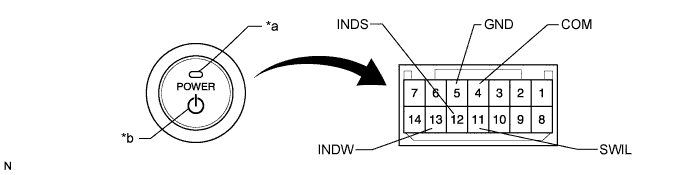
Text in Illustration *1 Indicator Light *2 Power Switch Illumination Standard Resistance Measurement Condition Specified Condition Auxiliary battery positive (+) →Terminal 11 (SWIL)
Auxiliary battery negative (-) →Terminal 4 (COM) or 5 (GND)
Illuminates
(Power Switch Illumination)
Auxiliary battery positive (+) →Terminal 12 (INDS)
Auxiliary battery negative (-) →Terminal 4 (COM) or 5 (GND)
Illuminates
(Indicator Light)
Auxiliary battery positive (+) →Terminal 13 (INDW)
Auxiliary battery negative (-) →Terminal 4 (COM) or 5 (GND)
Illuminates
(Indicator Light)
If the result is not as specified, replace the power switch.
-